Print circulation keeps falling, social platforms are throttling news reach, and search engines and AI assistants answer more and more questions directly. In the US, 68% of all Google searches now end without a single click on a result (SparkToro/Similarweb, 2026). That makes the clicks that remain even more valuable, and the ones that are left concentrate at the top of the organic results. So if you’re publishing without building organic visibility now, you stand to lose traffic, ad revenue, and subscription conversions all at once.
A well-thought-out SEO strategy makes your publication the go-to source for breaking news, background stories, and niche topics. You reach the people searching for your content without paying per click. This article shows you:
- why SEO for publishers matters more in 2026 than ever before
- what sets publisher SEO apart from other industries
- how to set up a keyword strategy for news, evergreen, and archive content
- which on-page, technical, and off-page levers work best
- and how to stay visible in AI answers from ChatGPT, Perplexity, and others.
Whether you run a regional daily, an online magazine, or a specialist or book publisher, the same steps apply.
- Why SEO for publishers matters more than ever
- The unique challenges of publisher SEO
- Keyword strategy for publishers: how to find the right topics
- On-page optimization: how to make publisher articles visible
- Technical SEO: Core Web Vitals, sitemaps, and indexing
- Google News and Top Stories: how to get featured
- Google Discover: the channel many publishers overlook
- E-E-A-T and author authority for publishers
- Off-page SEO and AI visibility (GEO)
- Bottom line: how to become organically visible with publisher SEO
Why SEO for publishers matters more than ever
Publishers have one big advantage over most other businesses: they produce high-quality editorial content on a regular basis. That’s exactly what search engines love. But the advantage doesn’t count for much if your content isn’t structured so search engines can fully understand and surface it.
What makes SEO especially valuable for publishers:
- Direct reach with no platform risk: you build a channel that neither Meta nor X can cut off.
- Cost efficiency: compared to paid channels, SEO traffic is cheaper over the long run. A piece of content that ranks well and is kept up to date often brings in traffic for months, even years.
- AI visibility: when you rank well in classic search results, AI-generated answers tend to cite you as a source more often. But it’s not automatic. A good number of cited sources actually rank outside the top 10 in classic search.
The unique challenges of publisher SEO
SEO for publishers differs from search engine optimization in other industries in a few important ways. It comes down to the sheer volume of content, the sprawling site architecture, and the specific business models in publishing.
Large volumes of content
Publisher websites often run to thousands or even hundreds of thousands of pages. That creates specific challenges around crawl budget management, duplicate content, keyword cannibalization, and internal linking.
Paywalls and SEO
Many publishers use paywalls to monetize their content. But that can hurt SEO if search engines can’t crawl the full content. The goal is to strike the right balance, for example with a metered paywall (a limited number of free articles per month) or a lead-in (the first few paragraphs open, the rest locked). Google groups both models under the term flexible sampling: you decide how much content your readers see for free.
Breaking news vs. evergreen
Publishers produce both breaking news and background pieces that stay relevant for years. The two content types call for different SEO strategies. News follows different rules (Google News, Top Stories) than evergreen content that’s meant to bring in traffic over longer stretches.
Multi-format content
Publishers don’t just publish text. They also put out podcasts, videos, infographics, and interactive formats. Each one needs its own SEO approach, from video SEO on YouTube to podcast optimization for Apple and Spotify.
This might sound like a lot, but you can tackle it all methodically. The chapters below take it on one step at a time: from finding topics to on-page and technical work, all the way to authority and AI visibility.
Keyword strategy for publishers: how to find the right topics
Keyword research underpins any SEO strategy, publishers included. But the approach differs from a typical online store or services site.
Topic clusters and hub pages
As a publisher, you usually have the editorial capacity to cover a topic thoroughly. Use that advantage. Instead of treating every article as an isolated page, build topic hubs. A hub is a strong overview page on a broad theme that links to all the detailed articles and gets linked back from them. For Google, this creates a clearly defined topic area on your site where all the articles visibly build on each other. That helps search engines understand what you stand for, and it steadily builds your authority on the subject.
Example for a business publisher:
The “Inflation” hub links out to explainers, breaking news, background analyses, and a glossary. Each detailed article links back to the hub and to two or three thematically related sister articles:
So how do you find the right keywords? “Keyword research” really just comes down to one question: which search terms do people actually type into Google when they look for topics you could cover? The goal is to figure out which terms are in demand, how many people search for them each month, and how tough the competition is. With that knowledge, you can make informed calls about which topics and articles are worth it.
You’ll find a detailed step-by-step walkthrough in our keyword research guide. The infographic below sums up the four most important points for publishers:
Special case: evergreen vs. news keywords
Evergreen keywords have steady search volume across months and years. News keywords explode for hours or days, then disappear again. Here’s an example: “what is inflation” gets searched more than a thousand times every month, whether it’s election season or a slow news week. A search for “inflation rate September 2026,” on the other hand, spikes the day the new numbers drop and falls back to almost zero soon after.
The two keyword types need different handling:
- Evergreen articles need deep research, regular updates, strong internal linking, and a clear main keyword. Substance is what counts.
- News articles need speed, clear headlines, accurate timestamps, indexing in the Google News sitemap (more on that later), and links from the homepage.
💡 Tip: refresh every evergreen article at least once a year. Update the numbers, add new angles, and revise the author bio. One important caveat: a fresh date is only appropriate when you’ve genuinely changed the content. Google treats date-only updates with no new substance as a policy violation. Technically, an update belongs in dateModified, not in the publish date. You’ll find more on this in our content refresh guide.
Tools for keyword research
Most publishers underestimate how many underserved topics sit right in their own field. With the right tools, you can uncover them systematically:
- Google Trends shows which topics are trending right now, ideal for news SEO and seasonal planning.
- Google Search Console shows which keywords you already rank for in positions 5 to 15, just a jump away from the top spots.
- The Keyword Research Tool from Seobility gives you search volume, competition, and related terms for any topic area. It’s especially handy for planning hubs.
- Tools like Answer the Public reveal which questions around a topic are still open. Answer them clearly and concisely, and you’ve got a good shot at a featured snippet: the highlighted answer box right at the top of the search results. The question-and-answer format helps here no matter what markup you use. Pose the question as a subheading and answer it in the first sentence or two below.
On-page optimization: how to make publisher articles visible
On-page SEO decides whether an article has any shot at ranking. For publishers, a few extra details matter that you won’t find in an online store or on a small-business site:
Headlines, title, and meta description
The meta title is the clickable headline Google shows in the search results. It largely decides whether someone clicks your article or scrolls on by:
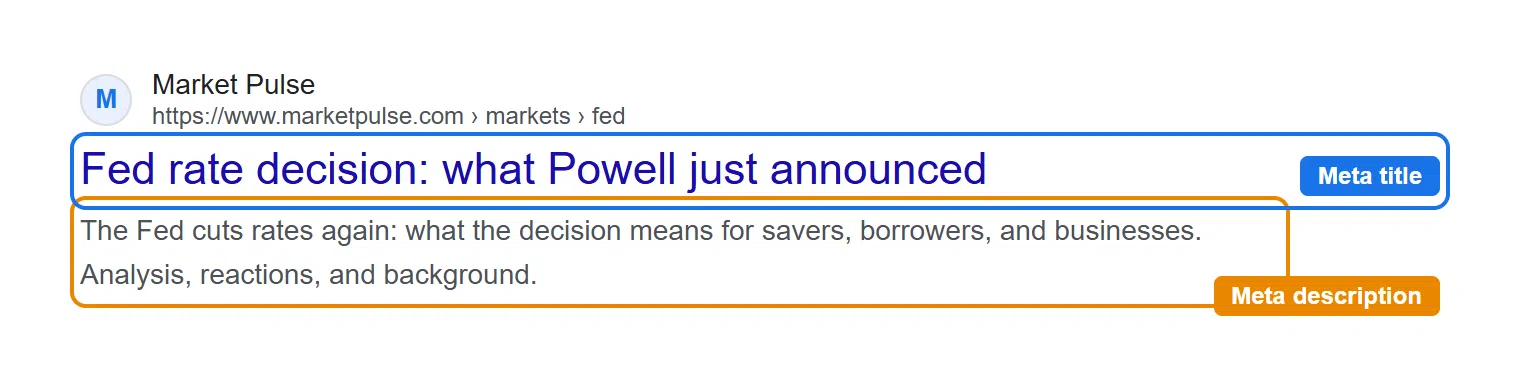
Unlike the journalistic headline on the page, the meta title should always contain your main keyword and make clear what the article is about. So keep the two fields separate in your CMS. A punchy editorial headline often underperforms in search because it leaves out the main keyword.
The rule of thumb:
- Your H1 (the headline on the page) can be punchy and opinionated.
- The meta title puts the main keyword as close to the front as possible and stays under 60 characters.
- The meta description sums up the article in about 155 characters, with a clear benefit for the reader:
Example for an article about the Fed’s benchmark rate
| Field | Content |
|---|---|
| H1 | “Powell’s new rate gamble splits the Fed” |
| Meta title | “Fed rate decision: what Powell just announced” |
| Meta description | “The Fed cuts rates again: what the decision means for savers, borrowers, and businesses. Analysis, reactions, and background.” |
Internal linking and archive strategy
For a publisher, internal linking is one of the most effective SEO moves there is. Every new article should point to relevant older ones, and every older article to newer ones where it fits.
Three simple rules to put this into practice:
- From every news article, link to the relevant hub and to a background story.
- From every evergreen article, link to the two or three most important related articles.
- On the homepage, regularly rotate old evergreen hits back toward the top so Google recognizes them as important.
A smart archive strategy can revive lost rankings. Here’s why: older articles often lose visibility over time as their content dates and newer pages pass them by. So identify articles that used to rank well and now sit on page 2 or 3. Even small refreshes help. Updated numbers and new paragraphs signal to Google that the content is current again, an updated dateModified makes that visible, and one extra internal link from a strong article passes “link power” to the page. Together, that’s often enough to bring them back into the top 10.
With Ranking Monitoring from Seobility, you can keep a close eye on which articles are climbing back up and which need more attention.
Structured data: NewsArticle, Article, Author, and more
Schema markup (also called structured data) consists of small pieces of code in your page’s source code. It gives search engines extra information about the content in a standardized format. That way, Google can immediately tell whether it’s a news article, an author profile, or an FAQ section, and can classify the piece better and serve it in the right search formats (e.g., Top Stories, featured snippets). The types that matter most for publishers:
| Schema type | What for |
|---|---|
| NewsArticle | Standard news articles. Recommended but not required: Google doesn’t require markup for Google News or Top Stories. |
| Article | Evergreen posts, guides, background pieces |
| Author (Person) | Author pages with bio, affiliations, social profiles |
| Organization | Homepage or About page: publication name, logo, contact details |
| BreadcrumbList | Breadcrumb navigation, helps in the SERP snippet |
| FAQPage | FAQ sections below articles. Heads up: as of May 2026, Google no longer shows FAQ rich results. The markup doesn’t hurt and is still read by Bing and AI crawlers, but it no longer earns you any visible extra space in Google. |
Schema markup might sound technical, but you can add it without a developer team. Many WordPress-based publisher sites use SEO plugins like Yoast SEO or Rank Math, which generate NewsArticle, Article, and Author markup automatically and place it in the source code. For larger or custom-built CMS setups, you may need to loop in your IT team to add the markup directly in the template or as a JSON-LD block.
Images, videos, and other media
Publishers often have strong visuals but use them weakly for SEO. Three simple steps change that:
- Give images descriptive file names: name your images so Google can tell what they show from the file name alone. 2026-fed-rate-cut.jpg says more than IMG_4831.jpg.
- Write alt text like a short caption: briefly describe what’s in the image instead of bluntly repeating the keyword. That helps Google and makes your page more accessible at the same time.
- Compress images before uploading: with tools like TinyPNG or Squoosh, you can easily get files under 200 KB. That protects your Core Web Vitals and keeps mobile readers from bouncing over slow load times.
With videos, it pays to double up. Upload the same explainer video to YouTube and embed it in the article at the same time. That way one production feeds two channels: YouTube is a search engine in its own right, and inside the article the video gives your readers a second way into the topic.
💡 Tip: once you’ve set up headlines, internal linking, structured data, and media cleanly, it’s worth stepping back to look at the big picture of your on-page optimization. The free SEO Checker from Seobility gives you a quick first overview. For your whole domain, take the next step with the Website Audit from Seobility.
Technical SEO: Core Web Vitals, sitemaps, and indexing
Publisher websites are often technical heavyweights. Ad tags, tracking, A/B testing tools, and newsletter pop-ups all add up. Publishers who set up technical SEO once and then leave it alone fall behind fast. Here’s what to keep on top of to prevent that:
Core Web Vitals on news pages
The Core Web Vitals are three metrics Google uses to judge how fast and stable your page feels. They’re a ranking signal, and ad-funded publisher sites with lots of external scripts often have ground to make up here. The three key values:
- LCP (Largest Contentful Paint): how long does it take for the largest element on the page (usually the lead image or H1) to become visible? Target: under 2.5 seconds.
- INP (Interaction to Next Paint): how quickly does the page respond to clicks, taps, and keystrokes? Target: under 200 milliseconds.
- CLS (Cumulative Layout Shift): does the layout jump around while loading (e.g., because an ad banner loads in late and pushes text down)? Target: under 0.1.

To improve these values on your publisher site:
- Reserve fixed placeholders for ad slots in your HTML/CSS. When the ad loads in later, the rest of the content no longer slides down. This is the most common cause of poor CLS scores on news pages.
- Load tracking and ad scripts with a delay. Add the “async” or “defer” attribute to your <script> tags so the browser renders the article first and only then runs the external scripts. With Google Tag Manager, you can also tie loading to user interactions.
- Compress hero images and serve them in WebP or AVIF format. That often lowers your LCP significantly without any visible drop in image quality.
- Set a performance budget per page type. For example, decide that an article page can be at most 1.5 MB and send no more than 30 external requests. Check these values automatically with every release.
- Test regularly with Google PageSpeed Insights. The free PageSpeed Insights shows you the Core Web Vitals for each individual URL and hands you specific suggestions for improvement along with them.
You’ll find a complete guide to optimizing your Core Web Vitals here.
Mobile optimization
Most readers access publisher content on a smartphone today. Since Google uses mobile-first indexing, a flawless mobile display matters a lot. Here’s how to optimize your publisher site for the mobile view:
Body text font size
Set your minimum body font size to at least 16 pixels, ideally 18. Anything smaller forces readers to zoom. Google itself names 16 px as the baseline for easily readable body text. Font size isn’t a direct ranking factor, but readers bounce off hard-to-read articles faster, especially older ones.
Button sizes and spacing
Aim for tap-target sizes of at least 48 × 48 device-independent pixels (dp), roughly 9 mm and about the size of a fingertip. Where needed, use padding to bump smaller icons (say, 24 px) up to 48 dp. Leave at least 8 dp of space (horizontal and vertical) between clickable elements so users don’t accidentally hit the wrong one.
Newsletter pop-ups and ad overlays on mobile
Keep newsletter pop-ups and ad overlays subtle on mobile. Google penalizes what it calls intrusive interstitials. These are overlays that cover the whole screen right after the page loads and make the main content inaccessible.
Adapt long tables for mobile
Make long tables horizontally scrollable or collapsible. Otherwise, classic publisher tables (stock quotes or sports scores, for example) blow past the screen width and push the layout sideways. That’s a common mobile UX problem that makes readers bounce fast.
Google News sitemap and indexing
A sitemap is a file that tells search engines which pages exist on your site and where to find them. Or put simply: a kind of table of contents for Google. A news sitemap is a separate XML file where you specifically tell Google which of your articles should be treated as news. Three rules to follow:
- Each news sitemap can hold at most 1,000 URLs. Split larger sets across multiple news sitemaps and bundle them under a sitemap index file that you submit in Google Search Console.
- news:publication_date, news:title, the publication name (news:name), and a language tag (news:language, i.e., en, de, etc.) are required fields. Configure your CMS or an SEO plugin with a news module (e.g., Yoast SEO News or Rank Math) so these fields get set automatically on publish.
- A news sitemap should only contain recent articles, typically from the last 48 hours. Set up an automatic cleanup job that removes older URLs from the sitemap once that window passes.
On top of that, keep your regular XML sitemap maintained so evergreen articles also get picked up during crawling. Submit both sitemaps separately in Google Search Console and check the indexing status there regularly.
Using paywall markup correctly
If you offer content behind a paywall, use the structured data markup for subscription and paywalled content. It tells search engines which content is freely accessible and which sits behind the paywall. Typically, you set isAccessibleForFree: false and additionally mark the locked area with hasPart and a matching cssSelector.
You don’t strictly have to code this yourself, but it won’t happen entirely on its own either. Rank Math can output the paywall markup through its Custom Schema Generator. Yoast SEO doesn’t support paywall schema natively right now, so you’ll need an extra snippet or custom code. The paywall itself is handled by plugins like WP-Members, MemberPress, or Leaky Paywall. You assign a CSS class to the locked area in the editor and set it once as the cssSelector, and the plugin then writes isAccessibleForFree and the selector into the source code. You’ll find the full guide with code examples in the official Google documentation.
Crawl budget and indexing
With hundreds of thousands of URLs on a publisher site, Google has to decide which ones to crawl and how often. This crawl budget is limited. According to Google, though, it only becomes a real concern on very large sites, roughly from a million URLs, or from around 10,000 URLs that change very frequently. A regional daily with a few thousand pages has nothing to worry about here. Your goal is for Google to spend its resources on relevant articles, categories, and important archives, instead of wasting them on tag pages, filter URLs, or outdated archive sections.
Here’s how to steer crawling and indexing:
- Give tag and filter pages a noindex: apply it to pages that have no standalone value for Google Search, so they never land in the index in the first place. Over time, that also lowers how often Google crawls these URLs. Two things to know: in the short term, it saves no crawl budget, because Google has to crawl the page first just to see the noindex. And the follow part doesn’t last forever, because Google eventually treats links on long-unindexed pages like nofollow.
- Merge old topic archives with no added value using a redirect: first check in Google Search Console which of these URLs still bring in clicks or impressions. For the leftover dead pages with no traffic, set up a 301 redirect to the relevant main page. That cleans up the index and, once it’s done, spares your budget.
- Block technical or useless areas from crawling with robots.txt: add paths like /print/, /preview/, or /?print=* with Disallow: in your robots.txt. This keeps Googlebot out and saves crawl budget.
Need more detail? No worries, in our crawl budget guide we walk you through step by step what crawl budget actually is and how you can optimize it.
Google News and Top Stories: how to get featured
Alongside the normal search results, Google has two areas built specifically for breaking news. Both are valuable for publishers because they bring visibility exactly when a topic is hot.
- Google News is Google’s own news platform, available as an app and as a website. It groups current articles by topic and interest.

- Top Stories are the news block with images that Google shows right at the top, above the normal search results, for timely queries.
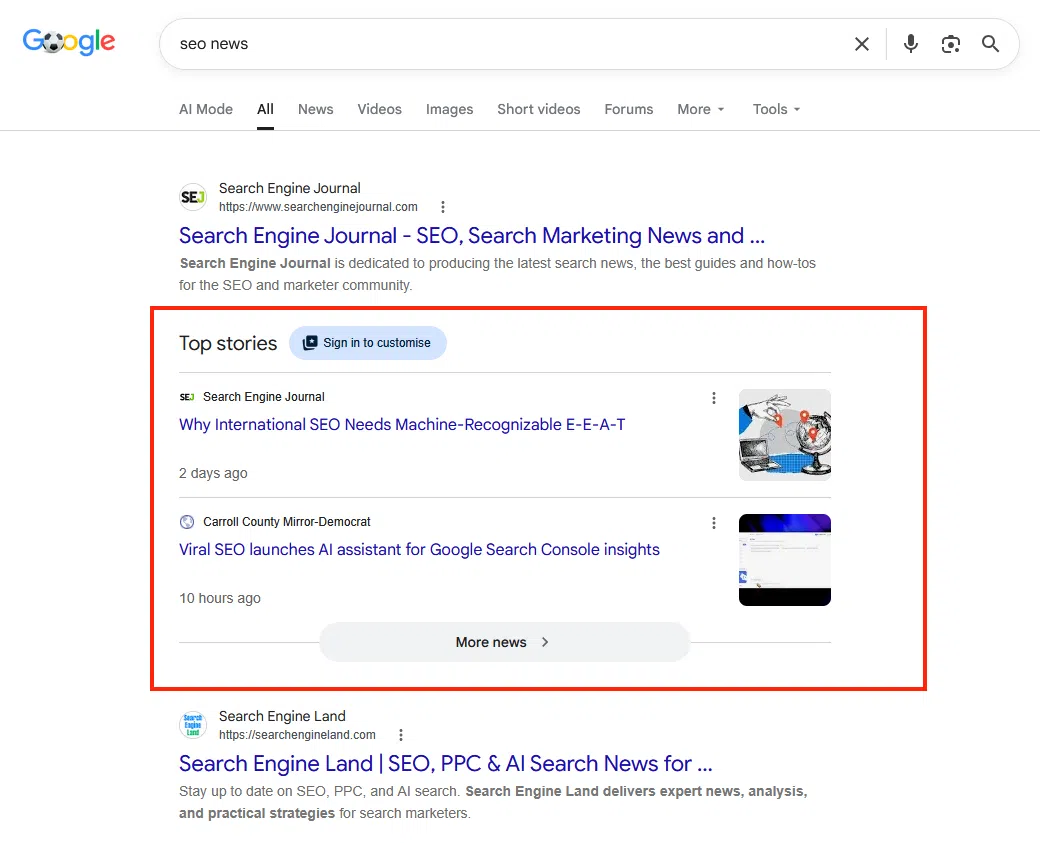
The good news: you can land in both without signing up anywhere. Google recognizes news content automatically. Your news sitemap from the technical section helps here, because it shows Google which articles are new and meant as news.
Whether you make it into Top Stories comes down to four things: how timely your article is, whether it’s technically clean and reachable, how clearly it fits a single topic, and how much trust your site has earned as a news source. Speed matters most here, because Top Stories change by the minute.
The only thing you can control is how your publication appears there. That’s what the Google Publisher Center is for: here you set the logo, name, and look for Google News. You don’t need it to get included; it just makes your presence more polished.
Beyond Google News and Top Stories, there’s a third Google surface that can drive a lot of traffic for publishers.
Google Discover: the channel many publishers overlook
For many publishers, Google Discover brings in more readers than classic Google Search. Discover is the personal news feed Google shows on Android phones and in the Google app. The clever part is that nobody types anything in. Google itself decides which articles match a user’s interests and shows them.
You can’t control Discover directly. But you can noticeably improve your chances:
- Use large, high-quality header images. They should be at least 1,200 pixels wide. If the meta tag max-image-preview:large is missing, Google only shows a tiny thumbnail, and far fewer readers click.
- Stick to honest headlines. Discover reacts even more sensitively to clickbait than normal search does. Your headline should deliver exactly what it promises.
- Cover your topics consistently. Discover assigns your site to certain interest areas. Publish regularly in the same topic field and you’ll get served more reliably than someone who dabbles here and there.
- Take a look at the Discover report in Google Search Console. It appears automatically once you have enough Discover impressions, and it shows you which articles really take off.
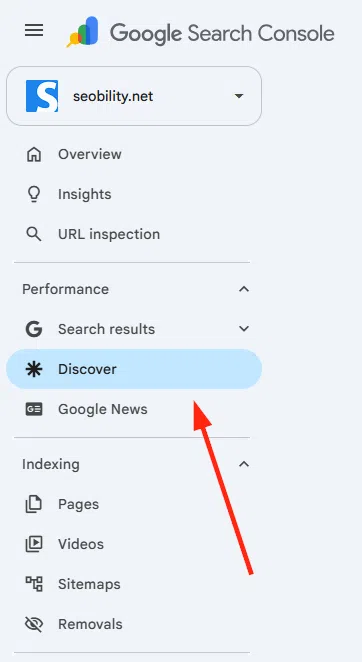
Discover traffic comes in waves and is harder to plan than classic search traffic. But as an extra channel, it’s a real prize for publishers.
E-E-A-T and author authority for publishers
E-E-A-T stands for Experience, Expertise, Authoritativeness, and Trustworthiness. Google uses these four criteria as a yardstick for how credible a site’s content is.
E-E-A-T isn’t a direct ranking factor that Google calculates live for every page. Instead, trained Google quality raters manually assess the quality of web pages against these criteria. Their ratings don’t feed directly into individual rankings; instead, Google uses them as a benchmark to develop and test its search algorithms. So by getting the measurable signals right, like clear author attribution, external mentions, and clean source citations, you gradually build the kind of quality Google rewards.
E-E-A-T is especially relevant for publishers because a lot of your content falls into the YMYL category (Your Money or Your Life). That includes topics like health, finance, law, and news. Wrong or poorly sourced information can do real harm here, so Google applies especially strict standards to these subjects.
The overview below shows exactly where you can strengthen E-E-A-T on your publisher site:
E-E-A-T for publishers: key levers
Picture a publisher specializing in tax law. When every article carries a bio like “CPA for 12 years, focused on small business,” that signals real expertise. A generic “Editorial team” byline, by contrast, does little to build trust in the YMYL space.
Site reputation abuse: when third-party content puts your domain at risk
There’s one issue you should know about that has hit several major publishers hard in recent years. Google calls it “site reputation abuse.” Here’s what it means: third parties publish content on an established publisher domain without the newsroom really having any editorial say. The goal is to cash in on the domain’s authority. Classic cases are outsourced coupon, comparison, or affiliate sections.
Google introduced the policy in March 2024 and has enforced it automatically since the spam update in August 2025. Among those affected were the affiliate sections of CNN, Forbes, and the Wall Street Journal. Google now detects when a section differs sharply in content from the rest of the site, and then treats it like a separate website. So the main domain’s authority no longer counts for that section.
Three takeaways:
- Every section on your domain needs real editorial ownership, with named authors and someone who signs off on the content.
- Don’t rent out subfolders or subdomains to third parties.
- Take a close look at existing partnerships. If a section has nothing to do with your publication’s journalistic core, it’s a risk.
Off-page SEO and AI visibility (GEO)
Off-page SEO is everything that happens outside your own website: backlinks, mentions, and citations in other media. Publishers traditionally have strong potential here, because they produce original content that others cite.
Building backlinks systematically
A backlink is a link from someone else’s website to your page. To Google, each of these links is like a vote that your content is trustworthy and relevant. That’s why backlinks are still an important signal, especially in competitive topics like business, health, or politics. Publishers have a structural advantage here: original, well-researched content gets cited and linked without any prompting, often without you having to do active outreach.
Four especially effective ways to speed up your backlink growth on purpose:
- Data-driven content: your own studies, surveys, or analyses often earn high-quality links, because other outlets reference exclusive data.
- Expert interviews and guest posts: strong expert interviews or contributions raise your chances of shares and links.
- Infographics and visual content: well-made graphics tend to get embedded on external sites with a link back to the source.
- Awards and rankings: industry rankings or best-of lists often get picked up and linked by the companies you name.
Avoid anything that looks like paid links, though. Google usually devalues them, and in the worst case your entire domain gets hit with a manual action.
💡 Tip: the easiest way to keep an eye on how your link profile develops over time, which domains are new, and which backlinks you’re losing is with Backlink Monitoring from Seobility. You’ll find a detailed guide to building links systematically in our link building guide.
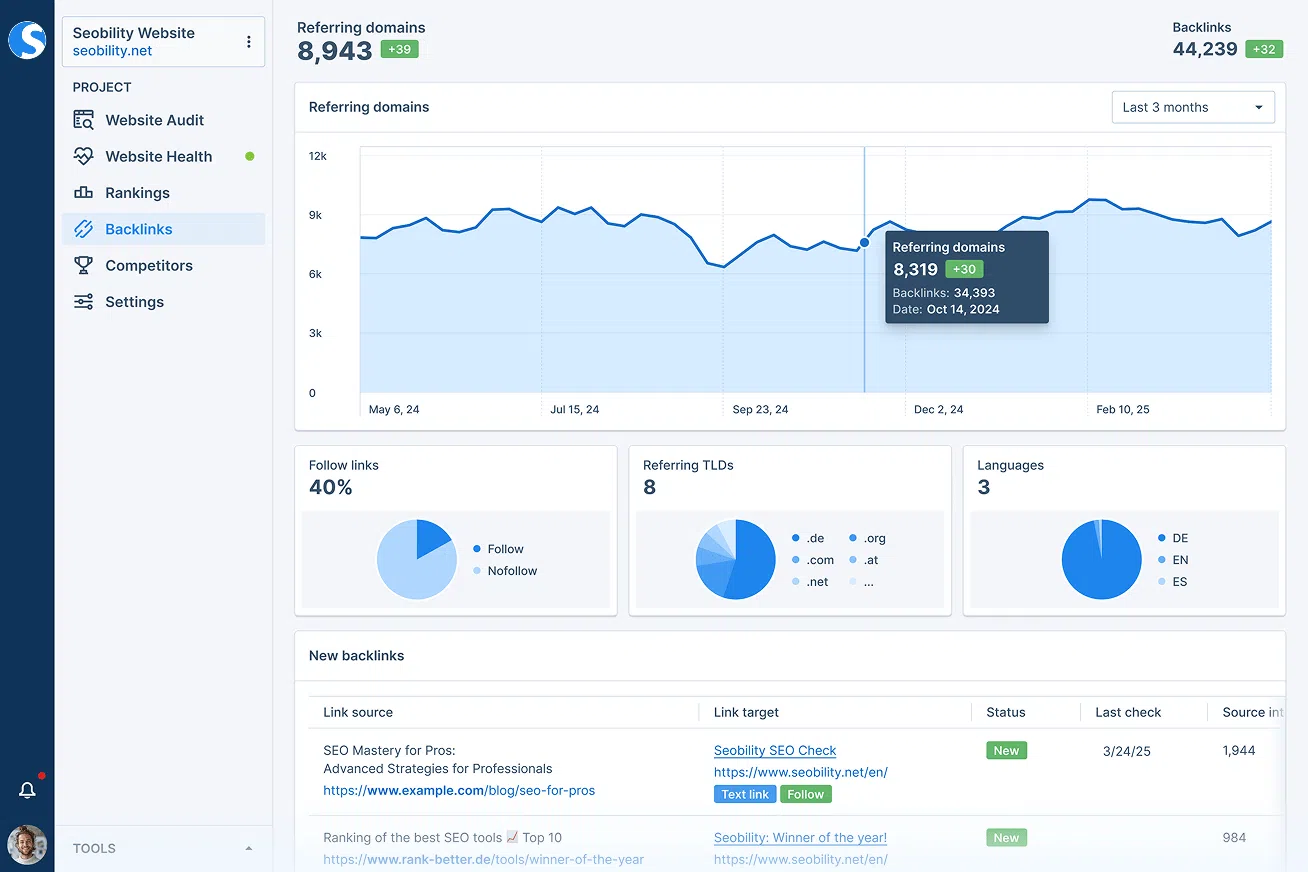
With Backlink Monitoring from Seobility, you always keep an eye on your backlinks.
Generative Engine Optimization (GEO)
More and more readers skip Google and ask ChatGPT, Perplexity, or Gemini directly. Get cited there as a source, and you gain reach. To optimize your content for AI answers:
- Put your key points at the start of every paragraph: AI systems prefer the inverted-pyramid style. Answer the paragraph’s implicit question in the first sentence or two, and let everything else add depth.
- Back up your claims with numbers, data, and sources: instead of “many publishers,” write “XX percent of US publishers” and link the underlying study. Fact-rich sentences land in AI answers far more often than general claims.
- Produce your own data and perspectives: publish original studies, surveys, or expert interviews on a regular basis. AI answers cite these sources far more often, because they aren’t available anywhere else.
- Use schema markup consistently: as described earlier, schema markup helps search engines and AI systems alike classify your content correctly. Article, NewsArticle, and Person for author profiles matter most here.
- Strengthen your author profiles and About page: AI models also pay attention to who stands behind a statement. Fleshed-out author profiles with qualifications and a transparent About page with editorial standards raise your chances of being drawn on as a reliable source.
- Keep content visibly current. Update important evergreen articles at least once a year, add new numbers, and reset dateModified. The publish date stays put. AI systems cite outdated information less often, or even flag it explicitly as out of date.
The best strategy for AI search is also the best strategy for classic SEO: create unique, well-structured, expert content that offers real value. AI systems value the same content your readers do.
Should you even allow AI crawlers?
This question looks different for publishers than for most other websites. The tips above show you how to become visible in AI answers. Whether you want that is ultimately a business decision. That’s because AI systems often answer the reader’s question in full, so the reader never opens your article or sees the ad on it.
You can block AI crawlers through robots.txt, individually and independently of Googlebot. The main ones are GPTBot (OpenAI), ClaudeBot (Anthropic), CCBot (Common Crawl), and Google-Extended. That last one affects only AI training and use in Gemini, and it doesn’t touch your normal Google rankings.
Many large publishers now take a third path and sign licensing deals with AI providers instead of only blocking or allowing everything. For smaller outlets, the practical advice is this: decide on purpose rather than by accident. Look at how much traffic you actually get from AI answers, and set your robots.txt accordingly.
Bottom line: how to become organically visible with publisher SEO
SEO checklist for publishers
A compact list for the coming weeks, ordered by effort and impact.
- Build topic clusters with hub pages for your 5 to 10 most important core topics
- Add Schema.org markup for NewsArticle, Article, Author, and Organization
- Create dedicated author pages with a bio, photo, and areas of focus
- Set up a Google News sitemap and auto-remove articles after 48 hours
- Measure Core Web Vitals and load ad scripts without hurting performance
- Add paywall markup if any content sits behind a paywall
- Clean up tag and filter pages with noindex or canonical
- Set up an archive strategy: identify old articles with update potential
- Check your backlink profile regularly and chase down unlinked press mentions
- Produce original studies or data journalism as link magnets
- Structure content for AI search: answers first, sources visible
- Schedule a monthly Website Audit with Seobility
SEO for publishers is a complex but rewarding subject. The four most effective levers are clear topic clusters, a clean technical setup, strong author profiles, and an off-page strategy that factors in AI answers.
The best place to start is analyzing your website with Seobility’s free 14-day trial. You’ll see right away where your biggest opportunities are, and you can build your SEO strategy step by step.
You can try Seobility free for 14 days right here.