In this post
Scale Efficiently with SaaS SEO
- The Core Issue: Paid ads and social campaigns are expensive and stop generating leads the second you cut the budget. Meanwhile, complex B2B SaaS buying cycles mean you need to convince multiple stakeholders over a long period of time.
- The Solution: A complete SaaS SEO guide: how to build a sustainable keyword strategy for the entire funnel, create content formats that convert, get your technical foundations right, and gain visibility in modern AI search tools.
- Quick Win: Jump straight to Build a keyword strategy along the SaaS funnel. There you’ll learn how to map your content to each decision-maker in the funnel and bring down your customer acquisition costs (CAC).
Getting found online is tough for software companies: the market is fiercely competitive and, in some segments, downright saturated. Many providers turn to expensive Google Ads or social media campaigns. But those have several drawbacks: they cost you money continuously, need constant attention, and stop generating leads the moment you cut the budget.
That’s why SaaS SEO is essential if you want to lower customer acquisition costs sustainably. When you rank organically, you generate leads around the clock without paying for every click. And unlike paid ads, SEO doesn’t get more expensive over time. Instead, it gets more efficient.
That said, SaaS SEO comes with a few quirks you should factor into your strategy. B2B SaaS buying decisions often take longer than in other industries. Multiple stakeholders are usually involved, and each one brings different questions to the table. At every stage of this customer journey, they need the right content from you.
That’s exactly what this guide is for. Below, you’ll learn …
- which specific characteristics SaaS SEO has
- how to build a keyword strategy for the entire funnel
- which content formats actually drive conversions
- how to lay a solid technical SEO foundation
- how to build authority through link building
- how to get cited in AI search results
- and which KPIs actually matter for SaaS SEO.
What is SaaS SEO and why does it matter?
SaaS SEO is search engine optimization built around the specifics of subscription software products (Software-as-a-Service). There are two fundamentally different worlds here: B2C SaaS (software for end consumers) and B2B SaaS (software for businesses). With B2C SaaS, decision paths are often short and purchases more emotional. B2B SaaS, on the other hand, usually involves several stakeholders, decision-making takes longer, and your content has to answer very different questions. This guide focuses primarily on B2B SaaS.
For an online store, the goal is clear: someone searches for a product, clicks through a few results, and buys. Done. SaaS works differently. Your potential customers do much more research, compare options, ask coworkers, loop in IT, and sometimes need months to decide.
That means your SEO strategy has to support a much longer and more complex process:
SaaS SEO vs. traditional SEO: What are the key differences?
Traditional SEO
Goal
Quick transactions (purchase, inquiry)
Typical keywords
“buy running shoes”, “electrician Chicago”
Search intent
Do-intent (buy directly)
Content formats
Product pages, category pages
Audience
Single buyer with purchase intent
Sales cycle
Minutes to hours
Conversion
Direct purchase
SaaS SEO
Goal
Lead generation, trial signups, demo requests
Typical keywords
“ERP for food industry”, “time tracking for contractors”
Search intent
Know-intent, solution awareness
Content formats
Feature pages, use cases, comparisons
Audience
Buying committee
Sales cycle
Weeks to months
Conversion
Free trial, demo, newsletter
What are the benefits of SaaS SEO?
Let’s take a closer look at the specific benefits of SaaS SEO:
Lower acquisition costs compared to paid ads
Google Ads can be expensive, especially in B2B SaaS. For competitive keywords like “CRM software” or “project management tool”, you can easily pay $10+ per click. With a sales cycle of several months and many touchpoints, that adds up quickly to a high customer acquisition cost (CAC).
With SaaS SEO, on the other hand, you invest once in creating a great article or a strong landing page. That content then works for you on an ongoing basis, and you’re not paying for every visitor.
The compound effect
Another benefit is what’s known as the compound effect. It’s essentially the compounding interest of your content.
Here’s how it works in practice:
- You publish a helpful guide on “time tracking for contractors”.
- The article ranks, attracts traffic, and picks up its first backlinks.
- Those backlinks raise your domain authority.
- As a result, other articles on your site tend to rank better too.
- New content benefits from the higher authority and ranks faster.
In short: every new piece of content you publish makes the whole system stronger.
Strategic value
How important SEO can be as a growth channel for SaaS companies is something Thomas Gareis, founder and former CEO of Seobility, has experienced firsthand. While building Seobility, organic traffic played a central role for many years. Not just for sustainable growth, but also for metrics like customer acquisition cost (CAC) and lifetime value (LTV), which are especially important for SaaS businesses.

What are the unique challenges of the SaaS market?
What we’ve described so far sounds straightforward in theory: create good content, build rankings, generate leads. In practice, many software companies hit obstacles that traditional SEO strategies can only partially solve:
1. Long sales cycles: your customers need time
B2B buying decisions rarely happen on a whim. Months often pass between the first Google search and the final contract. During that time, your potential customer compares vendors, reads reviews, requests demos, and discusses the decision internally.
That has a direct impact on your SEO strategy: a single touchpoint isn’t enough to win a customer. You have to meet your target customer at different points in their research with content that addresses their current needs.
2. Technical complexity and low search volumes
Many SaaS products solve very specific problems. That’s great for the audience, but a challenge for SEO: the keywords that best describe your product often have low search volumes.
That doesn’t mean SEO isn’t worth it. Quite the opposite, in fact: if you own the right niche keywords, you’ll attract highly qualified traffic. In other words, you’ll reach visitors who are searching for exactly what you offer.
3. Multi-stakeholder journeys: not one person, but a whole committee
For many B2B SaaS decisions, especially for larger tools or higher budgets, several departments are typically involved:
- IT and security: Is the software secure? How does integration work?
- Finance/CFO: What does the new software cost? How quickly does the investment pay off?
- The end users: Does this tool solve our specific problem? Is it easy to use?
Each of these groups searches Google differently. Your content has to cover all of these perspectives, or you’ll lose potential customers at one of the many touchpoints.
Important: this doesn’t apply equally to every SaaS product. For smaller tools, lower price points, or self-service models, decision-making is often much simpler. In those cases, a single person can sometimes decide on a tool independently. So always adapt your content strategy to the actual decision process of your audience.
4. Conversion is everything: traffic alone isn’t enough
Many SaaS companies celebrate rising visitor numbers without asking the question that matters most: how many of those visitors turn into leads?
Ultimately, organic traffic is only valuable if it converts. That means your content has to do more than rank and inform. It has to actively get visitors to book a demo, start a free trial, or sign up for your newsletter.
In SaaS, SEO and conversion optimization are inseparable.
5 steps to a SaaS SEO strategy
So how do you actually tackle these challenges? Below, we’ll walk you through a clear roadmap in five steps:
- Keyword strategy: find the right keywords for every stage of the customer journey.
- Content: create content that informs and converts.
- Technical SEO: lay the foundation so Google can understand your site correctly.
- Link building: build authority and earn trust.
- GEO and AI search: get visible in ChatGPT, Perplexity, and other AI tools.
How do you build a keyword strategy along the SaaS funnel?
The best SEO strategy won’t get you anywhere if you target the wrong keywords. In SaaS, this is especially critical because your potential customers search very differently depending on where they are in their research.
The approach that works here is a funnel-based keyword strategy. The basic idea: you split your keywords by where the user is in their buying journey. The three stages are Top of the Funnel (ToFu), Middle of the Funnel (MoFu), and Bottom of the Funnel (BoFu):
Top of the Funnel (ToFu): the problem exists, the solution doesn’t yet
In this phase, users already know they have a problem. But they don’t yet know there’s a software solution for it, or what kind of solution it might be. So they search for answers to specific questions.
Typical searches in this phase:
- “How do I manage client projects more efficiently?”
- “How do I automatically generate invoices?”
- “How do contractors track their time?”
The right content type for ToFu keywords is guides, blog articles, and explainer pages. Your goal here isn’t to sell or generate leads. You want to build trust and be seen as a helpful source.
⚠️ Pro tip: ToFu keywords often have high search volume but low conversion rates. Go for them anyway. They fill your funnel with new visitors that you can qualify further down the line.
Middle of the Funnel (MoFu): the search for the right solution
At this stage, the user already knows that certain software solutions exist for their problem. They’re now searching for the right category or type of tool.
Typical searches in this phase:
- “CRM software for startups”
- “Project management tool for remote teams”
- “Accounting software for freelancers”
Feature pages, use case landing pages, and category pages work well here. Use them to show the user that your product is built for their specific use case.
⚠️ Pro tip: create a dedicated page for every relevant use case. “Project management for agencies” and “project management for construction projects” are two different keywords with two different audiences, even if your product serves both.
Bottom of the Funnel (BoFu): ready to buy, still undecided
BoFu users know almost exactly what they want. They’re now comparing specific vendors, looking at pricing, and searching for the final deciding factor.
Typical searches in this phase:
- “Salesforce vs. Pipedrive”
- “monday.com alternatives”
- “Asana reviews”
These are the most valuable keywords in the entire funnel because purchase intent peaks here. Comparison pages, alternative pages, and review landing pages are the right formats for this stage.
Long-tail keywords are especially important here. These are very specific search queries. These keywords have lower search volume but significantly higher conversion rates because they describe exactly what the user needs. Instead of “CRM software”, go for “CRM software for contractor businesses”. Instead of “project management tool”, go for “project management tool for remote teams”. Someone searching that specifically usually knows exactly what they want and is close to making a purchase.
How to find the right keywords
Theory is good, execution is better. With a keyword research tool like Seobility, you can systematically research and evaluate keyword ideas across all three funnel stages:
Step 1: Gather seed keywords
List every term that describes your product and its use cases. For project management software, that might be “project management software”, “task management for teams”, or “project planning tool”. These terms are your starting point for the rest of the research.
Step 2: Research specific search terms
Once you’ve defined your main seed keywords, it’s time to research the actual search terms. Plug your seed keywords into the Seobility Keyword Research Tool, which shows you a list of related search terms users actually type into Google:
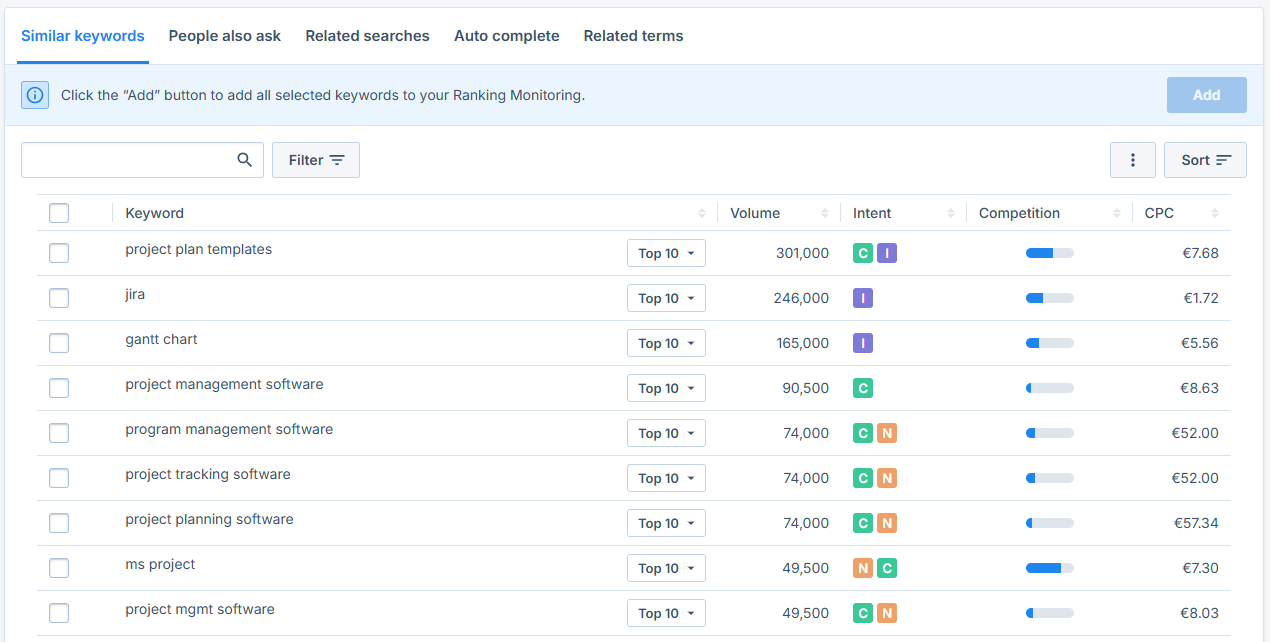
Why this matters: your seed keywords are often too general to rank for directly. Seobility shows you the exact terms users actually search for.
Step 3: Analyze and select keywords
In Seobility, you can see at a glance how often each keyword is searched per month and how competitive it is. That helps you set realistic goals.
When making your selection, always keep these four factors in mind:
| Factor | Explanation | What to watch for |
|---|---|---|
| Search volume | How often is the keyword searched per month? | Too high (over 10,000): usually very tough competition. Too low (under 10): barely any traffic. |
| Competition | How many others are fighting for this keyword? | Rule of thumb: as little competition as possible, as much search volume as possible. |
| Cost-per-click (CPC) | What do advertisers pay per click on Google Ads? | A high CPC (over $5) shows that the keyword has commercial value. |
| Search intent | What does the user want to achieve with this query? | Has to match your page type: informational → guide, transactional → feature page. |
Step 4: Assign keywords to funnel stages
Once you have a list of suitable keywords, assign each one to one of the three funnel stages: informational queries belong in ToFu, category and feature terms in MoFu, and comparison or alternative keywords in BoFu.
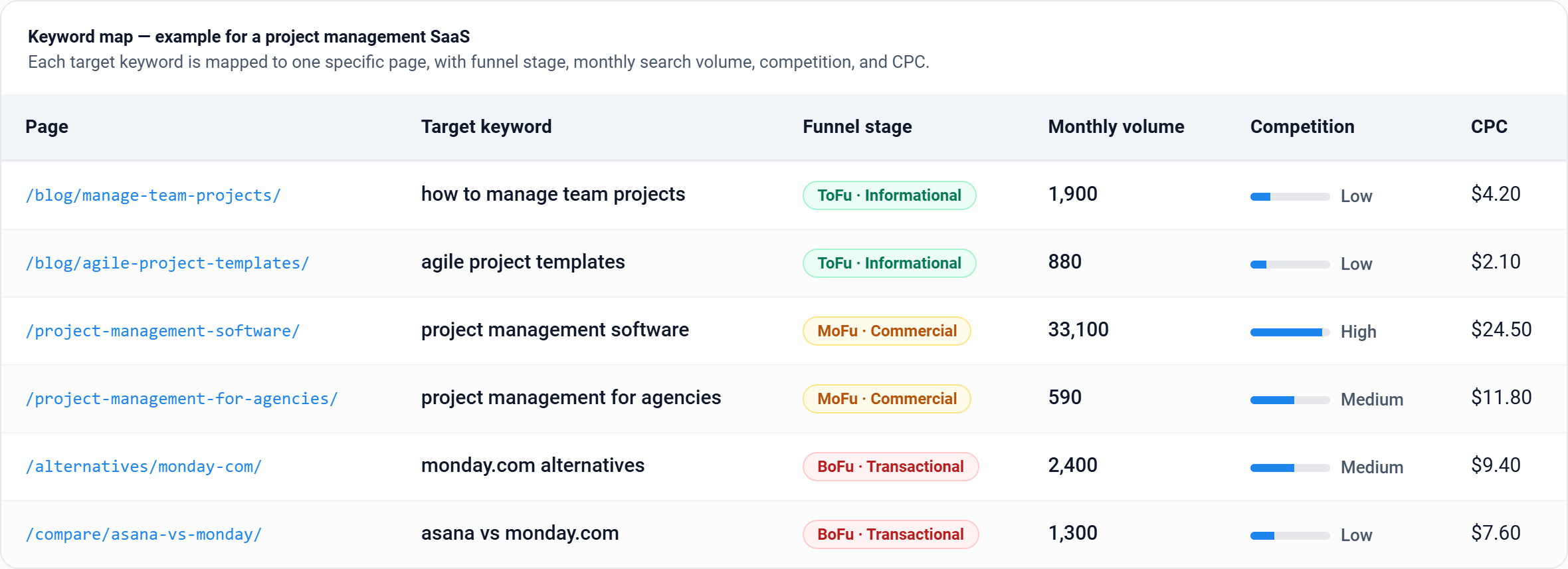
Step 5: Build a keyword map
A keyword map is a simple overview that assigns every keyword to a specific page on your site. That way, you avoid multiple pages competing for the same keyword (see more on keyword cannibalization) and keep an overview of your entire content strategy:
⚠️ Pro tip: we walk through how to find keywords step by step in our keyword research guide.
Content for conversions: What are the four most important page types?
Researching keywords is one thing. But what kind of pages should you create with them? In SaaS SEO, some page types work particularly well because they meet users exactly where they are in their customer journey. Here are the four most important ones:
1. Comparison pages: A vs. B
Comparison pages are one of the most effective page types in SaaS SEO. They target users who are already close to a buying decision and just need that final, deciding comparison.
Typical searches:
- “Salesforce vs. HubSpot”
- “Asana vs. monday.com”
- “Pipedrive vs. Zoho CRM”
Someone searching for terms like these is no longer just browsing. They want to buy and are often weighing only two options. Conversion rates on these pages are correspondingly high.
How to build a good comparison page:
- Compare features objectively and honestly in a table.
- State clearly who each tool is better suited for.
- Include a strong call to action, for example for a free trial.
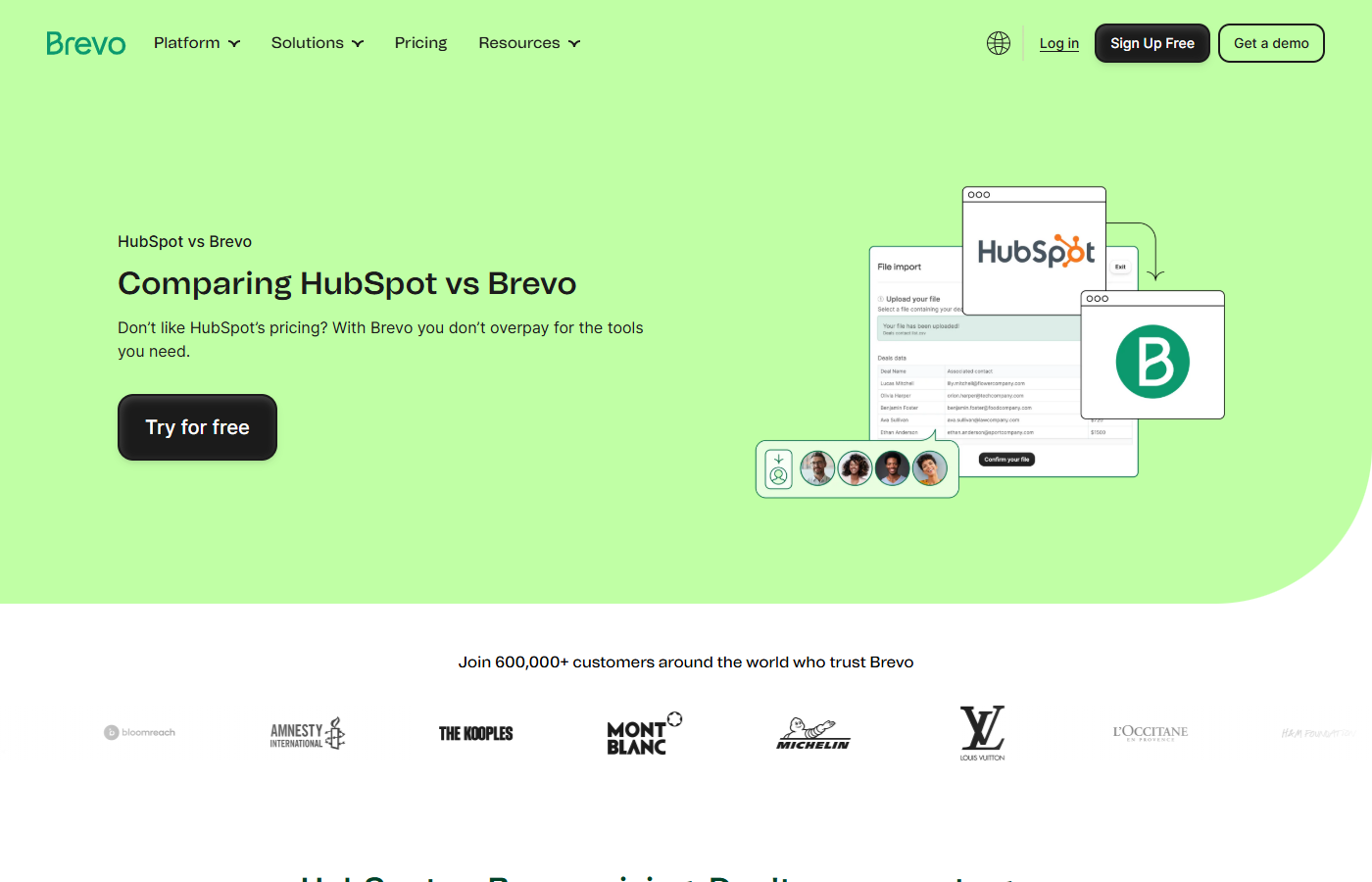
On a genuinely objective comparison page, you can present your software at its best while addressing very specific user groups. Source: brevo.com
2. Alternative pages: for users ready to switch
Alternative pages work on a simple principle: someone is unhappy with their current tool and looking for a better option. That’s exactly the moment to position yourself as the perfect alternative.
Typical searches:
- “alternatives to Slack”
- “monday.com alternatives”
- “better alternatives to Trello”
These users are highly motivated to switch. You just have to show them why your product is the better choice.
How to build a good alternative page:
- Highlight the strengths of your product clearly without sounding overly salesy.
- Address the main pain points users have with their current tool and explain how your software fills those gaps.
- Focus less on a feature list and more on the real business impact.
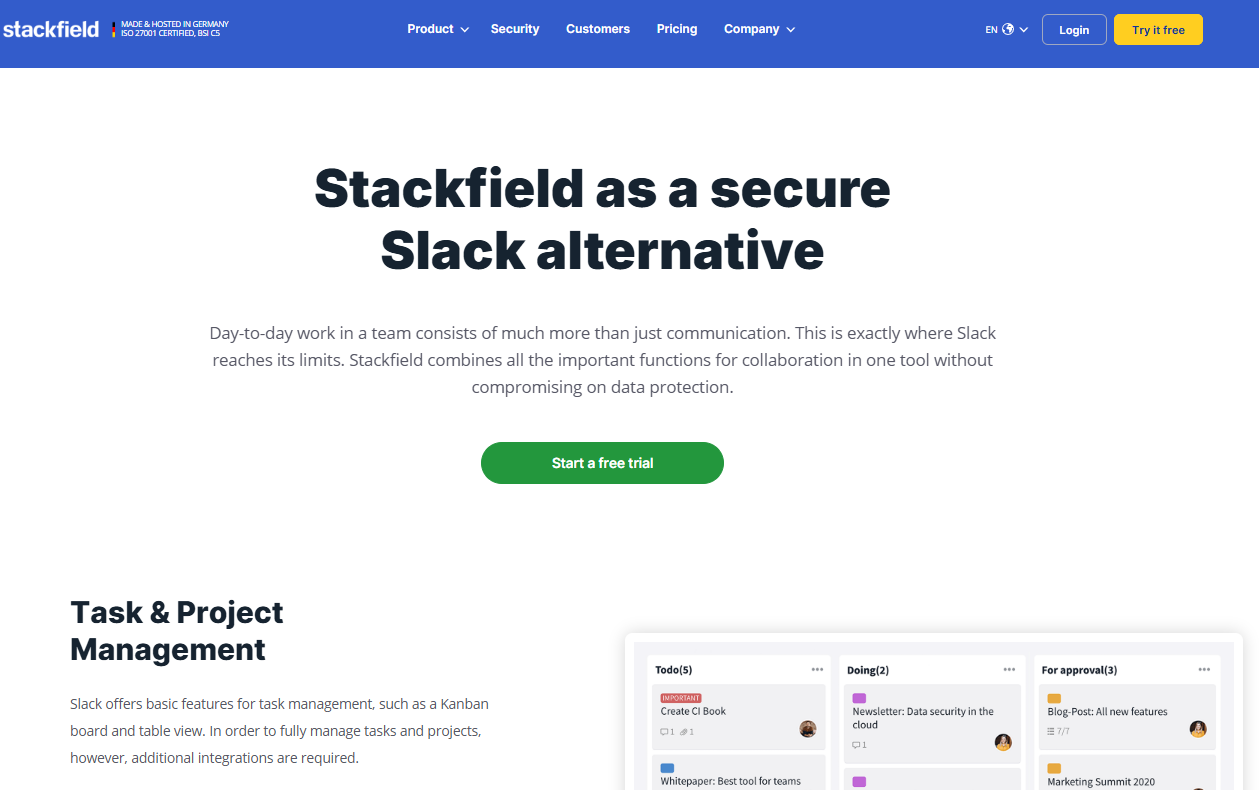
On alternative pages, stay as objective as possible. Source: stackfield.com
⚠️ Pro tip: alternative pages benefit a lot from current reviews and user ratings. Embed testimonials or ratings from neutral platforms like G2 or Trustpilot directly into the page to build trust.
3. Feature and solution pages: the use-case approach
Many SaaS companies make the mistake of creating just one general product page. But potential customers search far more specifically.
People search for things like “time tracking for contractor businesses” or “invoicing software for freelancers”. You need a dedicated page for each of these use cases.
Typical searches:
- “CRM for small businesses”
- “project management for creative agencies”
- “accounting software for freelancers”
How to build good solution pages:
- Describe the audience’s specific problem at the top of the page.
- Explain how your product solves that exact problem.
- Use language that fits the audience. A contractor thinks and talks differently from a startup founder.
- Include relevant testimonials or case studies.

For every audience or use case, a dedicated page usually pays off. Source: Workyard.com
⚠️ Pro tip: the more specific a solution page is, the better it tends to convert. “Project management software” is a fiercely contested keyword. “Project management software for creative agencies” is a long-tail keyword with much less competition and very high purchase intent.
4. Product-led SEO pages: the product takes center stage
Product-led SEO is an approach where the product itself becomes an SEO lever. That sounds abstract but is very tangible in practice.
The idea: instead of just writing about your product, you let users try it out directly or show its value in action. Free tools, templates, calculators, or interactive features are typical formats.
For example:
- An accounting SaaS offers a free tax calculator.
- A project management tool provides free project plan templates for download.
- A CRM vendor publishes a free lead calculator that shows how much revenue is possible through better lead management.
Why it works: users who try a free tool experience your product’s value immediately. The barrier to the next step, such as a trial signup or a demo, drops sharply. At the same time, these pages often generate valuable backlinks because others like to link to them: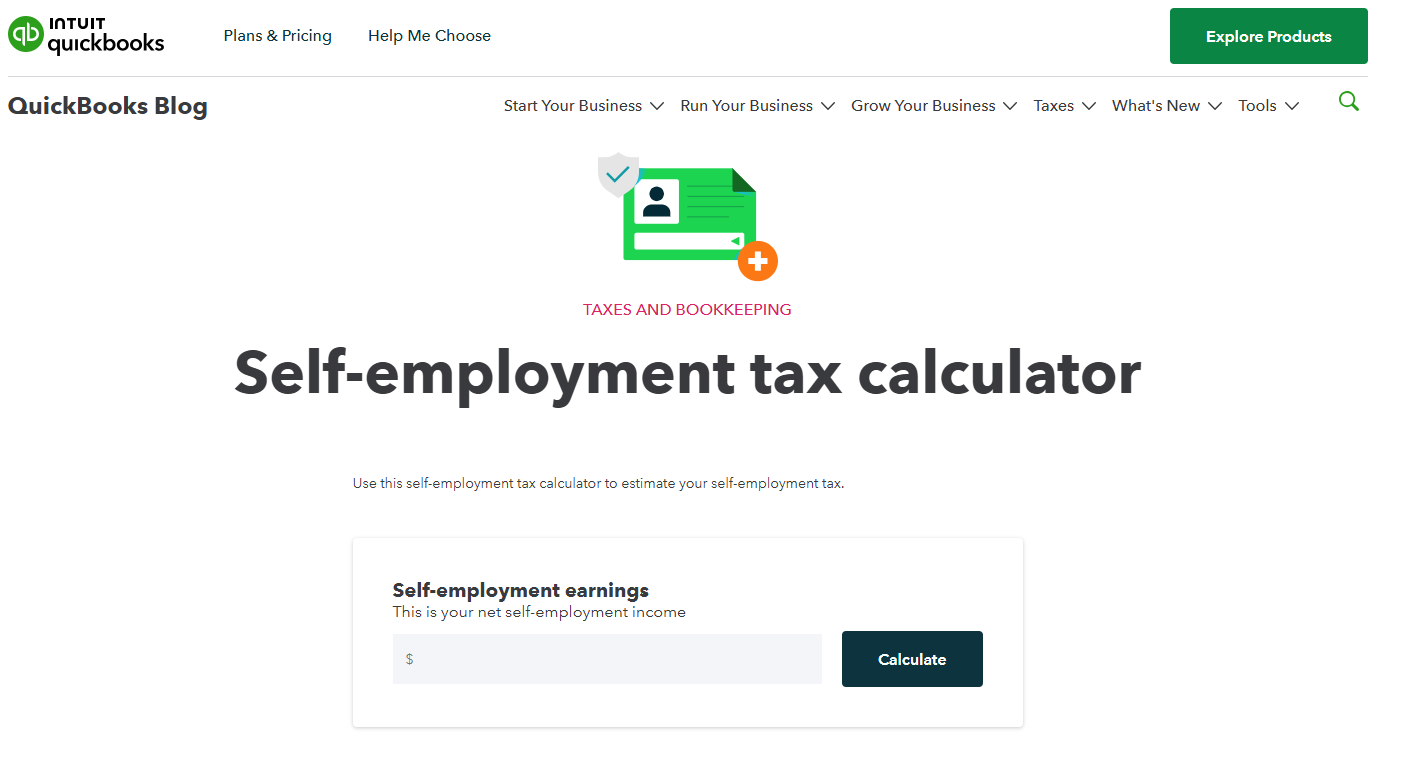
Source: QuickBooks.intuit.com
At Seobility, we’ve used this approach for years and it’s worked really well:
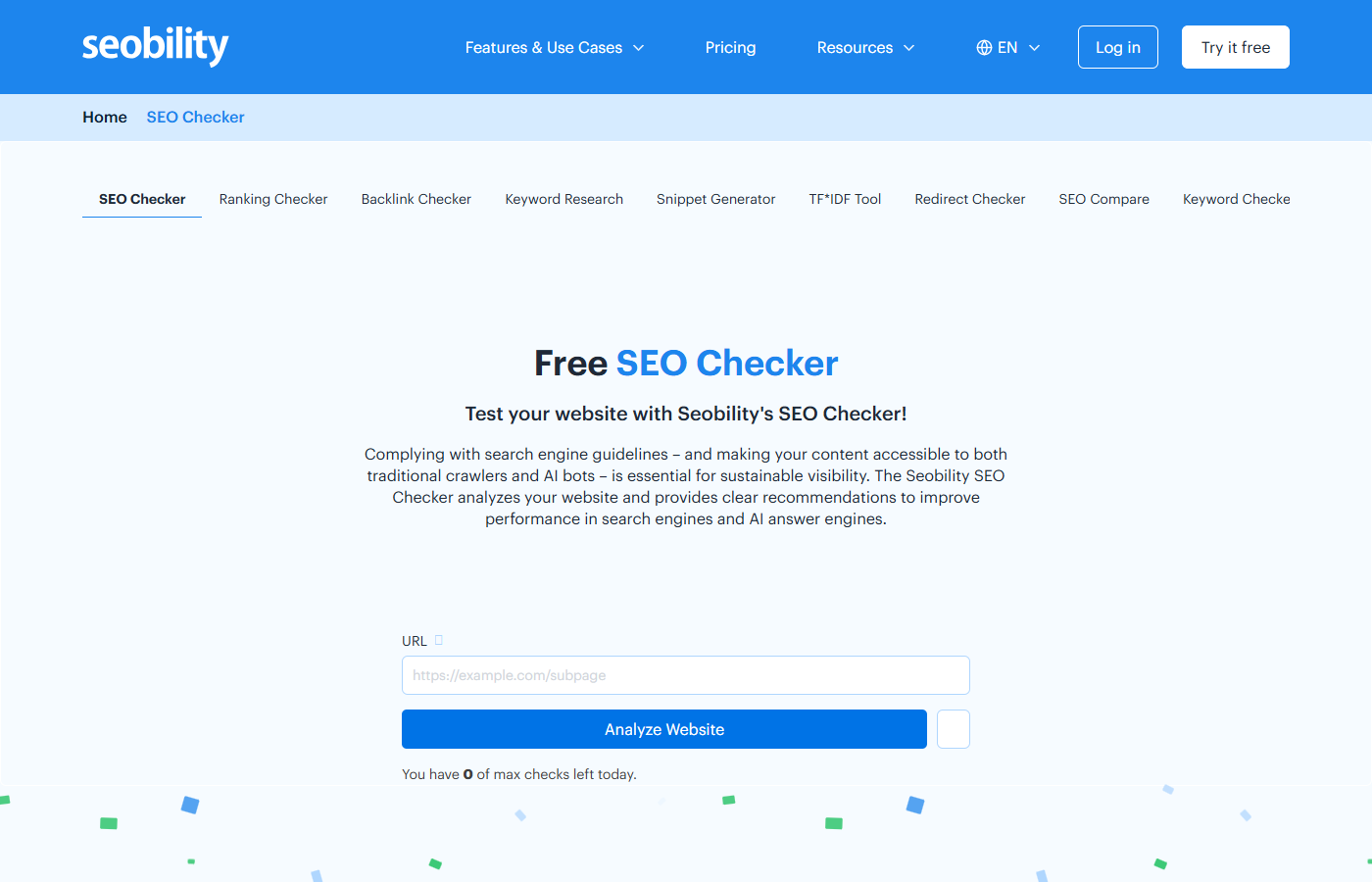
Now that you know which content drives conversions, let’s look at the technical side:
The technical SEO foundation for SaaS providers
You can have the best content in the world, but if Google can’t crawl and understand your site properly, all that effort goes nowhere. Technical SEO is the foundation everything else builds on.
For SaaS companies, this is especially important. SaaS websites are often technically complex, constantly updated, and heavily reliant on JavaScript. That creates SEO risks that are easy to miss. That’s why technical SEO should be an ongoing process, closely coordinated with your engineering team.
Here are the seven most important technical building blocks you should pay attention to:
1. Crawlability and indexing
Before Google can rank your site, it has to find and understand it. That sounds obvious, but it’s a real challenge for some SaaS sites.
Many SaaS companies build their sites with JavaScript frameworks like React or Vue.js. That has technical advantages, but it creates specific challenges for search engines. Google can render JavaScript, but it uses a two-stage process: first the raw HTML gets crawled, then the full page gets rendered later, sometimes days later. New or updated content ends up in the index more slowly. For SaaS products with many landing pages and frequent content updates, this can be a real competitive disadvantage.
There’s another issue that’s becoming more important as GEO grows: AI crawlers from ChatGPT, Perplexity, and similar tools typically don’t render JavaScript. Content loaded only via JavaScript is simply invisible to these systems and won’t be cited.
What to watch for:
- Make sure important content isn’t loaded only via JavaScript. Server-side rendering (SSR) or static pre-rendering can significantly speed up indexing.
- Use Google Search Console to regularly check whether your pages are being crawled and rendered correctly.
- Clean up broken redirects and 404 pages consistently. They strain your crawl budget and delay indexing of important pages.
For more on this topic, see our in-depth JavaScript SEO guide.
2. Load speed: optimize your page speed
A slow site costs you both rankings and customers. Studies show that even a one-second delay can noticeably lower conversion rates.
The most important metric is Largest Contentful Paint (LCP). It measures how long it takes for the largest visible element on a page to load. Google recommends an LCP value under 2.5 seconds.
How to improve your page speed:
- Compress images and use modern formats like WebP.
- Enable browser caching so returning visitors load your site faster.
- Minify CSS and JavaScript files.
- Use a Content Delivery Network (CDN) to serve content from servers close to the user.
⚠️ Pro tip: the free tool Google PageSpeed Insights gives you a quick overview of your current load times. We explain how to interpret the results and improve your page speed step by step in our in-depth page speed guide.
3. Structured data (schema markup)
Schema markup is code you embed in your site to tell search engines what’s on a page. That sounds technical, but it has very practical effects.
With the right schema markup, your page shows up in the search results with rich snippets: expanded entries with star ratings, FAQs, or pricing. That makes your result stand out and significantly boosts your click-through rate:
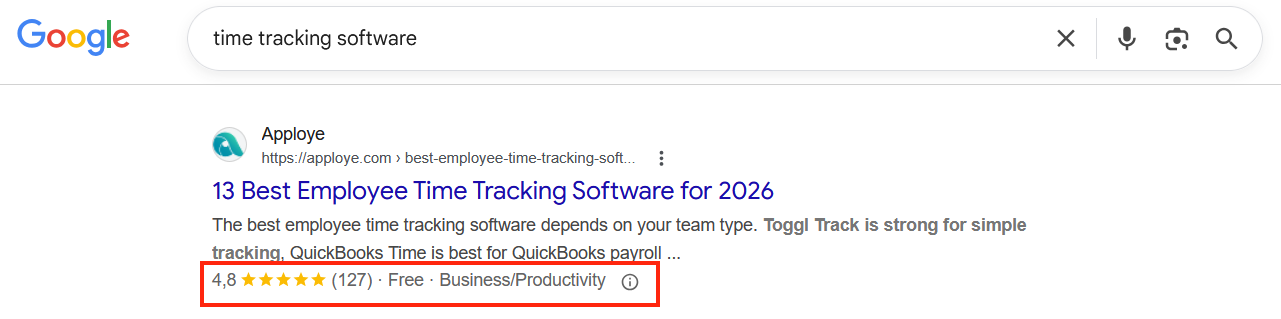
In this example, you can see rich snippets generated by schema markup: price, availability, and shipping terms appear below the actual meta description.
Schema types especially relevant for SaaS providers:
- SoftwareApplication for product pages
- FAQPage for FAQs
- Review for customer reviews
⚠️ Pro tip: structured data isn’t just important for traditional search engines. AI-powered searches like Google AI Overviews or Perplexity also use structured data to better understand and cite content. Schema markup is therefore an important building block for GEO too.
4. Mobile optimization and HTTPS
Two basics that some sites still neglect:
Mobile optimization: Google evaluates websites primarily based on their mobile version. Your site has to work flawlessly across all screen sizes. Check this regularly, especially after major design updates.
HTTPS and SSL certificate: a secure HTTPS connection has been a confirmed Google ranking signal for a long time. For SaaS providers, this is doubly important: users who’ll later enter payment or company data need to trust your site. A missing SSL certificate is a conversion killer.
5. Page structure, metadata, and internal linking
A clear structure helps both users and search engines find their way around your site.
What to watch for:
- Every page needs a unique title tag and a descriptive meta description.
- Use a clear heading hierarchy: exactly one H1 for the page title, H2 for main sections, H3 for subsections.
- Link internally from blog articles to relevant feature and solution pages. This gives Google a clear signal about which pages are especially important, and directs traffic to the pages that need to convert.
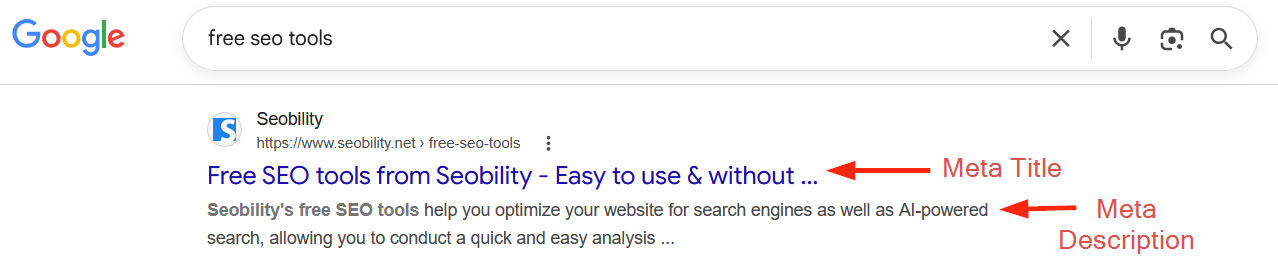
Meta title and description are often the first impression users get of your site and have a huge impact on click-through rate (CTR).
6. Canonical tags and XML sitemap
SaaS websites often have similar or nearly identical content on different URLs, which can lead to duplicate content and hurt your rankings. In SaaS, this can happen because of:
- Multilingual or regional versions without proper hreflang tags, for example /de/crm-software and /en/crm-software with largely identical content
- Test environments or staging systems accidentally indexed by Google
- Dynamically generated landing pages for similar audiences, for example “CRM for startups” and “CRM for small businesses” with nearly identical text
- Versioned documentation pages where multiple versions of your software docs get indexed at the same time
- UTM parameters from tracking links, which make the same page reachable at different URLs
The solution is canonical tags. They tell Google which URL is the “main version” of a page. That way, all the link equity flows to one page instead of being split across several. For a thorough guide on duplicate content issues and how to fix them, see our dedicated guide.
On top of that, a well-maintained XML sitemap lists all the important pages on your site for Google. That way, you make sure new content gets discovered and indexed quickly.
7. Regular site audits
SaaS websites are constantly being updated. New features get added, pages get restructured, URLs change. Technical SEO mistakes often slip in unnoticed during day-to-day development work.
So you should run a complete SEO audit of your site regularly. That way, you’ll spot new 404 errors, missing metadata, broken internal links, or indexing problems before they hurt your rankings.
The Seobility Website Audit crawls your entire site and gives you a prioritized list of all technical issues, with specific tips on how to fix them. Many of the points above, like metadata, internal linking, or duplicate content, get detected directly in the Website Audit and prioritized.
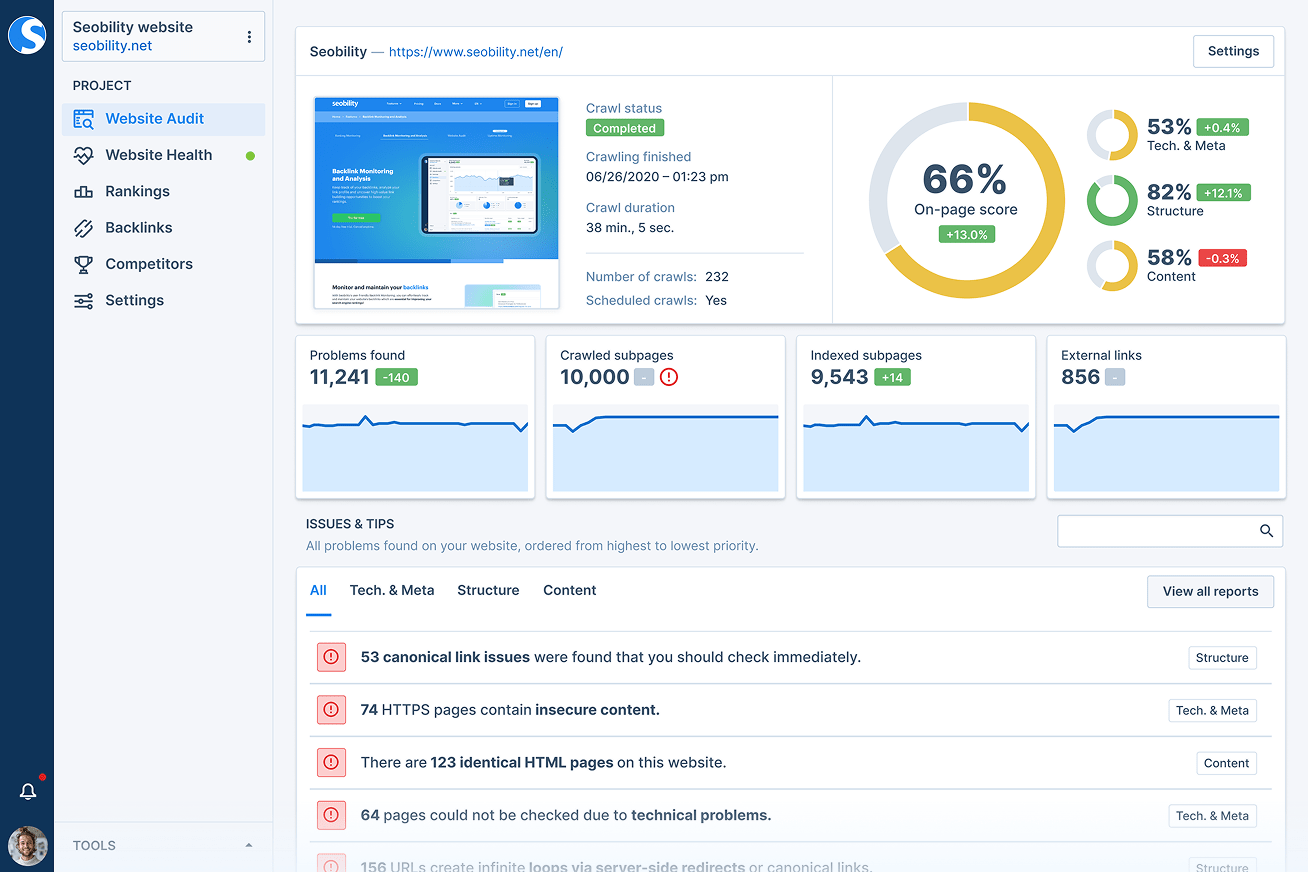
A regular audit is essential to keep your site performing well.
You can try this on a specific URL for free, no signup required, with the Seobility SEO Checker.
How to build authority: link building for SaaS companies
Rankings don’t come from great content alone. Google also evaluates a website based on how many other trusted sites link to it. These backlinks are a strong signal: when other sites point to you, that tells Google your content is relevant.
For SaaS providers, link building is especially important because competition for the best keywords is fierce. Without a strong domain authority, you won’t rank against established competitors.
But be careful: not every link helps you. Quality beats quantity. A single backlink from a respected industry magazine is worth more than dozens of links from irrelevant sites. When evaluating potential linking sites, check for topical relevance, authority, and a natural link profile.
Here are four effective link building strategies for SaaS companies:
- Data-driven PR: analyze internal usage data and publish studies or industry reports based on it. Journalists and trade media love to link to exclusive data they can cite in their articles.
- Guest posts: write helpful expert articles for publications your audience reads. You get a topically relevant backlink, and the editorial team gets good content.
- Unlinked brand mentions: are you getting mentioned online but without a link? Reach out to the author and politely ask for a link. You’d be surprised how often it works.
- Linkable assets: free tools, calculators, templates, or in-depth guides attract backlinks because others like to use them as a source.
For a complete backlink strategy, see our in-depth link building guide.
Generative engine optimization (GEO): How SaaS brands can get found in AI search
More and more people are running their queries through ChatGPT, Perplexity, or Google Gemini instead of Google. For SaaS providers, the takeaway is clear: if you only optimize for traditional search engines, your visibility will keep dropping.
The good news: GEO and traditional SEO aren’t as different as people often claim. If you do good SEO, you already have a solid foundation. There are a few additional levers, though, that decide whether an AI cites your content or ignores it:
- Answer first: start every section with the most important information. AI models prefer a clear information hierarchy and are especially good at extracting direct answers.
- Create compact “chunks”: write self-contained paragraphs that make sense in isolation. The more clearly a section addresses one idea, the easier it is for an AI model to use as a complete answer.
- Simple sentence structure (SVO): subject, verb, object. AI models process short, clear sentences better than nested constructions. The same goes for human readers.
- Use lists and tables: structured formats help language models grasp facts and relationships faster and reproduce them correctly.
- Consistent terminology: always use the same labels for your product and brand. That helps AI models build a strong association between your company and specific topics.
- Add facts and sources: back up claims with specific data. AI systems prefer sources that ground arguments in facts and support claims with numbers.
⚠️ Pro tip: for GEO as well, exclusive data, statistics, and internal usage data are worth their weight in gold. They not only increase your chance of being mentioned by an AI, but ideally of getting cited with a direct link.
KPI tracking: Which SEO and GEO metrics actually matter
Many SaaS companies measure SEO success by page views and rankings. That’s a start, but not the complete picture. In the end, what matters isn’t how much traffic you get but how much of it turns into paying customers. These are the metrics you should keep an eye on:
- Organic traffic: how many visitors come to your site through unpaid search results? That’s the baseline metric for whether your SEO is working overall. Recommended tracking tool: Google Search Console.
- Keyword rankings: where do you rank for your most important keywords? Track not only your main keywords but also long-tail keywords across the entire funnel. Recommended tracking tool: Seobility Ranking Monitoring.
- Conversion rate: how many visitors take a desired action, like booking a demo, starting a free trial, or filling out a form? This is the key metric for SaaS. Recommended tracking tool: Google Analytics
- Customer acquisition cost (CAC): what does a new customer cost you through the organic channel? Compare this with your paid channels to see the real value of your SEO investment.
- Lifetime value (LTV): how much revenue does a customer generate over the entire contract period? Together with CAC, this tells you how profitable your SEO really is.
- Backlink growth: how is your link profile growing? New backlinks from relevant domains signal that your domain authority is growing. Recommended tracking tool: Seobility Backlink Monitoring
Bottom line: SaaS SEO is a long-term growth driver
SaaS SEO typically takes 3 to 12 months before you see meaningful results. But those who start early build a competitive advantage that rivals can’t buy with paid ads.
If you want to take SEO into your own hands, you can try Seobility free for 14 days.