Someone asks ChatGPT for the best provider in your field. The answer names three businesses. Is yours one of them?
Checking that by hand means typing the question into every AI tool yourself, again and again.
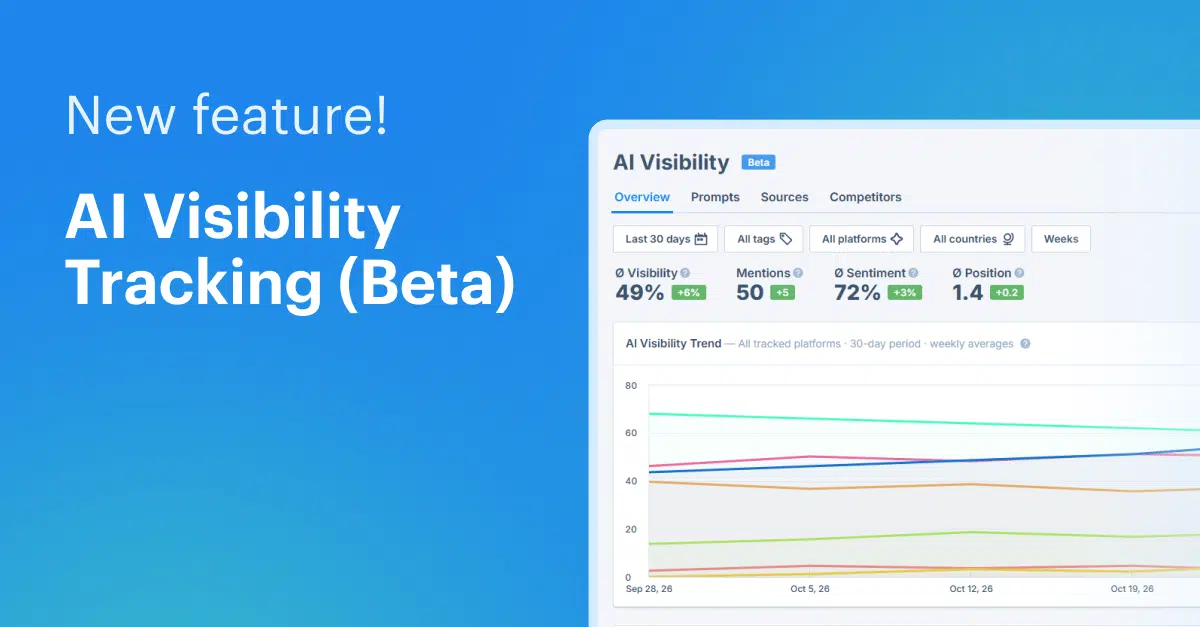
That’s why we built AI Visibility Tracking, and it’s now available in Beta in every Seobility project! It shows you whether ChatGPT, Gemini, Google AI Overviews, and Google AI Mode mention your brand in their answers, how it’s described there, and how you compare with your competitors.
In this article, you’ll learn what the feature shows you, how to set it up, which prompts give you useful results, and how to turn those results into more mentions.
Why a top Google ranking isn’t enough for AI answers
More and more people ask an AI tool instead of clicking through a list of search results. These tools don’t just repeat Google’s top ten. They put together their answers from their own mix of sources, often lean on forums, review sites, and comparison articles, and sometimes answer without linking to anyone at all.
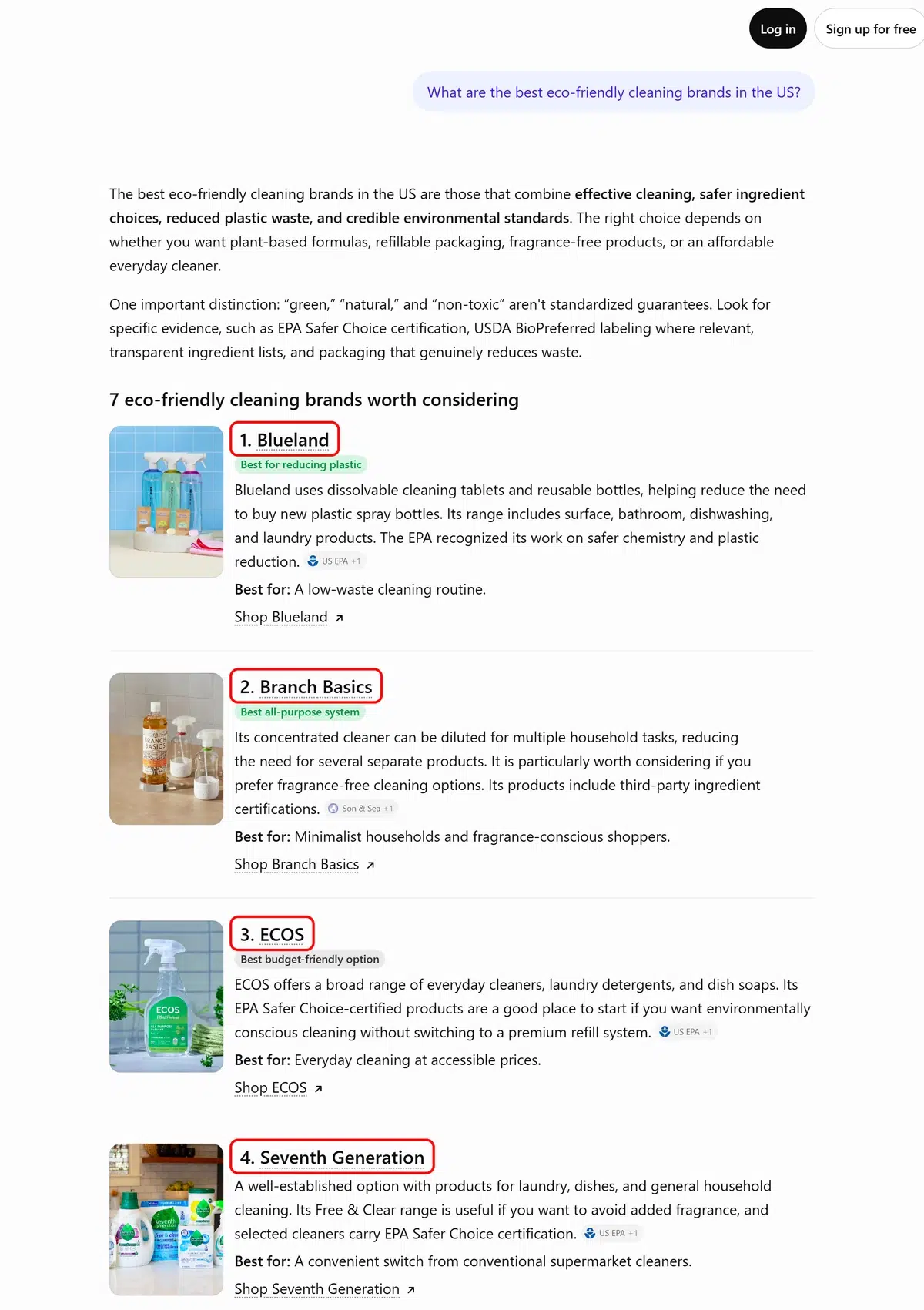
So your website can rank on page one for your main keyword and still be missing from the AI answer to the same question. It also works the other way around: a smaller provider that’s discussed a lot in communities can get recommended by AI ahead of much bigger websites.
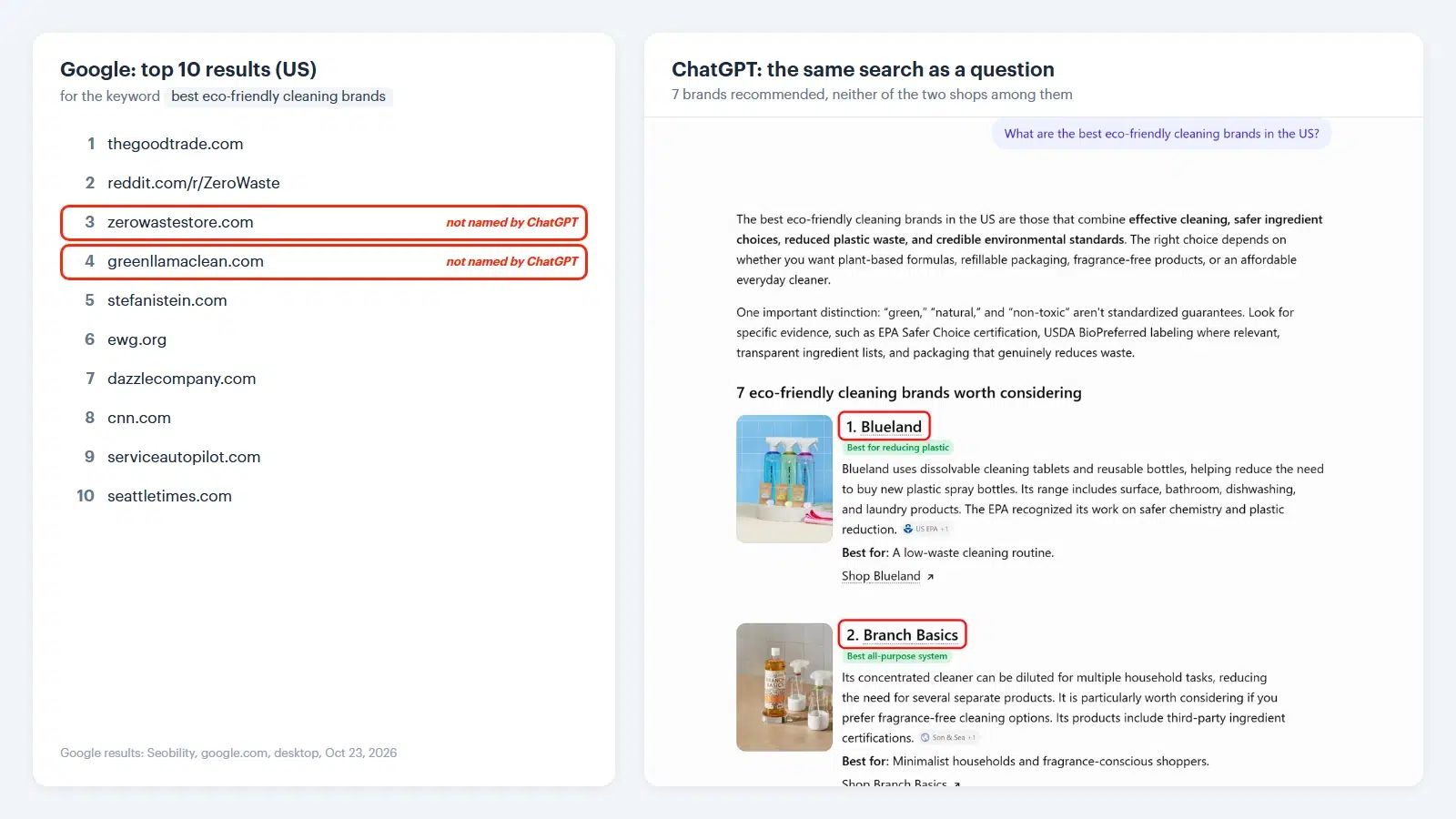
Seobility’s Ranking Monitoring already shows you where you stand on Google. What it can’t show you is what ChatGPT says when someone asks for a recommendation in your field. AI Visibility Tracking shows you exactly that, for the questions you choose. If you’d like the background on how AI search finds and picks its answers, our guide to AI-powered search explains it step by step.
How AI Visibility Tracking works
AI Visibility Tracking works with prompts: the questions your customers might ask an AI tool, for example “Which CRM is easiest to use for a small team?” Seobility sends your prompts to the AI platforms you choose and checks every answer: Is your brand named? In which position? Is it described positively or negatively? Which competitors are named next to you? And which websites does the AI cite as sources?
Your results are organized into four tabs, and each one answers a specific question:
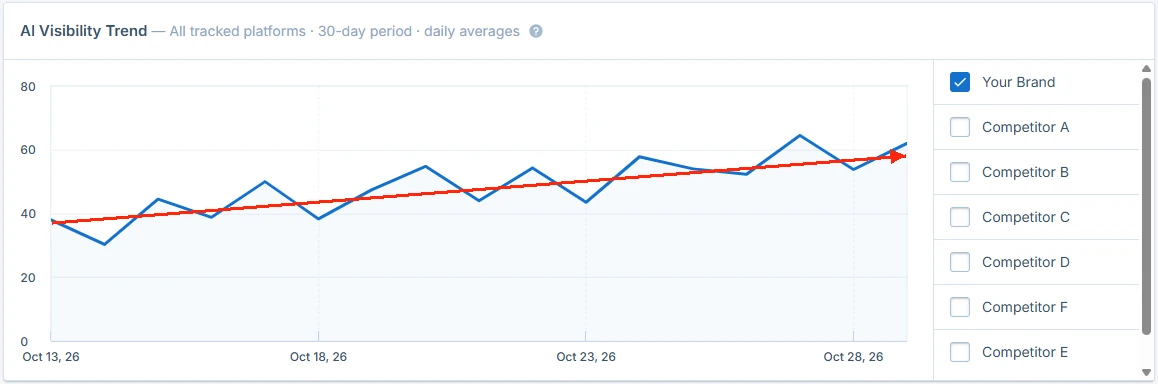
- Overview: Am I gaining or losing ground? Your average visibility, mentions, sentiment, and average position at a glance, plus the “AI Visibility Trend” chart and the “Top competitors” table.
- Prompts: Which questions bring my business up, and which don’t? Every prompt gets its own numbers. Click a prompt and switch to its “Chats” tab to read the actual AI answers.
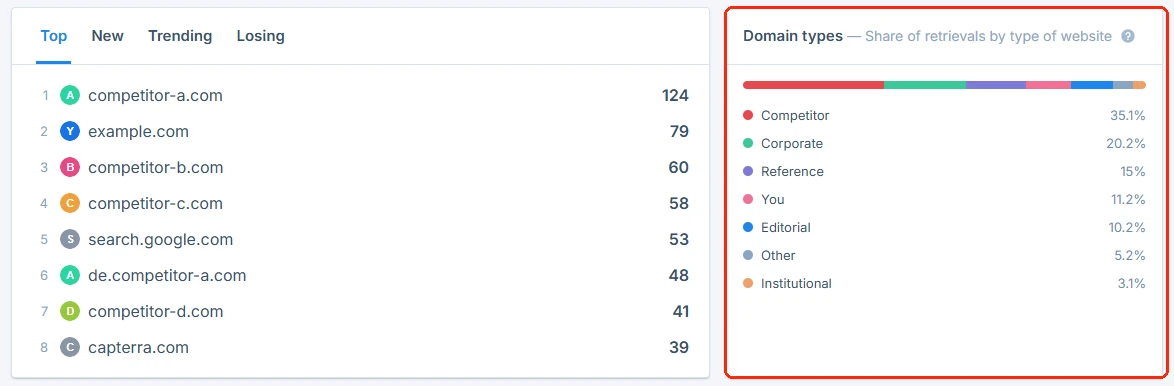
- Sources: Which websites does AI use as sources? The domains AI cites most often for your prompts, your “Citation share” (your share of all sources cited in those answers), and the “Domain types” chart, which shows the kind of websites that dominate: forums and review sites, editorial sites, or your own website.
- Competitors: Who gets recommended instead of me? Each competitor’s share of voice, number of mentions, and average position across your prompts.
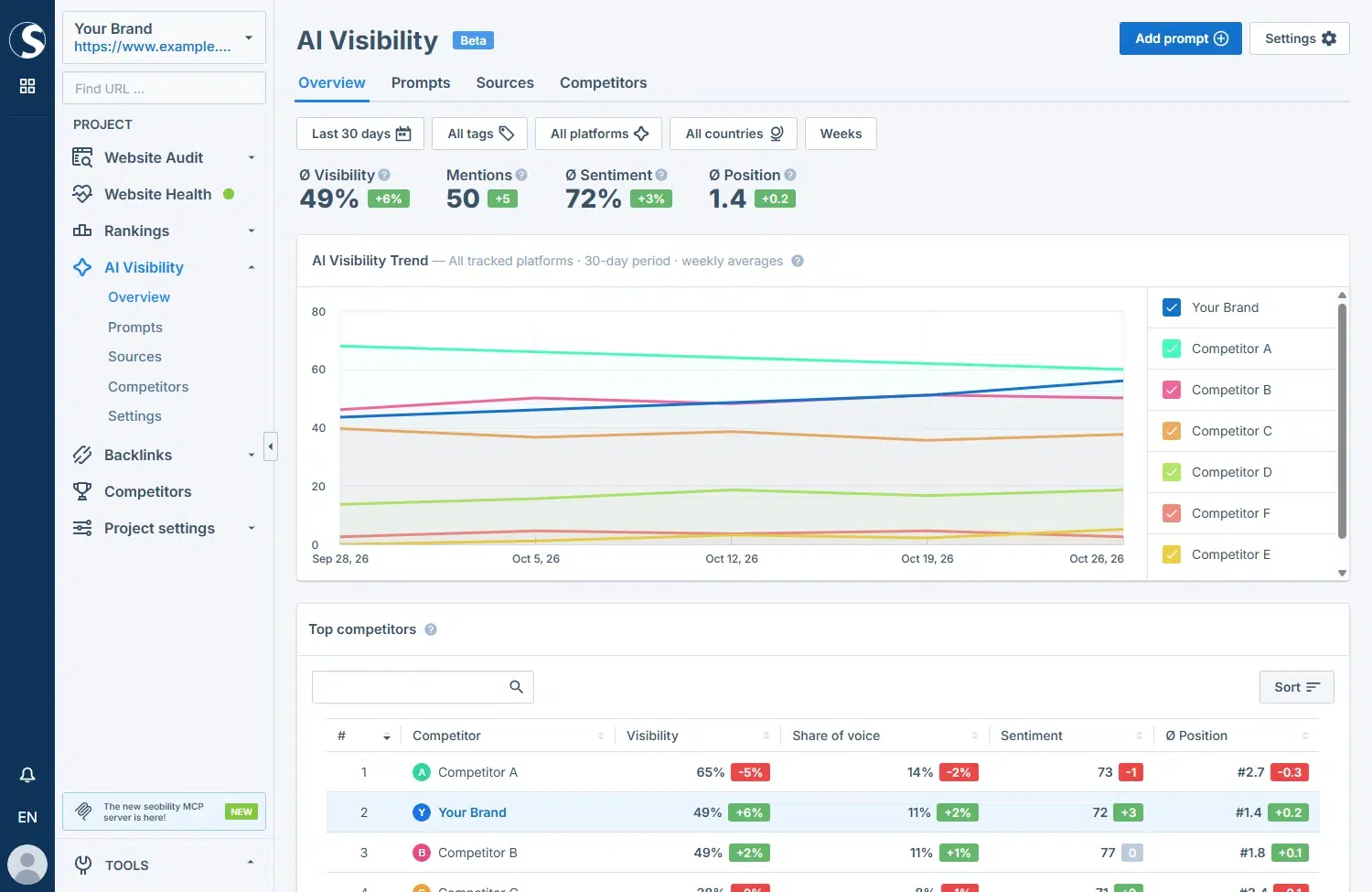
What the main metrics mean:
- Visibility: the percentage of AI answers to your tracked prompts that mention your brand by name or domain.
- Mentions: the number of AI answers that mention your brand. Each answer counts once, even if you’re named several times.
- Sentiment: whether AI describes you positively, neutrally, or negatively, as a score from 0 (negative) to 100 (positive).
- Average position: how early in an answer you’re named. A lower number is better.
- Share of voice: your share of all brand mentions in AI answers to your tracked prompts, compared with your competitors.
All of these metrics are based on mentions: your brand has to be named in the answer text. If AI only cites your website as a source, that doesn’t count here. You’ll find those citations in the “Sources” tab.
What is the difference between AI Visibility Tracking and AI Overview Tracking?
AI Overview Tracking is part of Seobility’s Ranking Monitoring and shows you, keyword by keyword, whether Google displays an AI Overview and whether your website is cited in it. This feature stays exactly as it is.
AI Visibility Tracking goes further: four AI platforms (ChatGPT, Gemini, Google AI Overviews, and Google AI Mode), based on full questions instead of single keywords. Use AI Overview Tracking for your keywords on Google, and AI Visibility Tracking to see who ChatGPT, Gemini and Google’s AI recommend for whole questions.
How to set up AI Visibility Tracking
You don’t have to start from scratch. AI Visibility Tracking lives inside your Seobility project and fills in most of the setup with what it already knows about your website.
In your project’s left-hand menu, click “AI Visibility”, then “Overview”. The guided setup opens and takes you through four steps:
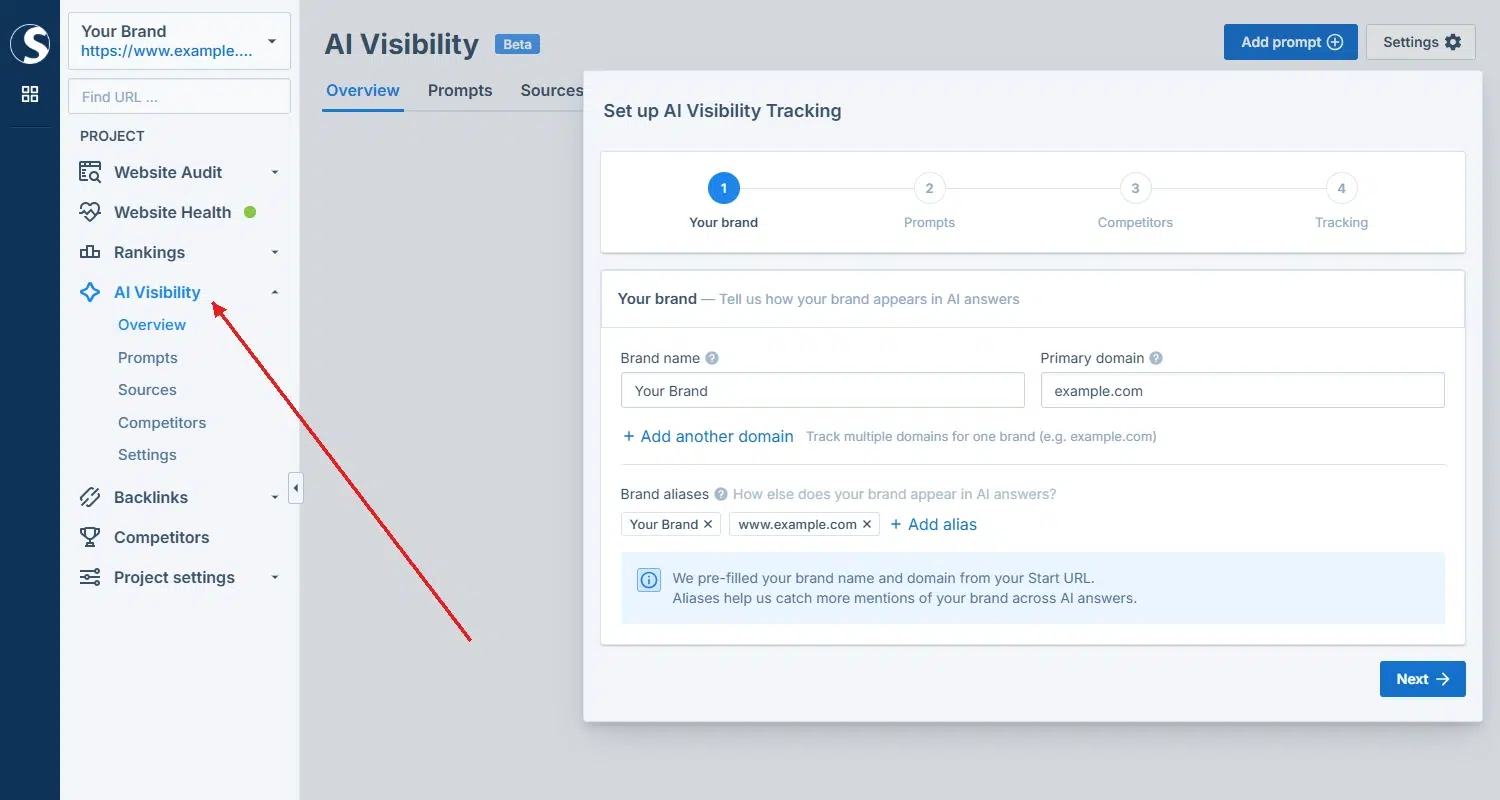
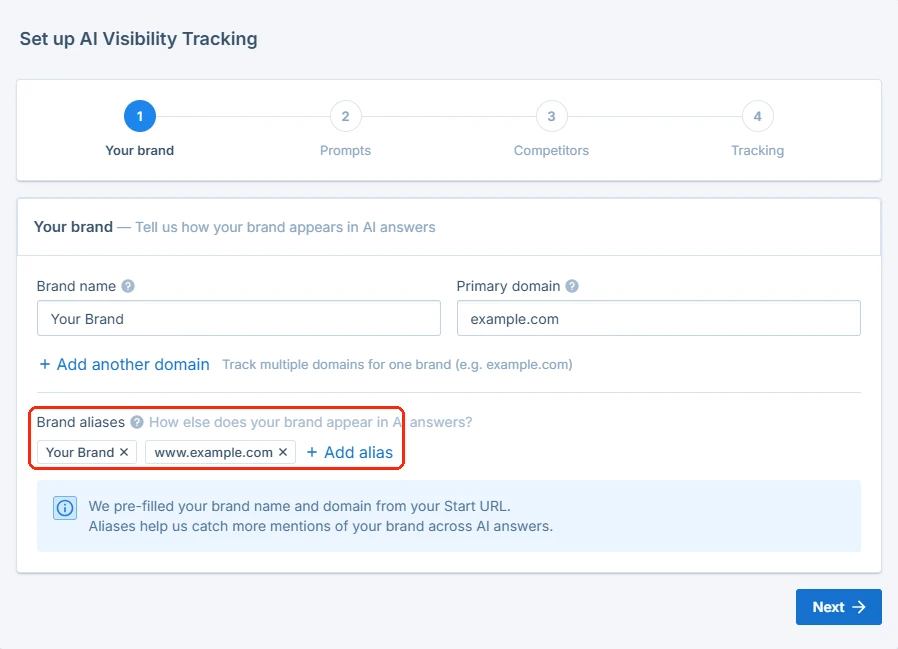
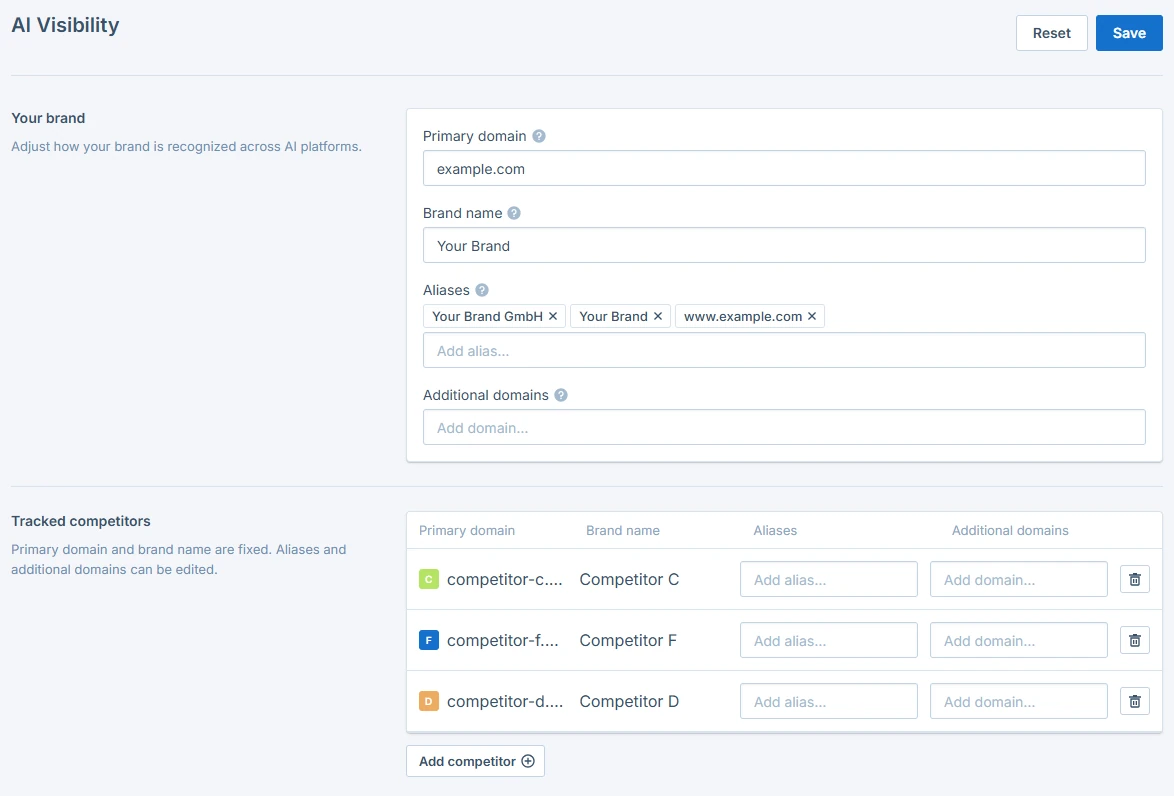
- Your brand: Check your brand name and primary domain, add more domains if your brand uses several, then add aliases, meaning the spellings, abbreviations, or name variants people use for your business. AI answers don’t always write your name the way you do, and Seobility can only count the mentions it recognizes.

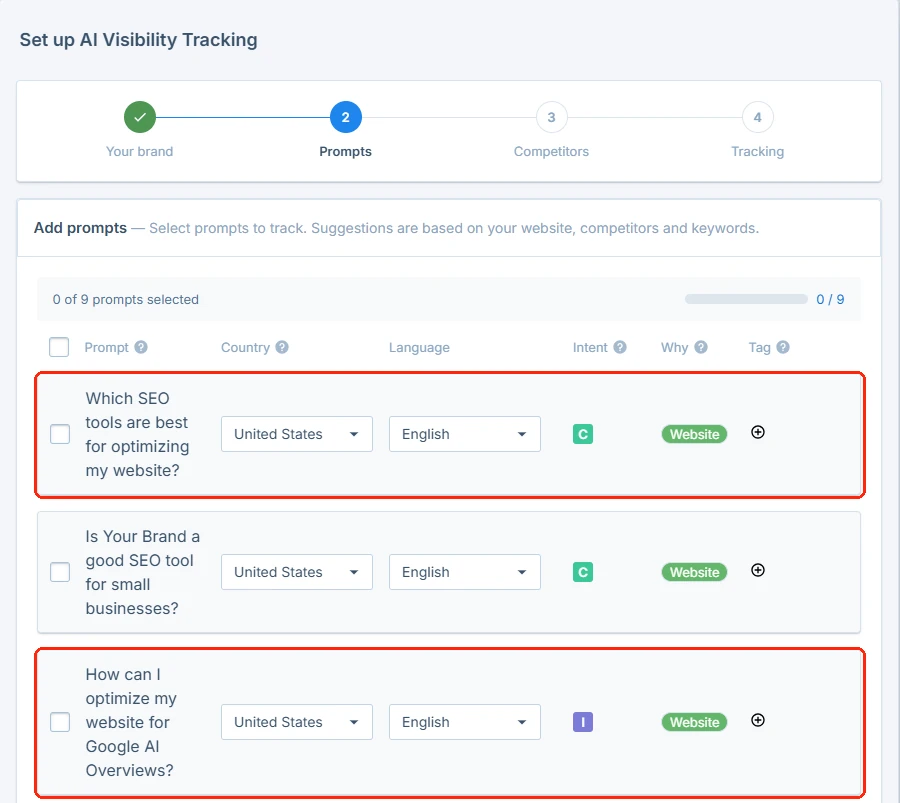
- Prompts: Seobility suggests prompts based on your website, your tracked keywords, and your competitors. Pick the ones that fit, add your own, and set the country and language for each prompt.

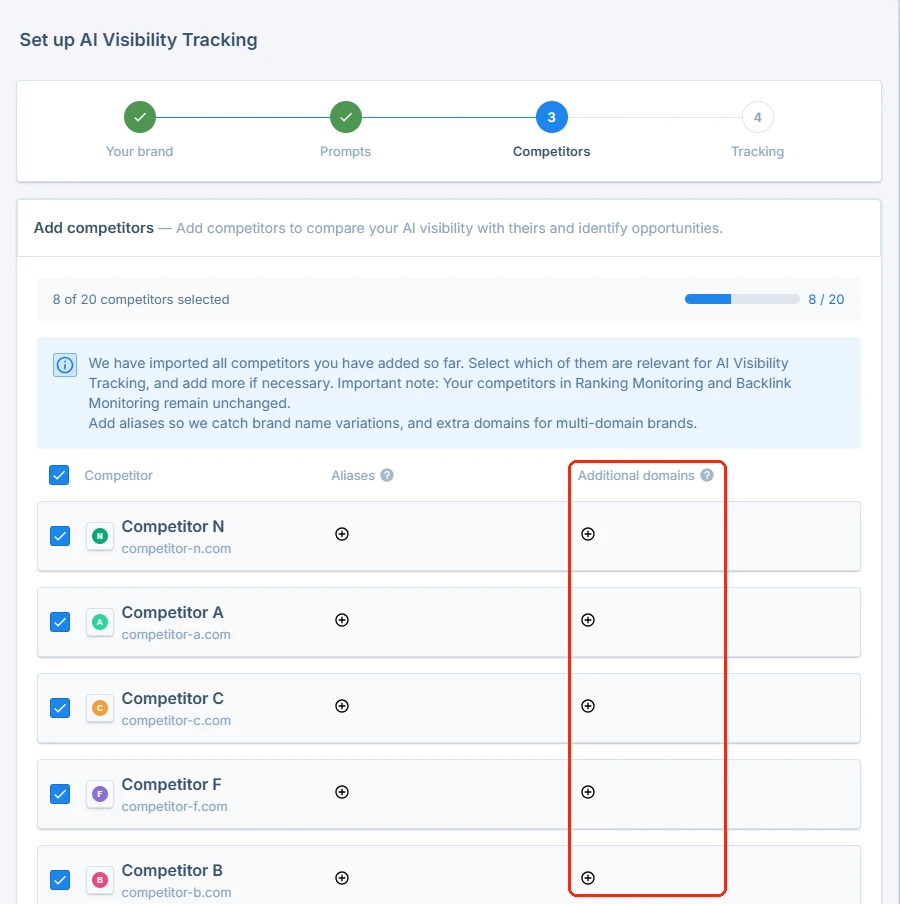
- Competitors: The competitors from your Ranking Monitoring are imported as a starting point. Review them, add aliases and additional domains, and add anyone who’s missing. AI Visibility keeps its own competitor list because here, one competitor can have several domains, for example example.com and example.co.uk.

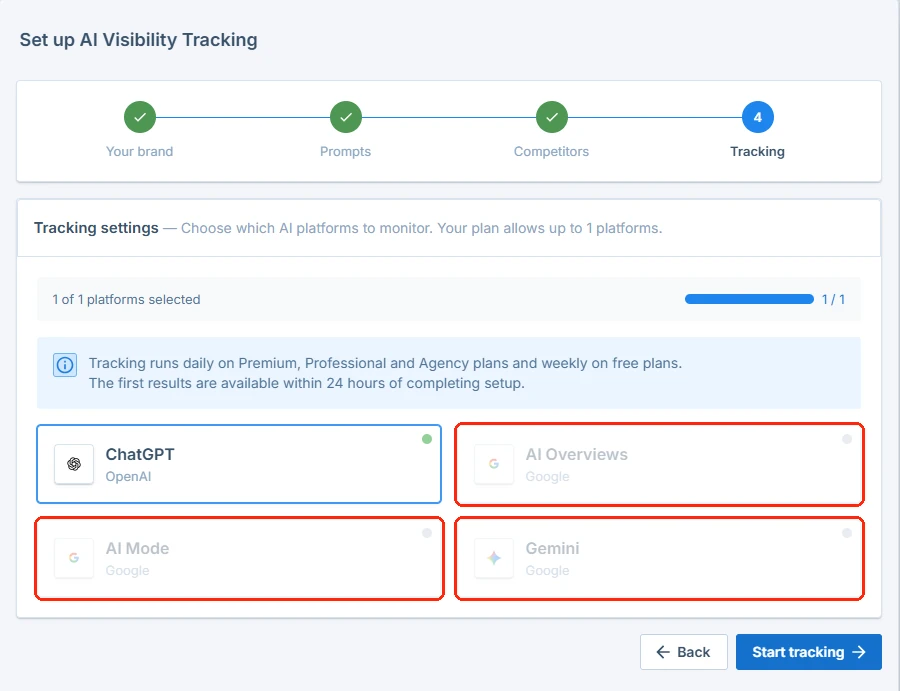
- Tracking: Choose the AI platforms you want to monitor (your plan sets how many) and click “Start tracking”.


Your first results appear within 24 hours of completing the setup. You can change your aliases, domains, competitors, and platforms at any time under “AI Visibility” → “Settings”.
Which prompts to track
Step 2 is critical because it decides how much value you will get out of AI Visibility Tracking. Your results only ever reflect the prompts you track. If you track questions nobody asks, you get exact numbers that don’t help you. A focused set of realistic prompts tells you far more than a long list of random ones.
To make the tips below concrete, we’ll use one example throughout: a small online shop that sells eco-friendly cleaning products.
Leave your own name out
A prompt that contains your name will mention you almost every time. That tells you nothing about whether new customers can find you. The valuable prompts describe a need without naming anyone, because that’s how people ask before they know you.
- Instead of: “Is [your shop] a good place to buy eco-friendly cleaning products?”
- Track: “Where can I buy cleaning products without harmful chemicals?”
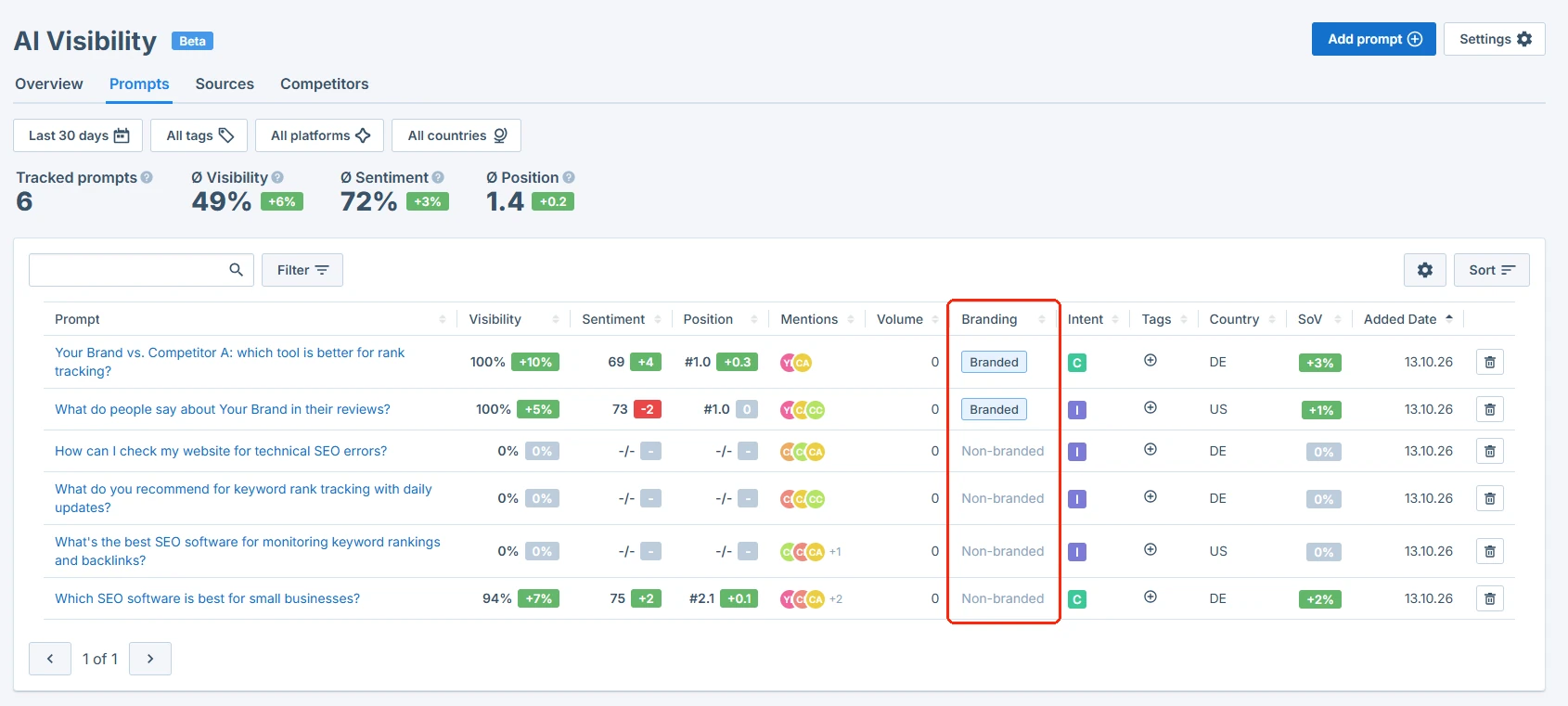
One exception: if you want to see how AI describes your business, add one or two prompts with your name, such as “What do customers say about [your shop]?” You don’t need to sort them yourself: in the “Prompts” tab, the “Branding” column marks prompts with your name as “Branded” and all others as “Non-branded”.
Write the way your customers talk to an AI tool
People don’t type keywords into ChatGPT. They ask full questions and often add details about their situation. Your prompts should sound the same:
- Instead of the keyword “eco cleaning products”, track “I have a toddler and a dog. Which cleaning products are safe for both?”
- Instead of the keyword “natural limescale remover”, track “How do I remove limescale from my shower without harsh chemicals?”
Your keywords from Ranking Monitoring are a good starting point: turn each important keyword into the question someone would ask. The prompt suggestions in the setup and in the “Add prompt” dialog help too, since they’re based on your website, your tracked keywords, and your competitors.
Cover every step of the buying decision
People ask different questions depending on how close they are to buying. If AI only names you when someone compares providers, people who start with a problem never hear of you. So mix prompts from each stage:
- Problem: “How do I get rid of mold in the bathroom without bleach?”
- Solution: “What are the best plastic-free cleaning products?”
- Comparison: “Are cleaning tablets you dissolve in water better than ready-made sprays?”
- Alternatives: “What are good alternatives to [competitor]?”
- Purchase: “Which online shops sell refillable cleaning products?”
Be specific enough to compete
Very broad prompts get answers full of big household brands. A small shop rarely shows up there, so the result tells you little. Add the detail that makes your offer the right answer: your audience, a use case, your price range, or a feature only a few providers have.
- Too broad: “What are the best cleaning products?”
- Specific: “Which cleaning products come in plastic-free, refillable packaging?”
- Specific: “What’s an affordable eco-friendly cleaning set for a first apartment?”
Match the country and language to your customers
The same question can get different answers in different countries and languages, because AI tools draw on different sources there. For every prompt, set the country and language where your customers actually are. If you sell in the US and the UK, for example, track your most important prompts for both markets.
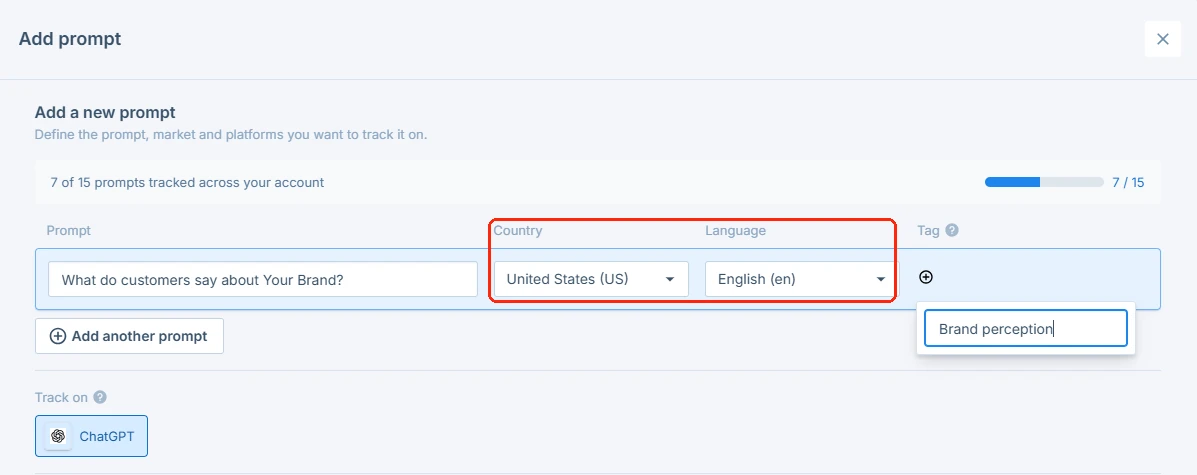
Keep your set focused and stable
Before you add a prompt, ask yourself two questions:
- Would a real customer ask this?
- Would it matter to your business if AI recommended a competitor here?
If the answer to either is no, leave the prompt out. Once your set is in place, let it run. Every prompt you add or remove changes your scores, which makes it harder to compare one month with the next.
Example: a starter set for the cleaning products shop
Put together, a first prompt set for our example shop could look like this:
- “How do I get rid of mold in the bathroom without bleach?” (problem)
- “What are the best plastic-free cleaning products?” (solution)
- “Which cleaning products are safe for homes with small children and pets?” (solution, specific audience)
- “Are cleaning tablets you dissolve in water better than ready-made sprays?” (comparison)
- “What are good alternatives to [competitor]?” (alternatives)
- “Which online shops sell refillable cleaning products?” (purchase)
- “What do customers say about [your shop]?” (branded)
None of these prompts is a keyword, only one contains the shop’s name, and together they cover everything from the first problem to the purchase.
How to get AI tools to mention you more often
Your first results are in. Now what? In this section, we’ll show you how to read your data and use it to improve your AI visibility, step by step.
1. Check which prompts you’re missing from
In the “Prompts” tab, sort the table by “Visibility” and look for the prompts where your visibility is low or zero. Each one is a real customer question where AI recommends someone else, and that makes it your clearest to-do list.
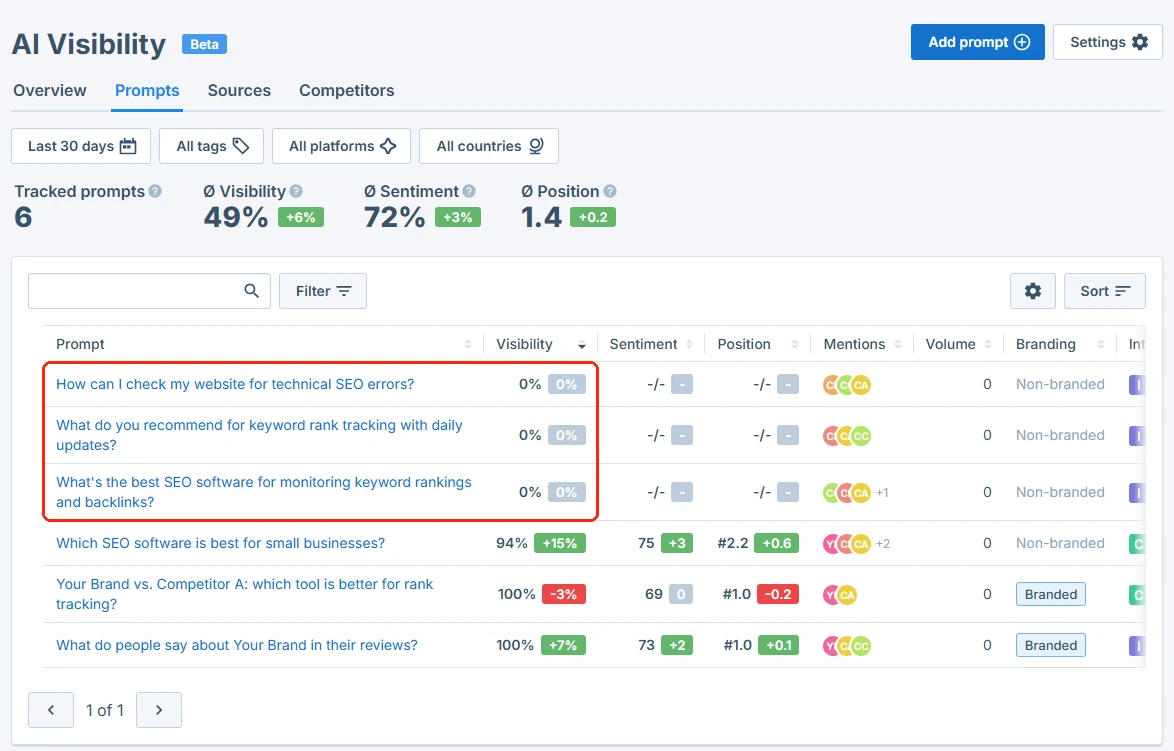
2. Find out why others get named
Click each of those prompts, open its “Chats” tab and read the full answers. Note what the AI says about the businesses it recommends: features, prices, use cases, and the sources it refers to. Often it highlights something you offer too, but don’t mention clearly on your website.
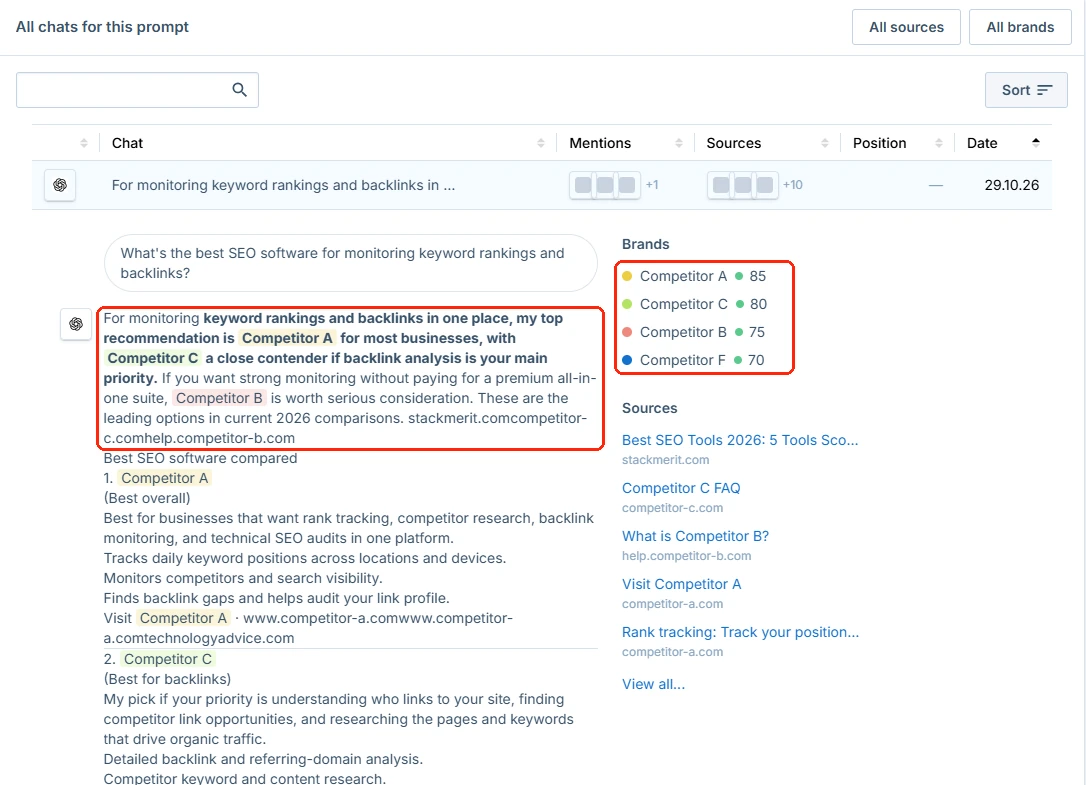
3. Cover those points on your own pages
Add the missing information to the right page, in plain and specific wording, and answer the question behind the prompt directly, for example in an FAQ section or on the matching service page. Clear, direct answers make it easier for AI tools to use your page as a source. Here’s what that could look like on a product page of a fictional cleaning products shop:
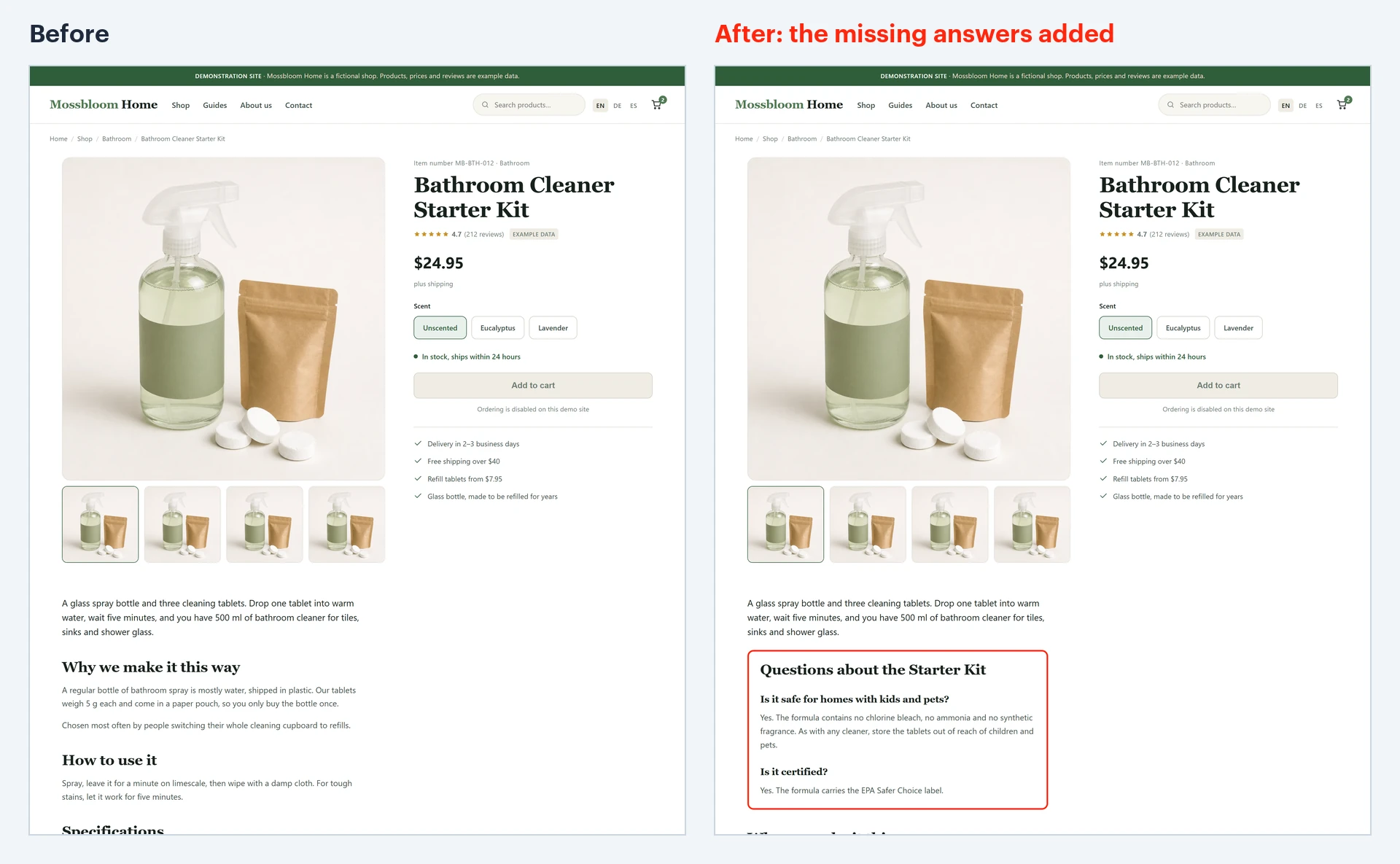
4. Get mentioned where AI looks
Check the “Sources” tab for the websites AI cites most often for your prompts. The “Domain types” chart shows whether AI mostly cites user-generated content (UGC) like forums and review sites, editorial sites like magazines and blogs, or your own website. Focus on the type that dominates for your prompts:
- If forums, communities, and review sites dominate, be present there: answer questions helpfully and ask happy customers for reviews.
- If editorial sites dominate, aim for guest articles and a spot in comparison or “best of” lists in your niche.
5. Compare yourself with the leading competitor
In the “Competitors” tab, look at the competitor with the highest “Share of voice”. Then put their numbers next to yours:
- Mentions: In how many AI answers are they named, and in how many are you? Prompts that name them but not you go straight to the top of your to-do list.
- Average position: Are they usually named first while you show up third or fourth? Then AI treats them as the obvious choice and you as an alternative.
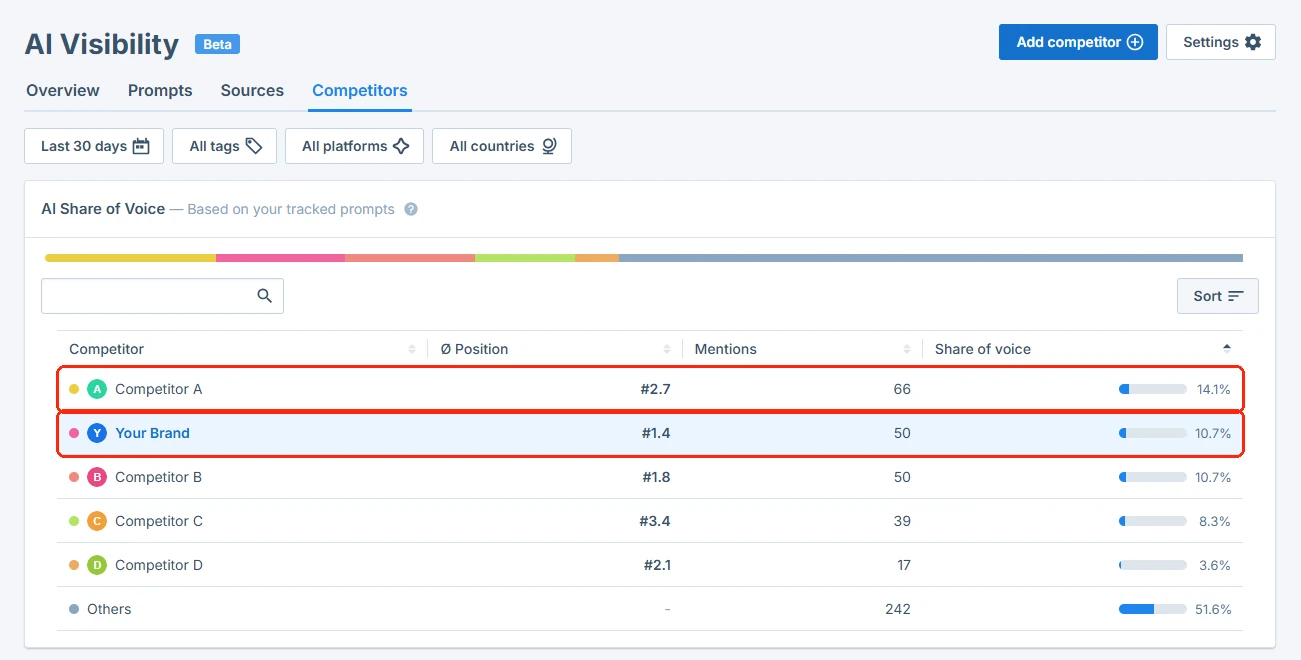
Next, open the “Chats” tab for a few prompts they win and look for what keeps coming up. Does AI praise the same strength every time, such as free shipping, a money-back guarantee, or a certified eco label? Does it cite the same review site or comparison article again and again?
For our example shop, that could look like this: AI keeps pointing out that the leading competitor’s products carry an eco certification. Your products have the same certification, but your product pages don’t mention it. That gap is easy to close: add the certification to your product pages and your About page, where AI tools can find it.
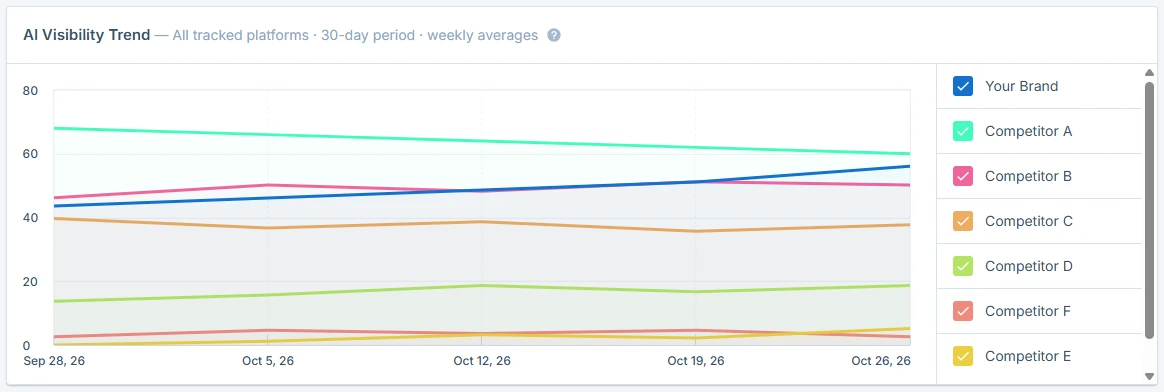
6. Track the trend over several weeks
AI answers change often, and new content takes time to get picked up. Keep your prompt set stable and watch your visibility and share of voice in the “Overview” tab and your “Citation share” in the “Sources” tab.
For more on how to get your content into AI answers, read our guide on how to rank in AI Overviews.
Which plans include AI Visibility Tracking
AI Visibility Tracking is available on all Seobility plans, including the free plan. What differs is how often your prompts are checked and how many platforms you can track:
- Tracking frequency: every day on the Premium, Professional, and Agency plans, once a week on the free plans.
- AI platforms: on every plan, you can choose any of the four platforms. Your plan decides how many you can track at the same time.
- More room: want to track all four platforms or more prompts than your plan includes? You can book an add-on.
You’ll find all the details on our pricing page.
How to interpret your results
AI Visibility Tracking is a tool for monitoring trends, not an exact ranking system. Three things help you read your results correctly:
- AI answers change often. The same prompt can get a different answer tomorrow. That’s why Seobility shows averages and trends. Monitor the direction over several weeks, not a single day.
- Your results reflect your prompt set only. They show how you perform for the prompts, markets, languages, and platforms you chose, not across the entire internet.
- Visibility is a signal, not a guarantee. Being mentioned more often in AI answers is a good sign, but it doesn’t automatically mean more traffic or sales.
How to share feedback on the beta
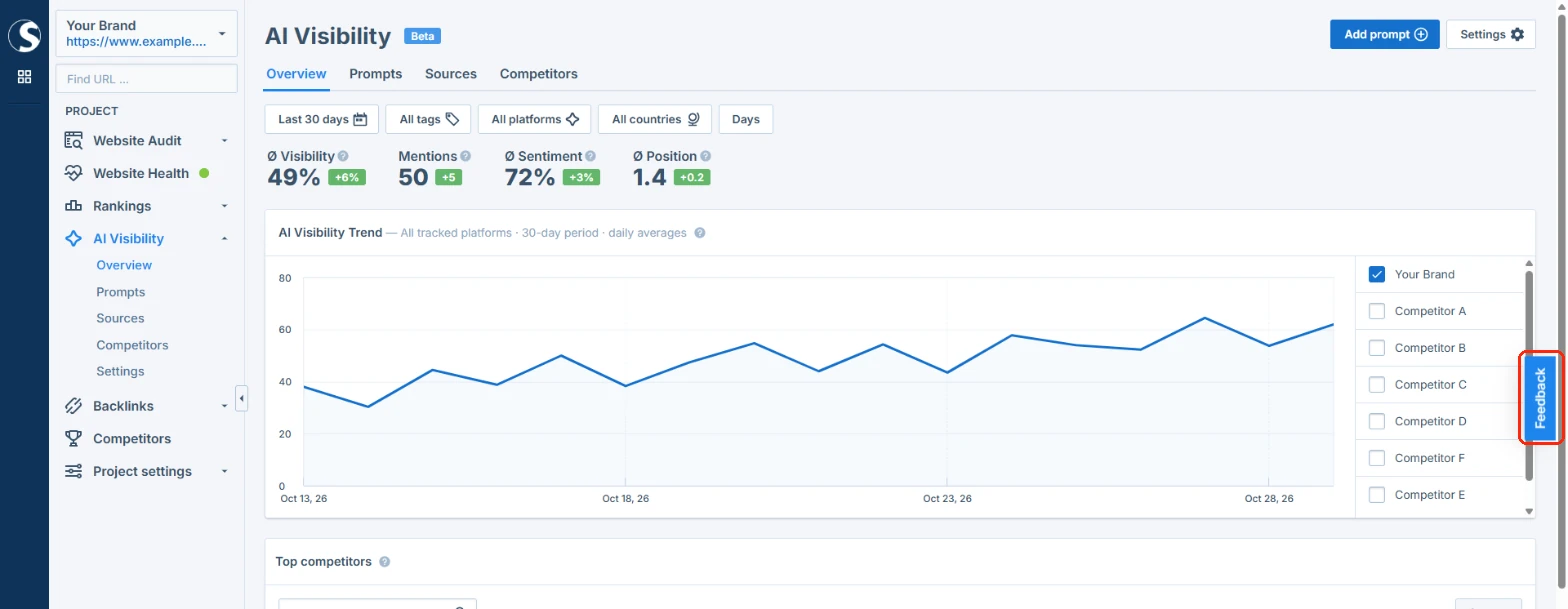
“Beta” means AI Visibility Tracking is fully usable, and we’re still improving it based on how you use it. If something is unclear or you’d like it to work differently, please tell us via the “Feedback” button on the right edge of the screen. We read every message.
Ready to see how AI talks about your business? Open your Seobility project, click “AI Visibility”, and set up your first prompts. Don’t have an account yet? Try Seobility for free and start tracking right away.