We’ve all been there: you click a link in the SERPs, stare at a blank screen, and before you know it, you’re back on Google muttering “never mind.”
In our world of shorts, fast food, and on-demand video streaming, patience isn’t something website visitors typically see as a virtue. If your site makes people wait, they won’t stick around.
So just how fast does your website need to be to keep people (and Google) happy?
In this short post, we’ll dive into this exact question.
In short
Aim for…
- …your site to load in under 2 seconds.
- …a PageSpeed Score of 90 or above.
- …a server response time of less than 500ms.
Why website speed is so important
Before we look at the specific metrics used to measure load times, it’s important to understand why website speed is so critical. A faster site benefits both your visitors and your visibility online.
- Improved user experience
Visitors expect pages to load quickly. Fast websites reduce waiting time, keep users engaged, and lower bounce rates, especially for mobile users or those on slower connections. - Better search engine optimization (SEO)
Search engines like Google prioritize fast-loading websites because they provide a better experience. A quicker site also allows crawlers to index more of your content efficiently, improving your chances of ranking in the search results. - Stronger generative engine optimization (GEO)
Faster sites are easier for AI crawlers to access too, increasing your chances of being included in AI-generated answers from tools like ChatGPT.
Website speed – what should I be aiming for?
There are a number of ways to look at website speed.
Each of these has its advantages and disadvantages, but in general, it can be good to keep all of them in mind when setting a target for your website speed.
Core Web Vitals Assessment (PageSpeed Insights)
Google PageSpeed Insights offers a score that can be a great benchmark for measuring the speed at which your website loads.
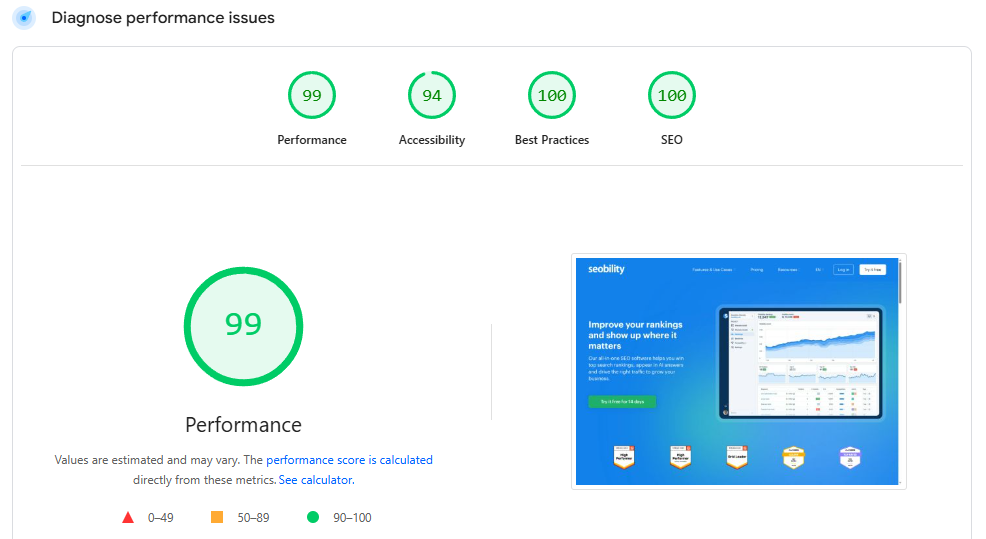
However, this score is calculated based on “lab data”, i.e., simulated tests run in a controlled environment with predefined device and network settings. While helpful for identifying issues, lab data doesn’t always reflect how real visitors experience your site under different devices, browsers, and connection speeds.
In general, you want to optimize for real-world data first, if possible. So we’ll cover this first…
For this, you want to look at the Core Wed Vitals Assessment at the top of the report.
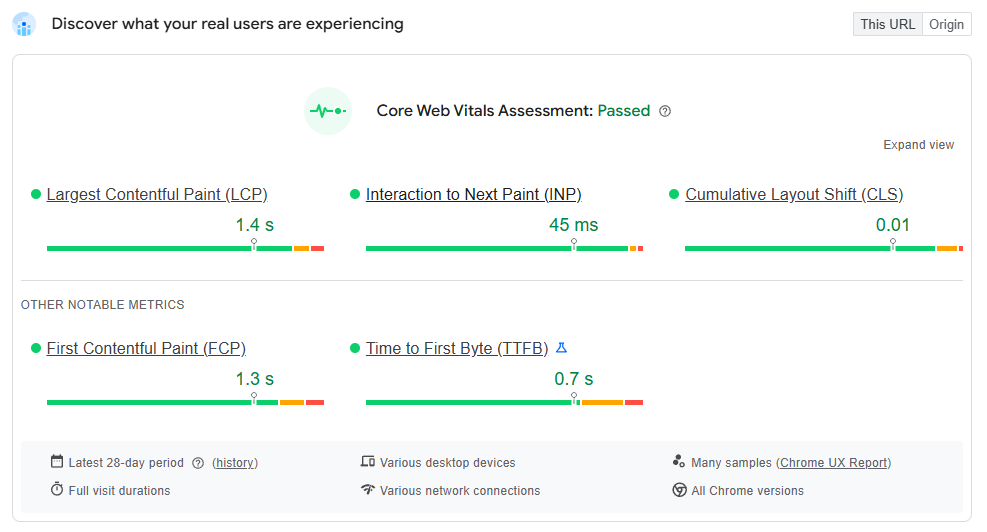
Note: if your website doesn’t get enough traffic, PageSpeed Insights might not show this section. If this is the case for you, then you can use a tool like Pingdom or GTMetrix and optimize based on the load speeds and scores they provide.

The metrics to look at
PageSpeed Insights provides various metrics to judge your load time, but we’ll start with Interaction to Next Paint (INP) and Largest Contentful Paint (LCP).
These metrics give you a good benchmark of both the loading experience (LCP) and the interaction experience (INP).
LCP measures how fast the largest visible element on a page, like an image, video or block of text, becomes visible to the user. It reflects both the server response time and the loading of critical resources (e.g., images, videos, and text).
INP measures the delay between a user’s first interaction (like a click) and when the next visual update occurs, reflecting how responsive the page is.
There’s no hard and fast rule, but we’d be aiming to keep LCP under 2.5 seconds and INP under 200ms.
But the bottom line is, you want your page to load as fast as possible without affecting core functionality, so any improvement counts.
In our Core Web Vitals guide, you’ll find tips for improving both your LCP and your INP metrics.
PageSpeed Score
As we’ve mentioned above, the PageSpeed Score on PageSpeed Insights is based on so-called “lab data”. This means it’s not the same as the actual load time experienced by visitors.
Nonetheless, it can be a great benchmark to work with – especially if you don’t yet get enough traffic to show the Core Web Vitals Assessment.
You’ll want to aim for a mobile PageSpeed score between 90 and 100.
According to Google, anything in that range is ‘Good’ and anything below that either ‘Needs improvement’ (50-89) or is ‘Poor’ (0-49).
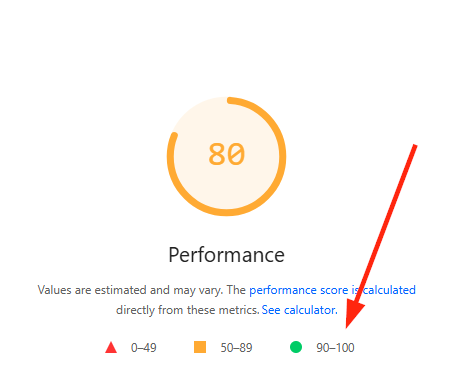
Needless to say, you want ‘Good’.
Matching or beating competitors: Why it’s not (always) a good target
From an SEO perspective, matching or beating your competitors’ website speed seems like a no-brainer. And to some extent, it is!
If you’re way slower than other sites that compete for the same searches, then crawlers and users aren’t going to give you as much love.
In that regard, it definitely makes sense to use competing sites as a benchmark.
However, there’s a problem…
If your competitors’ websites are slow, you’re shooting yourself in the foot if you use this as a target.
Ultimately, your website visitors are interacting with your site directly, not comparing it to other sites.
And if they’re stuck waiting, they don’t particularly care that you’re faster than another site.
Whether they’re looking to buy a product or read an article, if you make them wait, they’re going to bounce.
Check out this guide from Hobo Web for some great stats on how user abandonment and frustration increase with every second that ticks by.
And there isn’t much difference between your flesh-and-bones human visitors or their web-crawling (AI) counterparts. Slow load times can impact both negatively.
So, even though it makes sense to keep your competitors’ website speed in mind, using best-practice speed benchmarks like PageSpeed score and INP/LCP as your main goal is best.
How fast should your server response time be?
While it’s important to optimize your overall page load time, it can be useful to look at server response time specifically. This metric highlights how efficiently your server handles requests and helps you identify whether infrastructure, hosting, or backend processes are the real bottlenecks in your site’s performance.
Server response time is most commonly measured as Time to First Byte (TTFB) – the time it takes for a server to start responding after receiving a request. It includes both the server’s processing time and the delivery of the first byte of data back to the browser.
Ideally, your TTFB should be under 500ms. According to Google PageSpeed Insights, anything under 800 ms is considered good, while 800–1800 ms signals a need for improvement, and anything above 1800ms is regarded as poor.
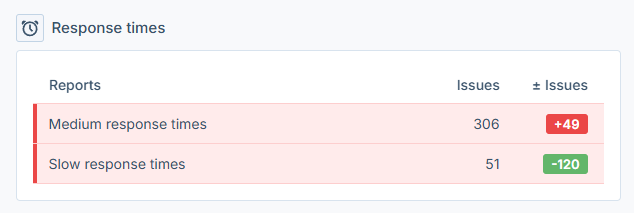
Tip: While Google PageSpeed Insights gives you a TTFB score for individual pages, Seobility’s Website Audit makes it easier to spot patterns across your entire website. Instead of testing pages one by one, you can quickly identify all pages with medium or slow response times, making it much faster to detect systemic performance issues.
Next steps
Now you know how fast your website should load and why it’s so important, it’s time to take action.
So, what are the next steps?
We have a number of speed optimization guides, including;
- 12 Page Speed Optimization Tips
- Optimizing WordPress page speed
- Optimizing Your Server & Infrastructure
These should give you all the information you need to ensure your website loads blazing fast.
A faster website for better results
Ultimately, a faster website leads to more love from both visitors and crawlers. It makes your site more accessible and can even improve conversion rates and reduce user frustration.
Now you know roughly how fast your website should load, you’re ready to take action. And, hopefully, the guides we linked to in this post will help you kick off your speed optimization campaign effectively.
Don’t forget to sign up for a free 14-day trial of Seobility to keep an eye on your server’s response times and check your site for more potential technical SEO issues that could impact your online visibility.