
In our previous article How do Google’s AI Overviews affect SEO (and how should you adapt)?, we explained how AI Overviews are changing what “visibility” in search means and why this doesn’t mean the end of SEO.
In this follow-up, we’ll move from theory to practice.
You’ll learn how to optimize your website and content so Google’s AI systems will include your pages in these new summaries.
We’ll walk you through each step, from identifying which keywords trigger AI Overviews to fine-tuning your content for AI readability, implementing structured data, and building trust signals.
Let’s get right into it!
- Two visibility goals: citations vs. mentions
- Citations
- Mentions
- Why both matter for your SEO
- Step-by-step checklist to optimize for AI Overviews
- Step 1: Build a strong technical SEO foundation
- Step 2: Identify your AI Overview opportunities
- Step 3: Optimize your content for AI readability and semantic relevance
- Step 4: Add value that AI can’t replicate
- Step 5: Implement structured data (schema markup)
- Step 6: Build topic clusters and internal linking to signal broader topical authority
- Step 7: Strengthen your off-page signals and brand presence
- Step 8: Keep your content accurate and up to date
- Putting it all together
Two visibility goals: citations vs. mentions
There are two main ways your website can appear in Google’s AI Overviews. It’s important to understand the difference between them before you start optimizing, since specific optimization tactics can affect each goal differently.
Citations
A citation means that Google’s AI Overview directly links to your page as a source. You’ll usually see these as small clickable cards or links inside or next to the AI-generated summary:
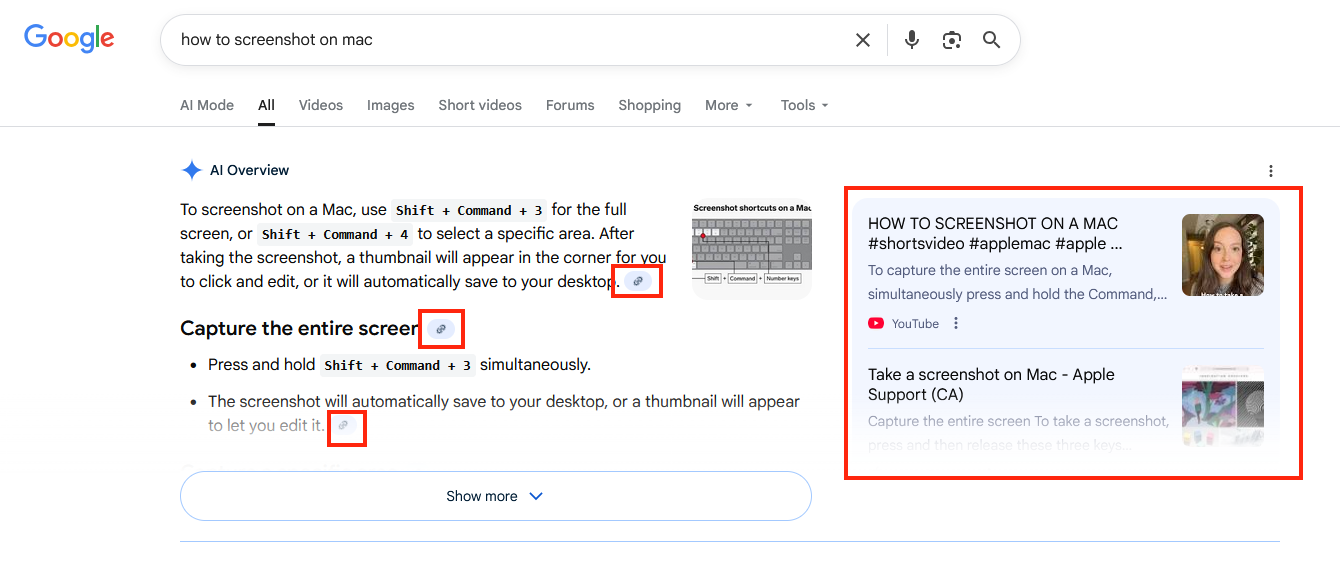
When your content is cited, it tells users that it was used as input for the answer, which makes it appear reliable and trustworthy. Citations may also result in clicks to your website if users want to learn more.
Mentions
On the other hand, a mention is when your brand, product, or website is named in the AI Overview’s text, though not necessarily with a clickable link:

Although they often don’t result in clicks, mentions are a powerful way to increase brand awareness. They position your name prominently within the AI answer and can lead to more searches for your brand name later on.
Why both matter for your SEO
Both mentions and citations contribute to your overall visibility in search and should be treated as goals in your SEO strategy.
SEO is not only about ranking or driving clicks anymore. It’s about being seen wherever users find information, including AI Overviews.
We’ve covered this in more detail in our post about the impact of AI Overviews on SEO.
Step-by-step checklist to optimize for AI Overviews
Now that you know the two types of visibility you can achieve, the next question is:
How do you actually get there?
Below, you’ll find a practical step-by-step checklist to help you with this, from fixing technical issues to fine-tuning your content and strengthening your off-page signals.
Step 1: Build a strong technical SEO foundation
Before Google can include your content in an AI Overview, it first needs to find and understand it.
That’s what technical SEO is all about: making it easy for Google’s crawlers to access and evaluate your pages.
If your website has broken links or takes a long time to load, Google won’t even consider it as a potential source.
So before working on anything else, make sure your technical foundation is solid.
Here’s how to do it step by step.
1. Run a full website audit
Start with a complete scan of your website to uncover any technical or on-page SEO problems. You can use Seobility’s Website Audit for this. (If you’re not using Seobility yet, you can start a free 14-day trial here.)
After crawling your website, Seobility will display an on-page SEO score that gives you a quick sense of how well your website is optimized for search engines.
Seobility > Website Audit > Overview
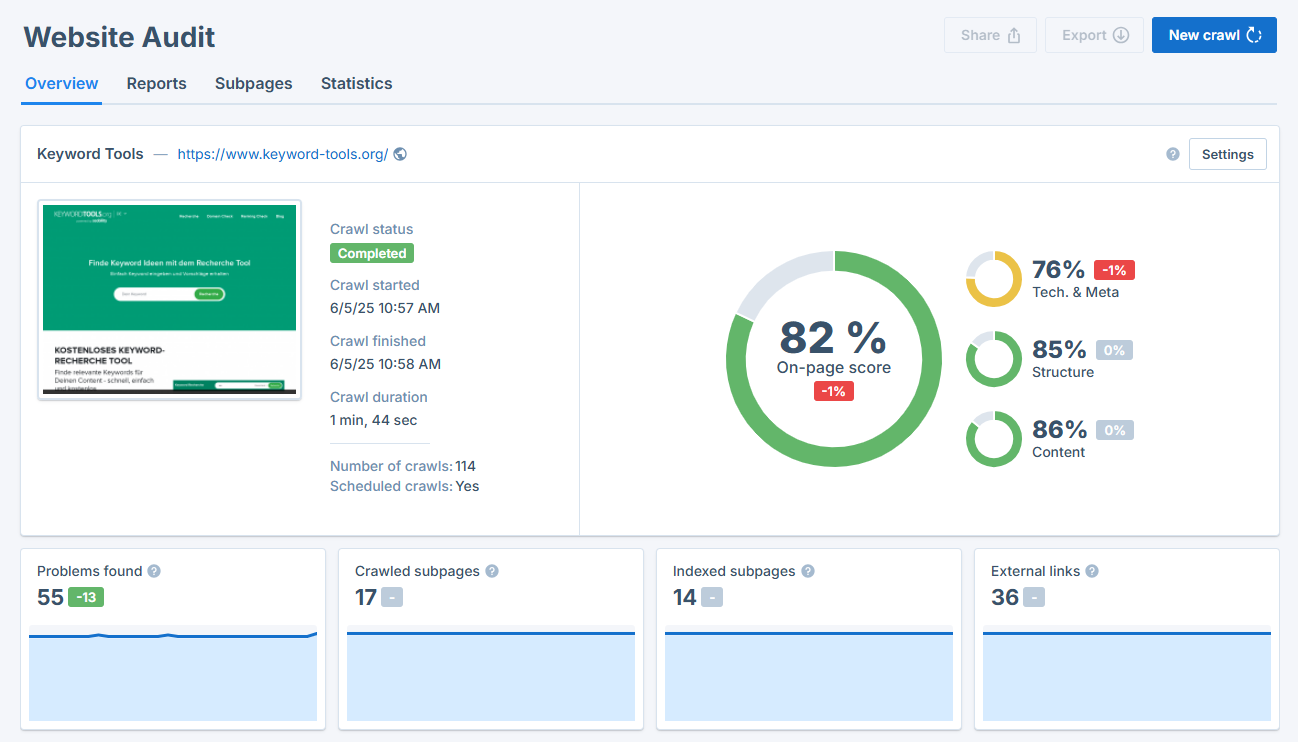
And below that, you’ll find a complete list of all problems Seobility found on your website, sorted by priority:

Work your way through this list from top to bottom and fix the issues on your website. To ensure that your website is sufficiently optimized, we recommend aiming for an on-page score of at least 80-90%.
2. Set up automated website crawls to detect new issues as they emerge
Technical SEO isn’t a one-time task. As you work on your website and publish new content, new issues can arise that may negatively impact your performance without you noticing.
In the Seobility Project settings, you can set up automated website crawls to make sure that you catch new issues quickly:
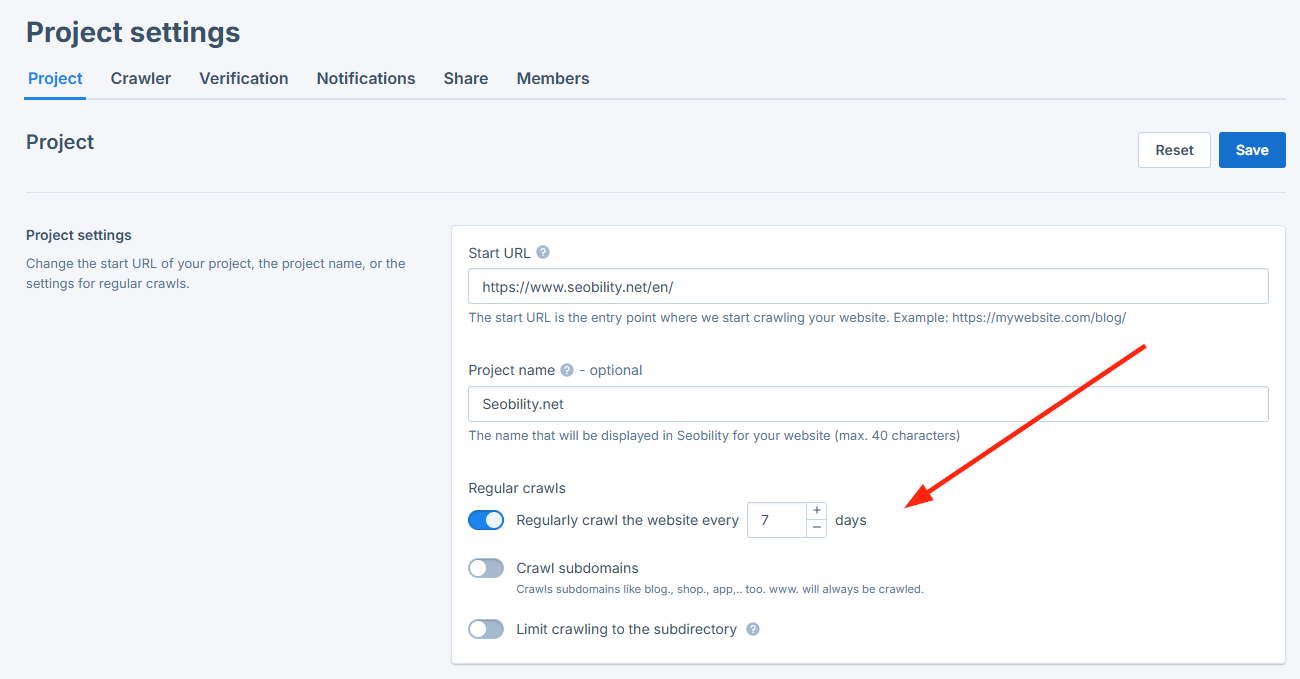
Seobility will notify you by email after each crawl and let you know of any new issues that popped up on your site.
Do I need an llms.txt file?
Recently, you might have heard about a new file format called llms.txt that’s supposed to tell AI systems how they can use your website content, similar to how robots.txt controls search engine crawlers.
In theory, it sounds like a good idea. In practice, though, you don’t need one.
Studies have shown that the llms.txt file currently has no measurable impact on whether or how AI systems access or reference your content.
Google’s AI Overviews, in particular, are based on data from the regular Google Search index. They don’t crawl websites separately or read llms.txt instructions.
So adding an llmx.txt file won’t increase or decrease your chances of being cited in AI Overviews. If you’re worried about how AI systems use your content, it’s better to review your existing robots.txt file to make sure sensitive areas are blocked from crawling.
Step 2: Identify your AI Overview opportunities
Once your website’s technical foundation is solid, the next step is to find out where AI Overviews already appear in your keyword set.
After all, there’s no point in optimizing blindly. AI Overviews only show up for certain types of queries, mainly informational or complex questions.
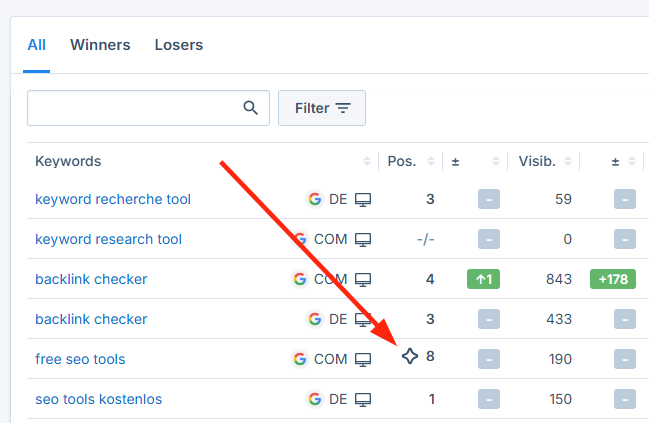
1. Check which of your target keywords trigger AI Overviews
You can easily do this with Seobility’s AI Overview Tracking. It tells you which of your monitored keywords currently display an AI Overview on Google’s results page by this indicator:
Seobility > Rankings > Keywords
2. Don’t limit your analysis to top-ranking pages
You might assume only top-ranking results can appear in AI Overviews, but that’s not the case.
Studies have shown that many cited pages come from outside the top positions, and sometimes even beyond the top 100 organic results.
If a page delivers high-quality and well-structured information, Google’s AI can still use it as a source.
So when reviewing your keywords in Seobility, also look beyond your best-ranking pages.
3. Analyze what types of pages Google includes
Once you’ve identified your opportunities, it’s time to look at what Google already includes in the AI Overview.
Seobility’s Ranking Monitoring will not only show you if an AI Overview appears for a keyword, but you can also analyze the complete AI Overview text and check which URLs are cited there:
Seobility > Rankings > Keywords > Click on one keyword

Try to identify patterns in the pages Google chooses:
- Are they forums or community discussions (like Reddit or Quora)?
- Are they expert blogs, product guides, or official government pages?
- Do they contain visuals, data, or how-to instructions?
This will help you understand what kind of content Google considers useful for each query.
For example:
If you notice that Reddit threads or community posts frequently appear for your target keyword, that’s a hint that first-hand experience is important.
To increase your chances of inclusion:
- Add real-world examples, case studies, quotes, or testimonials to your content.
- Include insights from your own data or customer experience, i.e,. things AI can’t easily replicate.
Step 3: Optimize your content for AI readability and semantic relevance
Once you know which pages to optimize and what type of content you need, it’s time to make sure your content is easy for AI systems to interpret and summarize.
Google’s AI Overviews gather information from multiple sources and try to merge them into a clear answer. To be selected as one of those sources, your content needs to be structured, concise, and semantically clear, meaning it covers a topic clearly enough for AI to understand.
Here’s how to do that:
1. Provide clear, concise answers
AI systems look for short and easy-to-extract passages that answer the user’s query.
This means that ideally you should open each page with a concise explanation or summary, depending on the type of keyword you are targeting:
- For question-based queries (e.g. “How does internal linking help SEO?”) → Start with a direct answer.
Example: “Internal links help Google understand your website’s structure and distribute link equity between pages.” - For non-question keywords (e.g. “website audit checklist”) → Start with a short summary of the points covered in the article.
Example: Provide a summary of the website audit steps before you go into detail.
Including a “TL;DR” or “Quick summary” box at the top also works well because it provides AI with a structured, easy-to-extract answer.
Additionally, FAQ sections at the end of each page are a great way to concisely answer common user questions. Use them to answer short, related questions your audience might ask.
For example: on the Seobility website, we use an FAQ section at the end of each feature page to answer common questions users might ask about our features, such as this one on our Website Audit feature page:
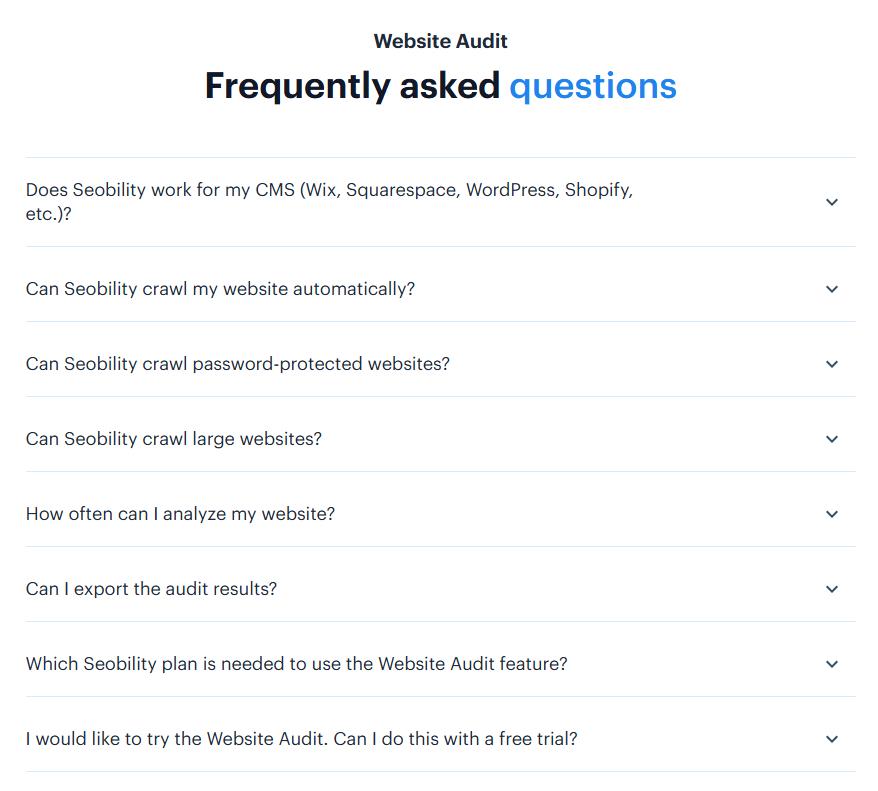
FAQs like these increase your content’s depth and provide easy-to-extract snippets for AI-generated answers.
2. Structure your content clearly
- Use headings and subheadings that mirror real user queries (e.g., in an internal linking guide: “How does internal linking help SEO?”, “How can I optimize my internal links step by step?”)
- Break long sections into logical chunks, each focusing on a single idea.
- Use bullet points and numbered lists to make your text easier to scan.
This clear structure helps AI models identify what each part of your page is about and where to find specific information.
3. Strengthen semantic clarity and relevance
AI Overviews rely on understanding the meaning of your content. To achieve that, your text needs to use the right semantic concepts to make sure that Google interprets correctly what your page is about.
This is where Seobility’s TF*IDF Tool can help. It analyzes the top-ranking pages for your target keyword and shows you which terms and phrases are commonly used on these pages.
Here’s an example for the keyword “website audit checklist”:

These terms represent the semantic context Google associates with the keyword, i.e., they reveal how successful pages make their topic clear.
Another example:
When writing about local SEO, you may notice that top-ranking pages often use terms such as Google Business Profile, NAP consistency, local citations, and customer reviews.
Rather than keywords to stuff into your text, think of these terms as clues that these concepts belong together. Including them in your content makes it clearer to Google that your page is about local SEO than if you repeatedly used the term “local SEO” on the page.
4. Write naturally and conversationally
AI models are trained on human language patterns, so natural, straightforward writing helps them interpret your content more reliably.
Use short sentences, active voice, and plain vocabulary. Explain terms where needed, but don’t overcomplicate.
Example:
❌ “The implementation of meta-optimization protocols enhances SERP performance.”
✅ “Optimizing your meta tags helps Google understand your pages and rank them better.”
Step 4: Add value that AI can’t replicate
Even the smartest AI systems can’t reproduce what makes your perspective unique: experience, creativity, and real-world insight.
That’s why one of the best ways to increase your chances of being cited in AI Overviews is to enrich your content with original, experience-based elements that go beyond what’s already on the web.
Here’s how to do it:
1. Add visuals and multimedia elements
AI Overviews consist mainly of text, which means visuals are a great way to offer something AI can’t reproduce.
- Use screenshots, infographics, charts, or videos to illustrate key points.
- When explaining a process, include step-by-step screenshots to show what users will actually see.
- For complex topics, add short video summaries or explainer clips.
2. Share first-hand experience and examples
Google’s helpful content guidelines and recent core updates have made one thing clear: Content that demonstrates first-hand experience performs better.
Whenever possible, back up your explanations with real examples from your own work:
- Describe the results of a change you implemented.
- Explain what worked and what didn’t.
- Include client stories or anonymized case studies that show practical outcomes.
3. Publish unique data or insights
If you have access to your own numbers, whether from user surveys or experiments, use them.
- Share results from your own tests, studies, or analyses.
- Include small data points or graphs that reveal fresh insights.
- Always explain the methodology behind your findings. This transparency builds credibility.
Even small-scale data can make your content more trustworthy because it shows that it’s based on real observations.
4. Highlight human expertise
Beyond visuals, examples, and data, make sure that your content reflects who is behind it.
- Add author bios that explain your background or experience on the topic.
- Mention certifications, years of work in the field, or notable projects.
This makes your content more trustworthy in the eyes of Google and users, which is the central component of Google’s E-E-A-T concept.
Step 5: Implement structured data (schema markup)
Once you’ve created content that demonstrates real expertise and originality, the next step is to make sure Google can correctly interpret it.
That’s where structured data, in particular schema markup, comes in.
Structured data tells search engines in a machine-friendly way what certain parts of your page represent, for example, whether something is a product, an author, a question, or an answer.
This extra layer of information helps Google categorize your content accurately. It’s not a ranking factor, but it simply supports machine readability.
1. Add the most relevant schema types
You don’t need to use every schema available. Just focus on the ones that match your content.
Here are some of the most useful types for AI visibility:
- FAQPage for pages that include lists of questions and answers
- HowTo for step-by-step tutorials or instructions
- Article for blog posts or informational content
- Organization to describe your business
- Person to identify individual authors or experts
- Product for product pages or reviews
How to add schema markup to your website:
- Generate the schema code: You can use free tools like Google’s Structured Data Markup Helper.
- Add the code in your CMS: Copy the generated JSON-LD code and paste it into your page’s HTML, usually inside the <head> section or via a custom code block. Many CMS platforms (like WordPress, Wix, or Webflow) also let you insert schema in a dedicated SEO settings field.
- Use a plugin if available: If you’re using WordPress, plugins like Yoast SEO, Rank Math, or SEOPress can add common schema types automatically without any coding.
2. Match your markup to your on-page content
It’s important that the information in your schema markup accurately reflects what users see on your page. If the two don’t match, Google may ignore the markup or, in some cases, treat it as misleading.
So, for example:
- If you use FAQPage schema, make sure those same questions and answers actually appear on the page.
- If you add Person or Organization markup, ensure your author bios and company details are visible and consistent.
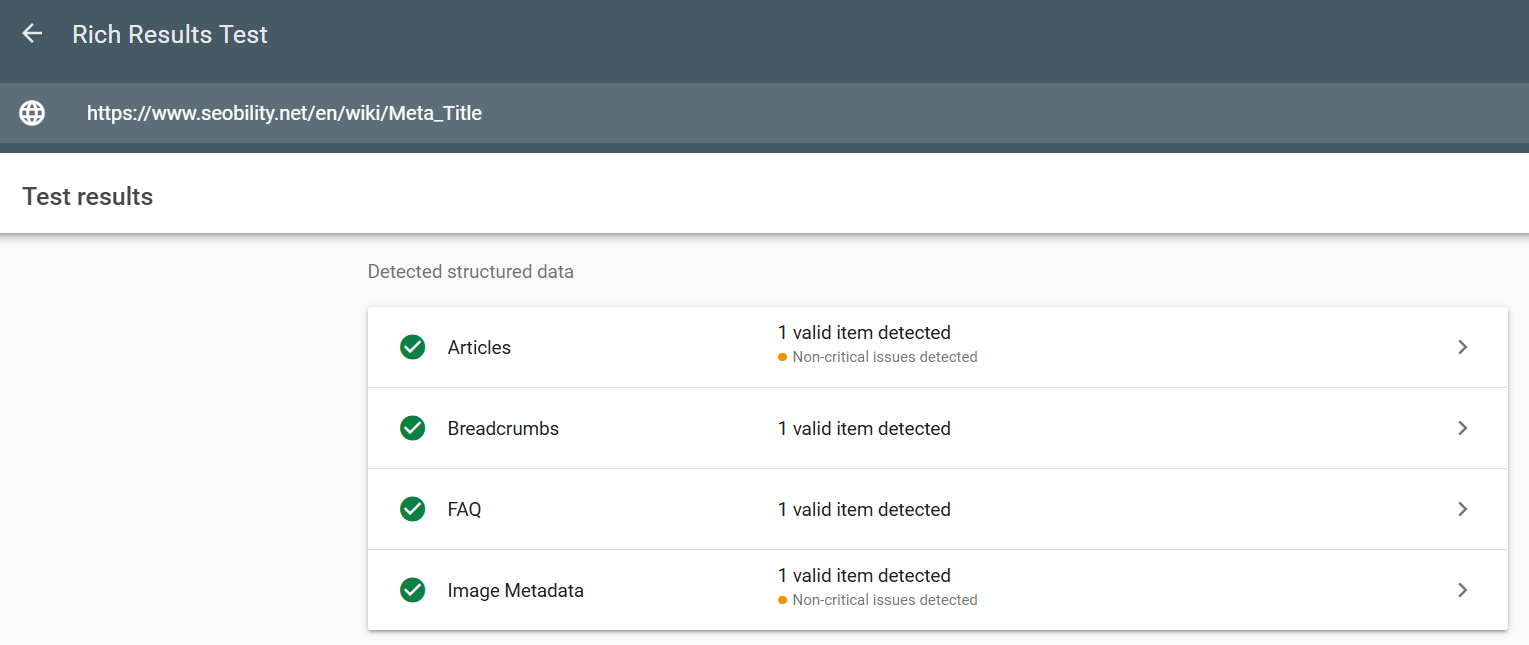
3. Validate your structured data
Always test your markup to make sure it’s implemented correctly.
Use Google’s Rich Results Test to check for errors and confirm that your schema is eligible for rich results:
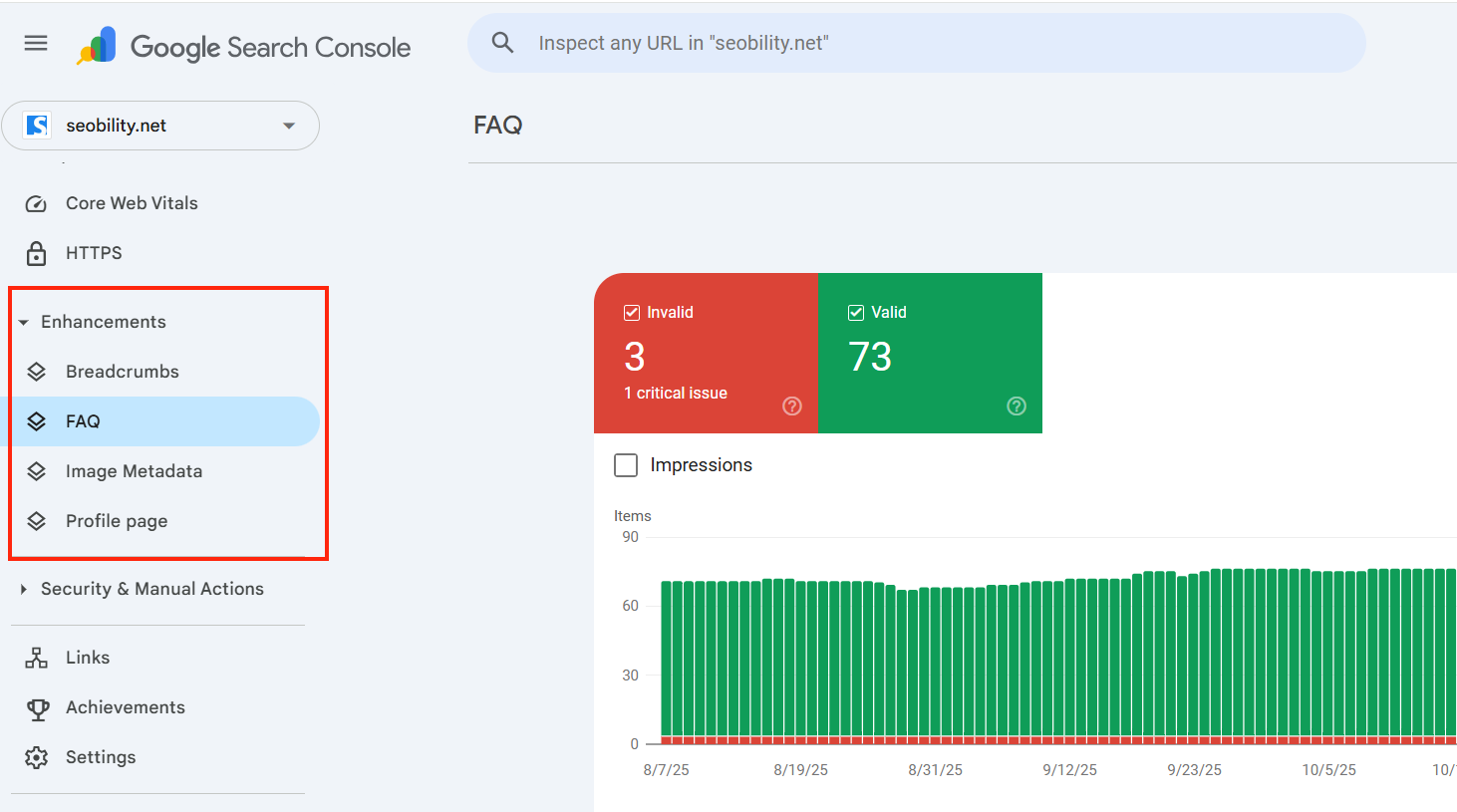
For monitoring, you can use Google Search Console, where errors or missing fields will be flagged automatically:
Google Search Console > Enhancements
Step 6: Build topic clusters and internal linking to signal broader topical authority
Google doesn’t evaluate single pages in isolation. Its algorithms also look at how well a website covers an entire topic, how pages connect, and whether the overall content demonstrates expertise and coherence.
That’s why topic clusters have been an SEO best practice for a longer time already: they help Google see your website as a source of knowledge on a specific subject, not just a one-off article.
How query fan-out reinforces this
When Google decides to generate an AI Overview for a search query and starts gathering information for it, the system doesn’t only look for that exact term. It breaks up the search into multiple related ideas and sub-questions, searches for them simultaneously, and then condenses the results into a coherent answer. This process is known as “query fan-out”.
For example, the query “AI in digital marketing” could be branched into many related subtopics, such as:
- How AI is used in content creation
- AI tools for SEO and keyword research
- AI-driven ad targeting and personalization
- Ethical considerations in AI marketing
- Impact of AI on marketing jobs
- Case studies and results from AI adoption
This video by Google illustrates how the process works:
Strong topic clusters naturally mirror this fan-out structure:
Your pillar page covers the main concept (AI in digital marketing), while your supporting pages explain the related questions (How AI is used in content creation, AI tools for SEO and keyword research, etc.).
Because your site aligns with the way Google’s AI organizes information, it’s easier for your content to be recognized as a comprehensive source and therefore be cited in AI Overviews.
By covering all major subtopics within your cluster, you also increase the chance that parts of your content are directly used to shape the AI’s generated answer, increasing the likelihood of being mentioned.
1. Create topic clusters around your main themes
Start by identifying your core topics, i.e., the areas you want your business or website to be known for.
For example, if you sell natural skincare products, your main topics might include:
- Skincare routines for different skin types
- Ingredients and their benefits
- Sustainable beauty practices
- Naturalskincare
For each main topic, create a pillar page that gives a broad overview of the subject, then build several supporting articles that go into more detail on subtopics.
Example:
- Pillar page: “The Complete Guide to Natural Skincare”
- Supporting articles: “5 Natural Ingredients That Hydrate Dry Skin,” “How to Build a Sustainable Beauty Routine,” “The Difference Between Organic and Natural Skincare Products.”
Together, these pages form a topic cluster that helps Google see your website as an authority on natural skincare and increases the likelihood that your content will be used or mentioned in AI-generated answers related to sustainable beauty.
2. Link your cluster pages strategically
Once you’ve created your clusters, connect them through internal links:
- Links from each supporting article back to its pillar page.
- Links between related subtopics to help users and Google navigate naturally.
- Use clear, descriptive anchor text instead of vague phrases like “read more”.
These internal links help Google understand how your content fits together.
3. Keep your clusters focused and up to date
When you add new articles, link them to the appropriate pillar page and update older pages with links to the new content.
Step 7: Strengthen your off-page signals and brand presence
Your on-page and content optimizations lay the groundwork for success in AI Overviews. The next step is to strengthen your brand’s presence across the web, so Google sees you as a trusted source.
That’s where off-page signals come in: backlinks and mentions from other reputable sites.
These signals show Google that real people and organizations find your content useful and that your brand deserves to be cited.
Google just recently confirmed that brand mentions in trusted media, business lists, or public articles can impact how its AI systems recommend businesses.
In other words, being talked about helps Google view your brand as recommendable.
1. Earn high-quality backlinks and mentions
Focus on earning links from credible, topic-relevant websites by creating content that others genuinely want to link to.
Practical ways to do this:
- Publish original research, checklists, or tools that others will link to naturally.
- Contribute guest articles or expert quotes to respected blogs in your industry.
- Collaborate with partners on joint content.
You can find more ideas in our article on how to build high-quality backlinks.
Tip: Use Seobility’s Backlink Monitoring to track new and lost backlinks:
Seobility > Backlinks > Overview

2. Participate in forums and community platforms
Google’s AI often extracts information from forums and Q&A platforms like Reddit, Quora, and niche communities because they include genuine, experience-based answers.
Join discussions where your expertise adds value:
- Answer questions related to your niche.
- Offer helpful explanations instead of self-promotion.
- Link to your resources only when it’s truly relevant.
This kind of participation builds brand awareness and can even influence the information that appears in AI Overviews.
3. Keep your public profiles consistent and complete
Your online profiles help Google confirm who you are and what your business does.
Make sure that your public profiles such as Linkedin, Google Business Profile, and any business directories are complete, accurate, and use consistent descriptions of what your company offers.
Consistency across all platforms makes it easier for Google to understand your products or services and increase the likelihood that your brand will be mentioned when users search related products or services.
Step 8: Keep your content accurate and up to date
AI systems value fresh and accurate information. That’s why it’s important to regularly review your content and keep it current.
Outdated facts, broken links, or old screenshots don’t just look unprofessional, but they can also cause Google’s AI to replace your page with a newer, more relevant source.
Focus on the informational pages that bring in the most traffic or that are cited in AI Overviews.
Review them every few months to check for:
- Outdated statistics, tools, or screenshots
- Changes in recommended best practices or terminology
Even small changes, such as refreshing examples or replacing old visuals, can signal to Google that your content is actively maintained.
Putting it all together
Success in AI Overviews is built on the same foundations that have always been relevant for good SEO: a technically healthy website, high-quality content, and trust signals.
What’s changing is the focus: Google’s AI systems favor content that’s easy to interpret and cite, adds unique insight, and reflects up-to-date, trustworthy information.
With Seobility, you have a strong toolset to succeed in AI Overviews:
- Website Audit to build and maintain a solid technical SEO foundation that ensures your content can be crawled and understood.
- Ranking Monitoring to track where and how your pages appear in both organic results and AI Overviews.
- TF*IDF tool to strengthen your content’s semantic relevance.
- Backlink Monitoring to track new and lost links and identify valuable link-building opportunities.