![Google reduces its crawl limit to 2 MB: What it means [+ Data from Seobility]](https://www.seobility.net/wp-content/uploads/2026/02/google-reduces-crawl-limit-header.webp)
Google has made an important change: the crawl limit for HTML files has been significantly reduced. Pages with HTML files larger than 2 MB are no longer fully crawled and indexed by Googlebot.
For most websites, HTML file sizes are below this new limit (as our data shows). But for pages that are affected, the change can become a serious issue.
At the same time, this update sends a clear signal: technical efficiency is becoming increasingly important for Google. With AI-powered search, rising computing costs, and ever-growing amounts of content, Google has to use its resources more selectively and expects websites to do the same.
In this article, we’ll take a closer look at what exactly has changed, what it means for your website, how to check whether your pages are affected using Seobility, and what you can do to keep your HTML files lean and crawlable.
- What exactly did Google change?
- Why is Google doing this?
- Which file types are affected?
- What does this mean for your website?
- How many websites does this actually affect? Insights from Seobility data
- How to check with Seobility if your pages are affected
- What should you do if pages exceed 2 MB?
- Best practices: how to stay on the safe side
- Final thoughts: technical SEO is becoming even more important
What exactly did Google change?
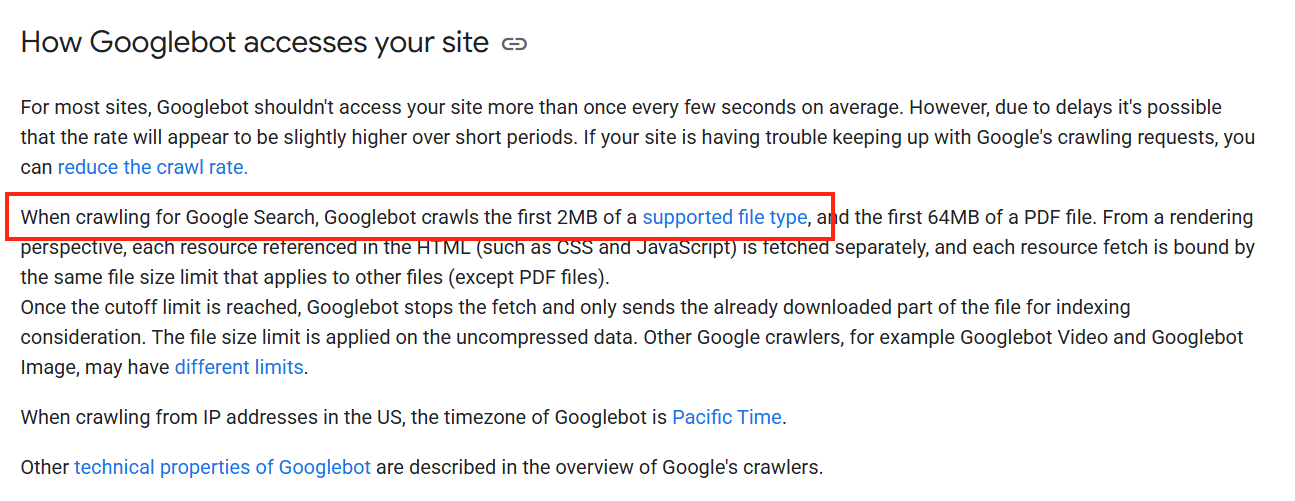
Until recently, Googlebot would fetch up to 15 MB of HTML content per page. That limit has been significantly reduced: Googlebot now crawls a maximum of 2 MB per file.
In practice, this means that if an HTML file exceeds 2 MB, Google fetches only the first part of the page content. Anything beyond that limit is ignored and therefore not indexed.
This restriction doesn’t apply only to HTML files. Other text-based resources, such as CSS and JavaScript files, are subject to the same 2-MB limit, with each file being evaluated individually. The only exception is PDF files, which still have a much higher crawl limit of 64 MB.
Google hasn’t officially announced this change, but it is already documented in the English version of Google’s Search Central documentation:
Why is Google doing this?
Google hasn’t provided an official explanation. The update was introduced quietly, without any announcement or detailed reasoning.
Likely reasons
It’s reasonable to assume that Google is trying to save resources. Crawling, rendering, and processing large files are expensive, and costs continue to rise as the web grows.
At the same time, Google is putting more emphasis on AI-powered search features, such as AI Overviews. Generating these responses requires processing massive amounts of data efficiently. Lean, well-structured pages make this much easier.
SEO perspective
From an SEO standpoint, this change aligns with trends we’ve been seeing for years, such as the introduction of Core Web Vitals. Google increasingly rewards websites that are technically clean, efficient, and user-friendly.
Bloated code, unnecessary scripts, and overly complex pages add little value and are becoming less acceptable. A solid technical foundation and clear content are increasingly important.
Which file types are affected?
The new limit applies to all text-based files fetched when a page is loaded. Each file is evaluated separately and has its own 2-MB limit.
HTML files (most critical)
HTML files are most affected, as they contain the actual page content: text, headings, internal links, and structured data.
If an HTML file exceeds 2 MB, important content toward the end of the page may no longer be seen by Google.
CSS files
CSS files also fall under the new limit. Large or unoptimized stylesheets can cause Google to retrieve only part of the file. This does not directly affect the content, but it can influence how Google renders and understands your page.
JavaScript files
Google also crawls JavaScript files up to 2 MB. This becomes especially relevant for websites that rely heavily on JavaScript to load content dynamically. When Google cuts off a JS file, parts of the content may never appear for search engines.
(That said, websites should not rely on JavaScript alone to load critical content, a topic we cover in our JavaScript SEO guide.)
What does this mean for your website?
When an HTML file exceeds the 2-MB limit, Google stops processing the remaining content. As a result, Google may:
- skip important text
- miss internal links
- ignore structured data
Potential SEO impact
If Google can’t fully process a page, it can’t evaluate it properly. This can lead to several issues:
- Google may misunderstand the page’s topic or intent
- keyword context may become incomplete
- rankings may decline because Google underestimates the page’s value
How many websites does this actually affect? Insights from Seobility data
To better understand the real-world impact of this change, we analyzed data from Seobility.
We reviewed the HTML file sizes of around 44.5 million pages crawled with Seobility. The result is clear:
Only 0.82% of all analyzed pages exceed 2 MB.
For the vast majority of websites, the new crawl limit is currently not an urgent issue. But if one of your pages is affected, you need to take action.
Here’s how HTML file sizes break down across the analyzed pages:
- 83.76% exceed 50 KB
- 68.96% exceed 100 KB
- 40.45% exceed 250 KB
- 18.73% exceed 500 KB
- 5.5% exceed 1 MB
- only 0.82% exceed 2 MB
Even large websites can run into this limit
While the numbers are low, this issue doesn’t affect only small or poorly-maintained websites. Even large, well-known platforms with experienced SEO teams can hit the new limit.
In spot checks, we found HTML pages exceeding 2 MB on well-known German sites, including OMR Reviews (approx. 3.4 MB) and Zalando (approx. 2.6 MB).
These examples don’t reflect poor quality. It’s quite the opposite: complex websites with filters, personalization, tracking setups, and dynamic content naturally generate larger HTML files.
These examples show that the new crawl limit is a structural issue, not a beginner’s mistake.
How to check with Seobility if your pages are affected
Seobility helps you quickly identify pages with unusually large HTML files.
-
Open the “Subpages” tab in the Website Audit section of your Seobility project.
(If you’re not using Seobility’s Website Audit yet, you can test it free for 14 days.)
- Click the gear icon on the right and enable the “File size” column.
- Sort the table by file size in descending order.
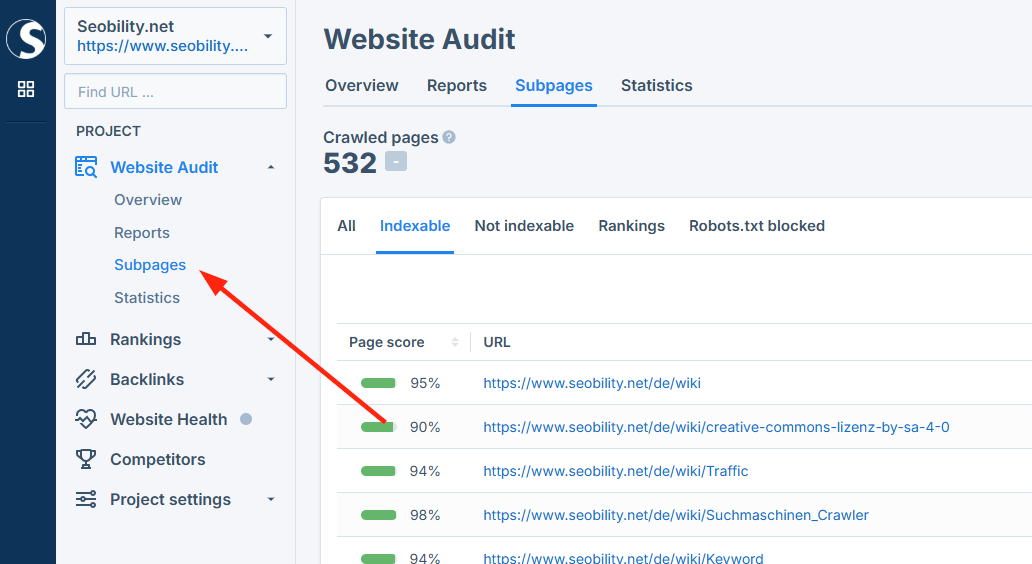
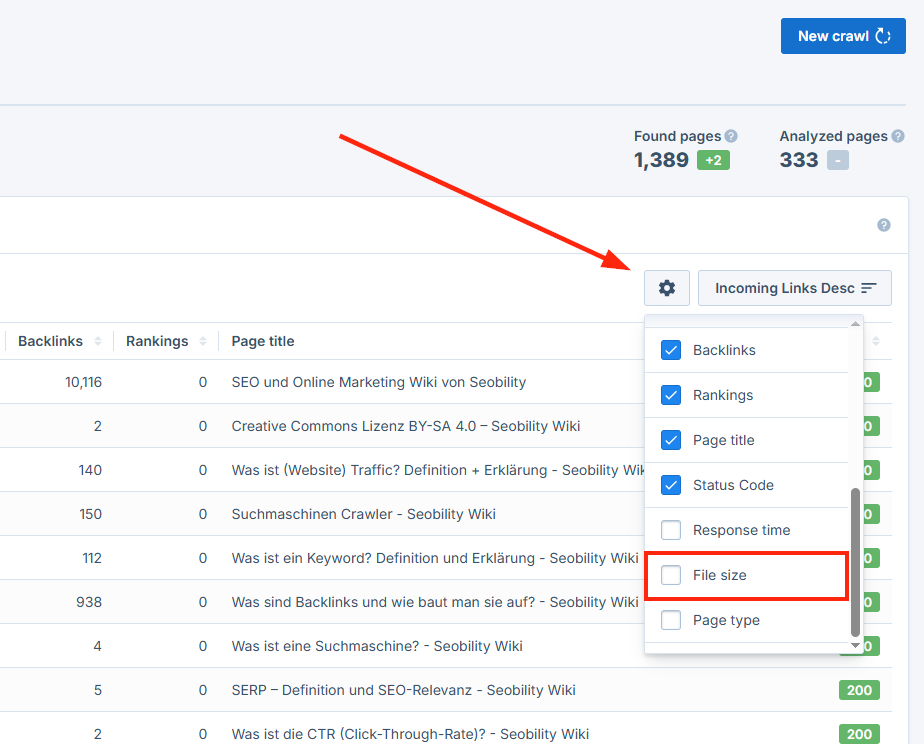
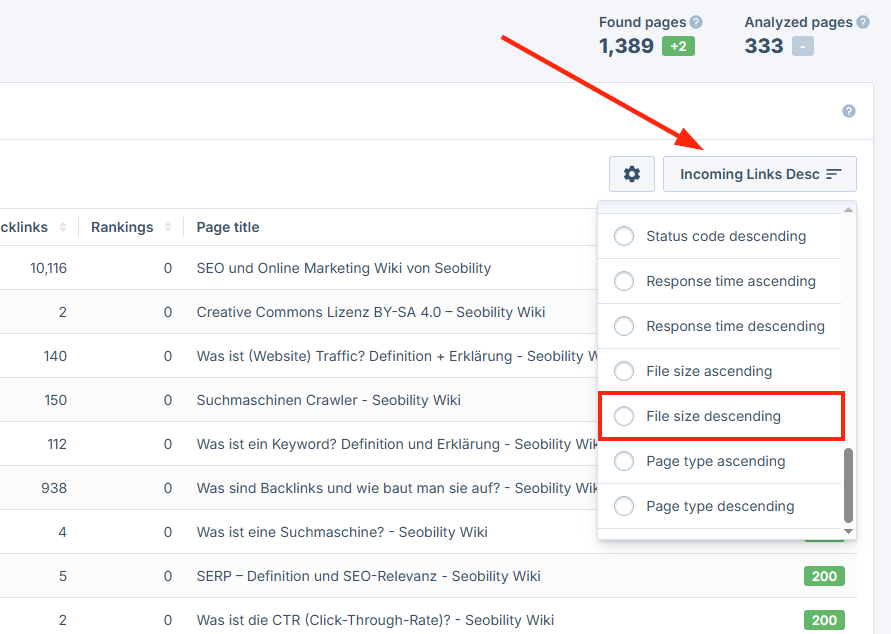
This gives you a clear overview of your largest HTML pages and shows where action may be needed.
Seobility report: “Pages with large file size”
Seobility also provides a dedicated report highlighting pages with unusually large HTML files.
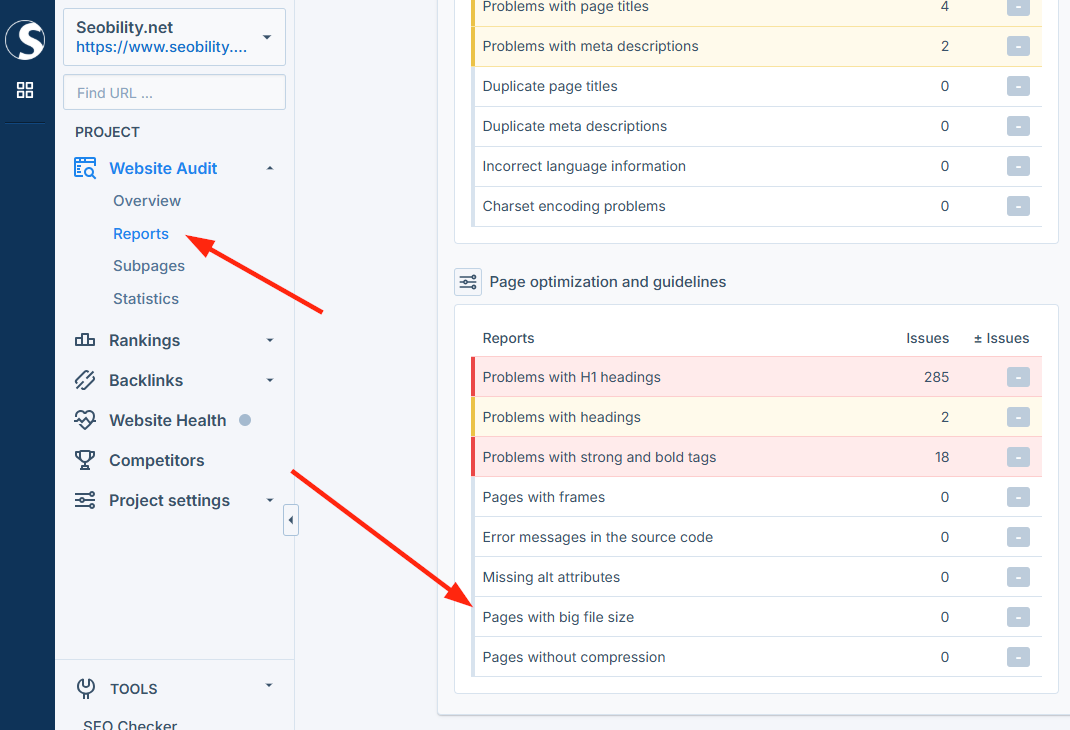
Seobility deliberately uses a threshold of 0.5 MB (500 KB) in this report. This value is well below the current Google limit and is recommended to keep HTML files lean and easily crawlable.
Even if a page is below Google’s 2 MB limit, it may appear in this report as an indicator of optimization potential.
What should you do if pages exceed 2 MB?
If some of your pages are larger than 2 MB, there’s no need to panic. In most cases, the issue can be resolved with relatively simple optimizations.
Reduce HTML file size
Start with the HTML itself, as this is where your actual content lives.
Large HTML files often contain unnecessary or bloated code: elements that exist in the markup but don’t provide real value. Removing this code usually doesn’t affect how the page looks.
Inline CSS and inline JavaScript can also inflate file size quickly. Whenever possible, move this code into external files that Google loads separately.
It’s also worth reducing HTML comments, excessive whitespace, and deeply nested elements. Many modern build tools can handle this automatically.
If you’re using a page builder like Elementor or WPBakery, keep in mind that these tools often generate a lot of extra code. Try to:
- remove unnecessary widgets or layout elements
- simplify overly complex layouts
- move non-essential content elsewhere
Optimize CSS and JavaScript files
CSS and JavaScript files should be minified to reduce their size. Minification removes everything the browser doesn’t need, such as comments and extra spaces.
This can usually be done easily via:
- performance plugins (e.g., for WordPress)
- hosting-level optimizations
- content delivery networks (CDNs)
For JavaScript, it may also help to split large files so that only the code required for a specific page is loaded. This is often referred to as code splitting.
Finally, review all third-party scripts (analytics, marketing tools, consent banners) and ask yourself whether they’re really needed on every page.
Rethink structure and content
Sometimes the issue lies in the page structure, not the code.
Very long pages with large amounts of content can easily exceed the limit. Splitting content into multiple, well-structured pages often helps.
Infinite scroll requires special care. When pages continuously append content to the HTML, file size grows quickly. Combine infinite scroll with classic pagination so Google can access all content reliably.
Regardless of structure, make sure important content appears early in the HTML. That way, it remains visible to Google even if a page approaches the crawl limit.
Best practices: how to stay on the safe side
To ensure the new Google limit does not become an issue for your website over time, it makes sense to follow a few basic best practices. They not only support efficient crawling but also improve performance and user experience.
Target HTML file sizes
Even though Google allows up to 2 MB, it’s wise to aim much lower.
A good rule of thumb: Keep HTML files under 500 KB whenever possible.
This leaves enough buffer for new content, features, or scripts, and usually improves page speed as well, which is an important Google ranking factor.
Monitor file sizes regularly
Large files often grow gradually. New plugins, tracking tools, or design tweaks can slowly bloat your pages over time.
Regular Website Audits with Seobility help you spot these issues early and take action before they become a problem.
Treat performance and crawlability as part of content quality
Great content isn’t just about text. Technical quality matters too.
Even high-quality content can lose visibility if it’s buried in bloated code. Performance and crawlability aren’t just technical concerns. They’re a core part of sustainable SEO.
Why this also matters for AI search
Lean HTML isn’t only beneficial for traditional search engines. AI systems like ChatGPT also rely on clean, well-structured web content.
The clearer your HTML structure is, the easier it becomes for AI systems to:
- interpret content correctly
- summarize it accurately
- use it in AI-generated answers
Final thoughts: technical SEO is becoming even more important
Even though only a small percentage of websites currently exceed the 2-MB limit, this change clearly shows where Google is headed and that technical SEO is gaining importance.
Google increasingly rewards websites that are efficient, clean, and well-structured. Bloated code and unnecessary complexity are becoming real risks, not only for classic search results, but also for AI-driven search experiences.
With Seobility, you can keep an eye on all of this, from HTML file sizes and technical issues to specific on-page optimization opportunities. Try Seobility free for 14 days and make sure your website stays fully crawlable.