
Uptime Monitoring
Stay updated on your website’s availability, receive quick alerts during downtime or server outages, and protect your rankings and revenue.
Try Seobility for free 14-day free trial. Cancel anytime.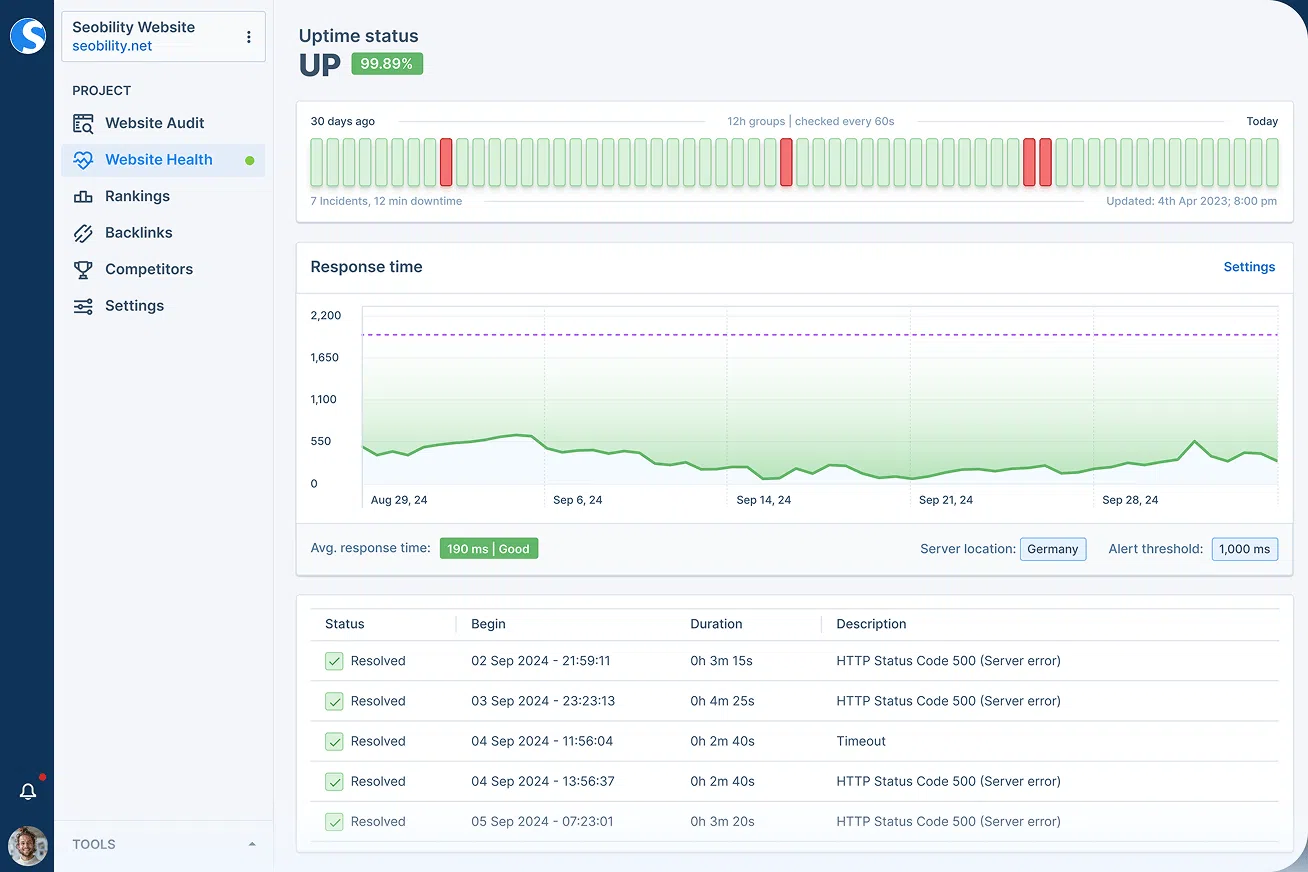
Enjoy the peace of mind that your website is up and running

With Seobility’s Uptime Monitoring, you don’t have to worry about unnoticed outages or performance issues.
Seobility automatically checks the start URL of your website at a monitoring interval you choose (between 1 and 60 minutes) and immediately sends email alerts if an outage, timeout, or failed HTTP status is detected.
This proactive monitoring helps you:
- React quickly to downtime incidents
- Minimize revenue loss from server outages
- Prevent negative SEO effects from extended site unavailability
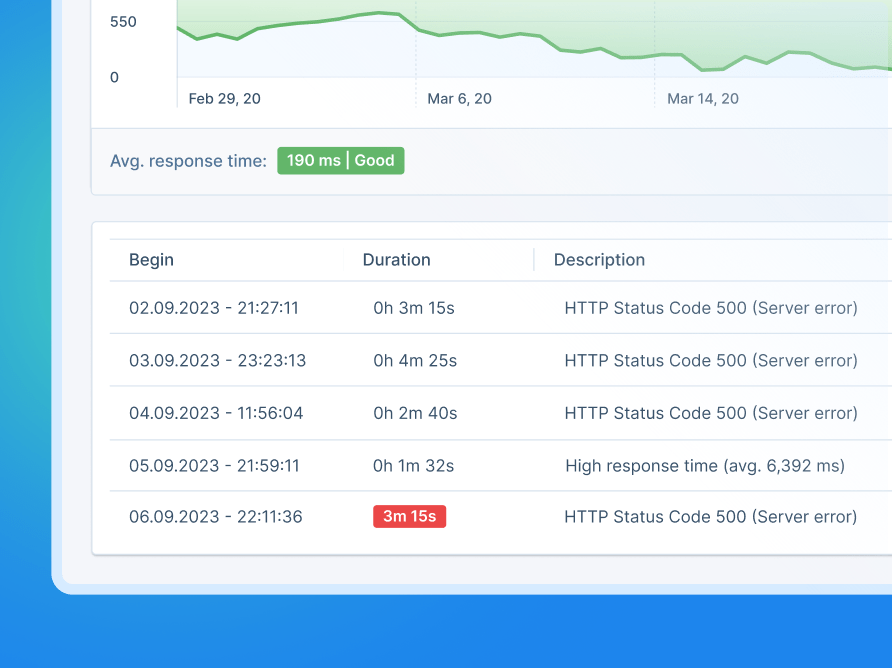
Get detailed information on what caused the downtimes

Seobility doesn’t just tell you your site is down – it shows you why.
You’ll see precise diagnostic details, including:
- Server timeouts or connection failures
- HTTP error codes (e.g., 404, 500)
- Slow response times
- Incomplete file transfers under 5kb (indicating missing page data)
This helps you quickly identify and fix the root cause, whether it’s a server outage, DNS issue, or hosting error.
Monitor and improve your server performance
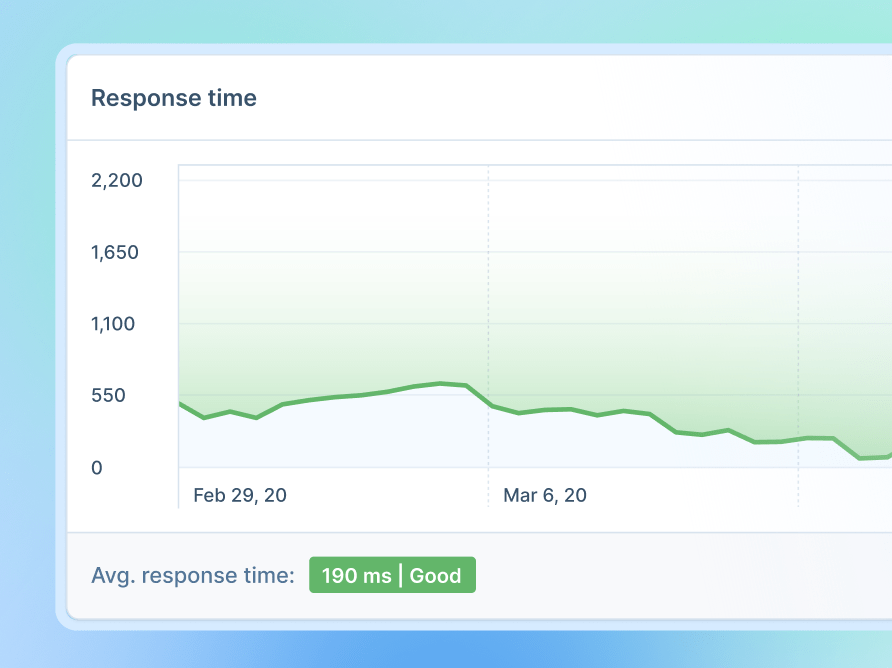
In addition to availability checks, Seobility continuously tracks your server response time to help you detect early signs of performance issues.
With this feature, you can:
- Set a custom response time threshold.
- Receive alerts when your defined limit is exceeded.
- Identify hosting bottlenecks and site reliability issues before they result in downtime.
By detecting slowdowns early, you can maintain consistent website performance, which plays an important role in user experience and long-term SEO stability.
Frequently asked questions
Monitoring your website’s uptime helps ensure maximum availability, reduces the risk of lost sales during outages, and protects your SEO rankings from negative effects caused by frequent downtime.
Search engines like Google expect websites to be reliably accessible. According to Google Search Central documentation, extended periods of unavailability can lead to a temporary removal of your website from search results.
You can set a custom monitoring interval from 1* to 60 minutes. This allows you to define how frequently Seobility checks your website for availability, depending on how critical uptime is for your project. Shorter intervals enable faster downtime detection, while longer intervals are suitable for less critical monitoring needs.
*The 1-minute interval is only available in Seobility’s Agency plan. More details on our pricing page.
Seobility sends an email alert as soon as downtime or slow response is detected.
All incidents are also logged in your Uptime Monitoring Dashboard, where you can analyze downtime events, causes, and resolution timelines.
Yes. You can add multiple recipients to receive incident notifications, ensuring your web admin or site reliability engineer team is informed quickly.
Yes. By default, Seobility monitors the project’s start URL (usually your home page), but you can change this to any custom URL, such as a checkout page, login page, or landing page, depending on your site’s goals.
In Seobility’s Uptime Monitoring, “downtime” refers to any event preventing the successful retrieval of a monitored URL.
Downtime includes:
- Server timeouts: Seobility does not receive a response within 10 seconds. This timeout limit is defined by Seobility and is lower than typical server-side timeouts. From an SEO perspective, response times above 10 seconds are already problematic, so these cases are treated as downtime.
- Non-200 HTTP status codes: Any HTTP response code other than 200 (success) is classified as downtime. This includes server errors as well as status codes that can negatively impact SEO.
- Exceeded response time threshold: If the server’s response time exceeds the custom threshold you have defined, the event is recorded as downtime.
- Other technical errors: This includes issues such as disconnected domains or network-related errors that prevent the page from being accessed.
- Incomplete page delivery: If the server responds with a file size smaller than 5 KB, the page is considered unavailable. While not a traditional downtime, this indicates server issues and can negatively affect SEO, as search engines cannot properly access the page content.
This detailed definition ensures even partial or invisible outages are detected before they harm your SEO or user experience.
Website downtime directly affects crawlability and indexing. If Googlebot repeatedly encounters server errors, it may temporarily remove affected pages from search results.
Consistent uptime helps ensure your website remains accessible, properly indexed, and trusted by both users and search engines.
Unlike many uptime monitoring tools, Seobility also detects incomplete content transfers under 5 KB. This helps uncover hidden content delivery, rendering, or server-side issues that may not trigger traditional downtime alerts but can still negatively affect SEO performance and AI-based search indexing.
Yes. The free trial includes access to all Premium plan features, including Uptime Monitoring.
A payment method is required for signup, but you won’t be charged if you cancel before the trial ends.
Try Seobility now – Get 14 days free!
Explore our full SEO software suite and discover how easy SEO can be with the right tools. Optimize your website, monitor your rankings, track backlinks, and more.
Try Seobility for free!